
This is an opinion piece. Views expressed are the author's own and do not constitute professional advice.
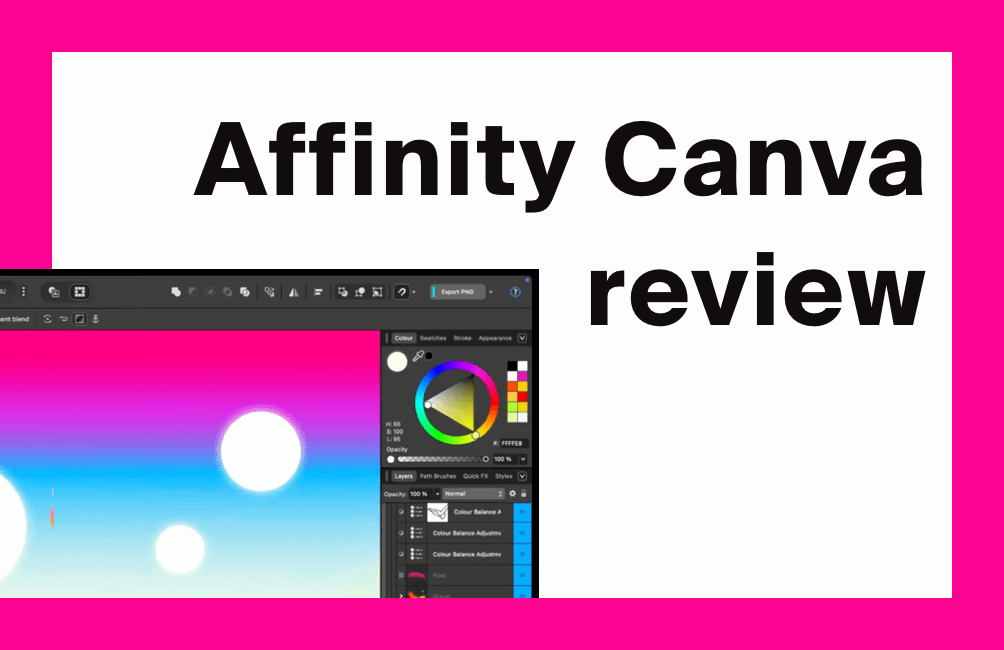
Affinity by Canva is Canva’s new all-in-one creative app that combines what used to be Affinity Photo, Designer and Publisher into a single, totally free program in this review we cover off everything from it's features to how it compares to Adobe's staples. It is aimed at people who want Adobe-level tools without paying a monthly subscription and it currently runs on Mac and Windows, with iPad on the way. Canva says this version is free forever and can export straight to Canva, which is a big shift from the old paid Affinity model.
Affinity canva review - What Affinity by Canva actually is
After Canva bought Serif (the UK company behind Affinity) in March 2024, they spent the next year folding the three Affinity apps into one unified app. The new Affinity lets you switch between Vector, Pixel and Layout workspaces in the same file, so you can do logo work, image retouching and magazine layout without opening three separate apps. That mirrors Illustrator, Photoshop and InDesign in one place, which is exactly what a lot of reviewers have picked up on.
Key tools you get:
- Vector tools for logos, icons and illustrations
- Pixel/raster tools for photo editing, masking and retouching
- Layout/page design for posters, brochures and social content
- Support for common pro formats like PSD, PDF and AI so you can work with existing assets
Is it really free?
Yes, the core app is currently free on desktop and Canva is marketing it as “free forever.” Advanced AI features such as Generative Fill, Expand & Edit and background removal are tied to Canva Pro, so there is an upsell path, but you can design without paying. This is a sensible model, since Canva can monetise through its broader platform while keeping Affinity attractive to pros who hate subscriptions.
AI and Canva integration review
Affinity now has a Canva AI Studio panel if you are a Canva premium customer. That lets you do the fast jobs people love in Canva, like remove background and smart edits, straight inside Affinity without exporting. You can also save files locally on your Mac/PC or push them to your Canva account which is useful if you collaborate with a team in Canva. Source
Platforms
Right now it is on Windows and macOS, with an iPad version coming. Canva and Affinity have both said iPad is planned, so anyone used to the old Affinity on iPad should be able to move across later. You can keep files on your device or save to Canva cloud, which gives you a choice between local ownership and online access.
What real users are saying about affinity and canva when they review it
From forum threads and Reddit comments, the mood is mostly positive, because:
- It is free and powerful
- Performance is still fast and responsive like the old Affinity apps
- It keeps the pro, layer-based workflow that Adobe users expect
Some long time Affinity users are cautious, since they liked the old “buy once” model and worry Canva could change the deal later or slow updates for the old V2 apps. That’s worth noting for agencies with big installed bases, but it doesn’t change the fact that the current 2025 version is excellent value.
Setup and getting started
- Download Affinity from the official Affinity/Canva page.
- Install on Mac or Windows.
- Sign in with your Canva account if you want cloud save and AI, otherwise run it locally.
- Start a document and choose the workspace (Vector, Pixel or Layout).
- Save either to your device or to Canva so you can keep working on it in the browser.
It is close enough to the old Affinity UI that existing users will not be lost, and new Canva users will recognise the tidy layout.
Reviewing how Affinity by Canva compares to Adobe
Adobe still wins on ecosystem depth, video, 3D and huge integrations. Affinity by Canva wins on price, simplicity, and the fact you can do illustration, photo and publishing in one free app. For freelancers, students and small studios in the UK who just need to create brand assets, decks, posters and socials, Affinity is now a very serious alternative.
1-to-1 Comparisons
Comparing Adobe Photoshop vs Affinity by Canva (Pixel / photo editing)
- Photoshop is widely regarded as the industry standard for photo compositing, high-end retouching, advanced masking, video layers, and extensive plugin support.
- Affinity by Canva covers the majority of everyday photo editing needs: RAW development, unlimited layers, non-destructive edits, CMYK/LAB support.
- Key difference: Photoshop offers deeper features (e.g., advanced AI selection tools, extensive video/timeline work) while Affinity offers a faster, unified experience at no subscription cost. Users note that Affinity “gets the job done” but might lack that last 20 % of ultra-specialist features.
- Workflow/format: Affinity supports PSD and major formats and now integrates vector + layout in same environment.
Adobe Illustrator vs Affinity (Vector / illustration)
- Illustrator provides top-tier vector drawing, precise anchor control, advanced typography, packaging and print-industry features.
- Affinity Designer (now part of Affinity) offers very strong vector tools, often enough for many designers, combined with raster support in one tool.
- The trade-off: If you require the most advanced vector workflows (complex live text-to-vector Trace, typekit integrations, enterprise print pipelines), Illustrator still leads. For many freelancers, startups, and mixed-media designers, Affinity’s vector toolset is extremely capable.
Comparing Adobe InDesign vs Affinity (Layout / publishing)
- InDesign is the deep-rooted standard in professional print, multi-page documents, high-end typographic control, footnotes/end-notes, GREP styles, pre-press workflows.
- Affinity’s layout tools (previously Publisher, now built into Affinity) support master pages, linked text frames, CMYK, styles and integrate with vector/raster in one app.
- Difference: For large publishing houses or books with extremely complex typography workflows, InDesign remains stronger. For many designer/agency workflows, Affinity’s layout component offers excellent value and strong integration.
Affinity by canva review comparison Table
| Feature / Area | Adobe Photoshop / Illustrator / InDesign | Affinity by Canva |
|---|---|---|
| Cost | Subscription-based (Creative Cloud) | Free core app (with optional AI features via Canva Pro) |
| Photo editing (pixel) | Very deep feature set, lifecycle model | Strong core, non-destructive editing, fewer ultra-specialist tools |
| Vector/illustration workflow | Best-in-class vector tools, typography | Highly capable vector tools integrated with raster/layout |
| Layout/publishing | Excellent for complex typographic, print | Very usable for most layouts, integrated workspace |
| Workflow integration | Multiple specialised apps | One unified app — switch between Pixel/Vector/Layout seamlessly |
| File format support & interoperability | Very broad, industry standard | Supports PSD, AI, PDF, SVG, etc, plus native Affinity format |
| Team/enterprise collaboration | Strong, mature ecosystem | Improving under Canva; less entrenched in large agencies yet |
| Suitability for freelancers/small teams | Powerful but higher cost & complexity | Excellent value, low barrier to entry |
| Suitability for large agencies/print houses | Very strong in legacy and complex workflows | Good but some specialist workflows may find gaps |
The major takeaway: Affinity by Canva offers a unified, highly capable design environment that covers photo-editing (Photoshop territory), vector illustration (Illustrator territory) and layout/publishing (InDesign territory) with a strong value proposition; especially for freelancers, small teams, and UK-based creators. Adobe remains the go-to for specialist, enterprise, print-heavy or large-team workflows where every niche functionality and ecosystem integration matters.
Our rating
Overall rating: 4.8/5
Brilliant value, pro-grade tools, strong Canva tie-in, and no subscription required right now. We only drop points for uncertainty around long term roadmap and the fact that AI extras sit behind Canva Pro.
For more smart tools and ways to save on creative services, have a look at our guides on https://coolcuration.com/service-guides where we round up useful UK-friendly offers.
What's trending
Recent posts
- Premium Bonds Alternatives UK 2026: Prize Savings Accounts Compared
 Four Premium Bonds alternatives open to new savers, with each provider's published odds, prize tables, access rules and protection.
 - Best Audiobooks October 2026: 10 UK Listens RankedTen new audiobooks for October 2026, from a full-cast Dracula with Jonathan Bailey to Russell T Davies reading his own television memoir.
- Louis Fratino at David Zwirner ReviewLast updated: 4 October 2026 By Tristan · Arts, exhibitions and creative culture This is an opinion piece. Views expressed are the author's own and do not constitute professional advice. Exhibition reviewMayfair Saunas, subway cars and a lot of skin in Mayfair Louis Fratino at Zwirner is the American painter's first solo show in London,… Read more: Louis Fratino at David Zwirner Review

No Comments.