
Navidrome: Your Own Free Music Streaming Server
Last updated: 12 October 2026
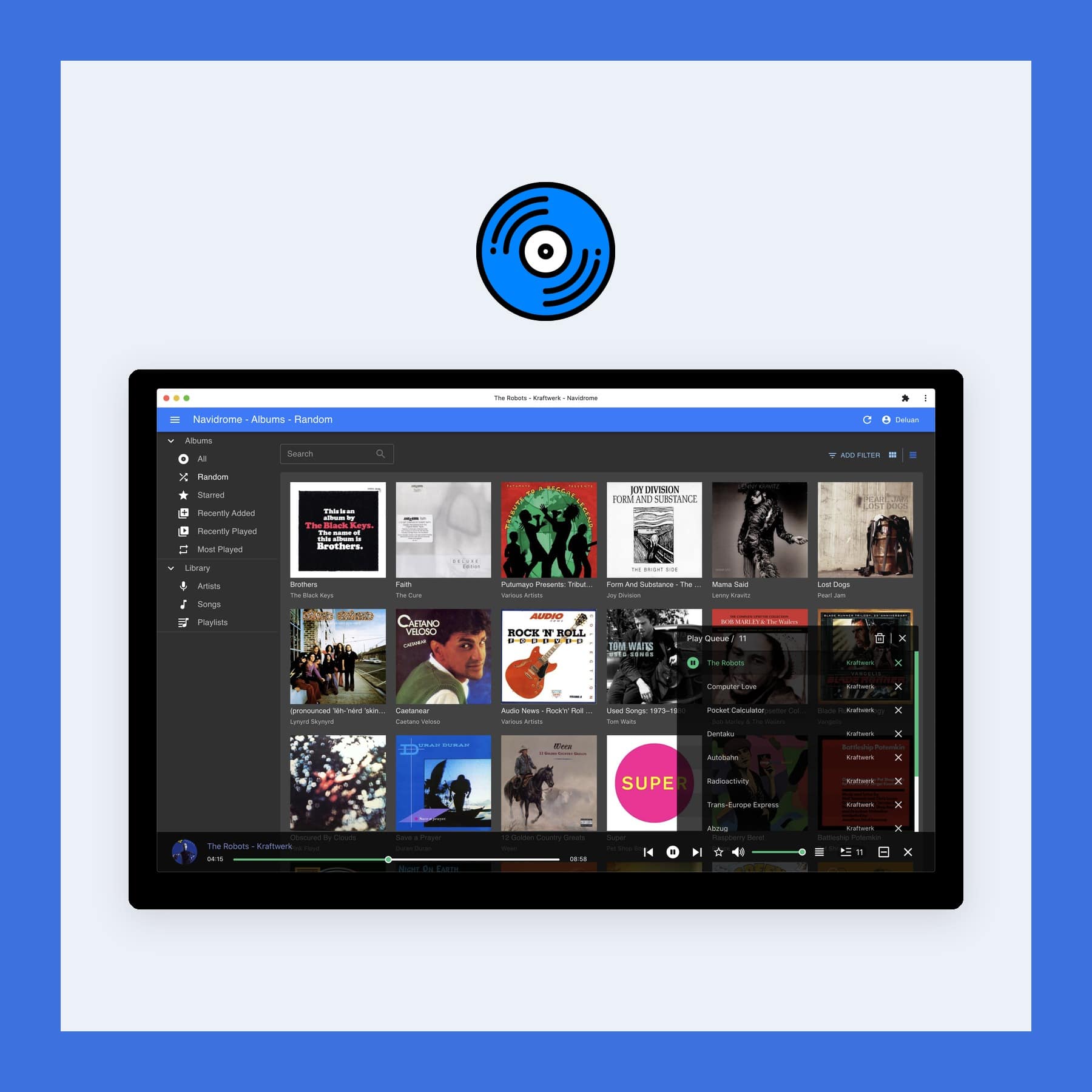
Navidrome is a free, open source music server that streams the songs you already own to your phone, laptop or browser, wherever you are. Think of the Navidrome music server as a private YouTube Music or Spotify built from your own MP3 and FLAC files, with playlists, play counts and separate logins for everyone at home. The software is free and runs happily on a Raspberry Pi, whereas Spotify Premium is £12.99 a month. I checked the current version on Navidrome's site and Spotify's UK price on 12 October 2026.
What Navidrome replaces, and what it does not
Navidrome replaces the player side of YouTube Music and Spotify for music you own. You point it at a folder of albums, it reads the tags, and then it serves the collection through a web player and through phone apps. Each person in a household gets their own account, playlists, favourites and listening history.
What it cannot replace is the catalogue. There are no songs to discover beyond the files you give it, no radio stations built from millions of tracks and no new releases arriving on a Friday. So it suits people with a large CD rip or a download collection, especially in lossless FLAC, who want to hear it everywhere without a subscription. If most of what you play comes from Spotify's catalogue, Navidrome works alongside it rather than instead of it.
XDA Developers' Dhruv Bhutani swapped Spotify for Navidrome in June 2026 and called it "a drop-in replacement for Spotify for anyone with a decent home music library".
Key features
- Web player: a full player in any browser, with album art, queues and themes.
- Works with Subsonic apps: any app built for the Subsonic music server standard connects to it, on iPhone, Android and desktop.
- Multiple users: each user has their own play counts, playlists and favourites, and can be given access to different libraries.
- Smart playlists: playlists that fill themselves from rules such as genre or play count, similar to iTunes. They are marked as a beta feature.
- Streaming over mobile data: it converts files to smaller formats such as Opus on the fly, set per user or per device, so a FLAC library does not drain your data allowance.
- Scrobbling: sends your listening history to Last.fm or ListenBrainz.
- Large libraries: Navidrome says it has been tested with about 900,000 songs.
The phone apps
Navidrome has no official phone app. Instead, you choose one of the third-party apps that speak the Subsonic standard. Navidrome's own list includes Symfonium for Android, which has a free trial, play:Sub for iPhone, which is paid, and Amperfy and Substreamer, which run on iPhone. On a computer, Feishin and Supersonic are desktop players.
What you need to run it
Navidrome runs on Linux, Windows, macOS and FreeBSD, and as a Docker container. The current release, 0.64.2 from 24 September 2026, also ships a native build for Apple silicon Macs. It needs ffmpeg installed for format conversion, and it asks very little of the computer: Navidrome says it runs well on a Raspberry Pi Zero and older hardware.
To listen away from home, the server has to be reachable from outside. XDA's setup used Tailscale, a private network tool, so the server stays off the open internet. Navidrome is open source under the GPL v3 licence, and its lead developer is Deluan Quintão.
Get Navidrome for Mac, Windows, Linux or Docker
Tags, uploads and other limits
Navidrome depends on good tags. Its FAQ says untagged libraries are not supported, it does not browse by folder, and it never writes to your music files, so it cannot fix tags for you. Use a tagging app such as MusicBrainz Picard before you import. It also has no upload button, so new albums go into the music folder on the server directly.
It is still a pre-1.0 project, too. Version 0.64.0 changed how it stores its internal IDs, and the release notes told users to back up the database before upgrading. Read the release notes before each update. The full list of supported apps is on Navidrome's apps page.
FAQs
Is Navidrome free?
Yes. Navidrome is open source under the GPL v3 and free to use. Some of the phone apps that connect to it are paid.
Can Navidrome replace Spotify or YouTube Music?
For music you own, yes. It cannot give you songs you do not have, so it does not replace the streaming catalogue or its recommendations.
Does Navidrome have an iPhone app?
Not an official one. Third-party apps such as play:Sub, Amperfy and Substreamer connect to it on iPhone.
Can I run Navidrome on a Raspberry Pi?
Yes. Navidrome publishes ARM builds and says it runs well even on a Raspberry Pi Zero.
How much does Spotify Premium cost in the UK?
Spotify Premium Individual is £12.99 a month. I checked Spotify's UK price on 12 October 2026.
More from CoolCuration
- Best budget turntables UK: record players worth buying if you want your music on vinyl too.
- Nothing Headphone (1): over-ear headphones with a see-through design.
- Audible UK: plans and prices for the audiobook service.
- Brave browser: a free browser that blocks ads and trackers.
- Gifts for tech lovers: gadgets for people who live on their devices.




Follow us: Instagram
Copyright 2026 CoolCuration | Privacy Policy | Cookie Policy | Affiliate Disclosure | Cool Factor
-----------
We are proud supporters of a safer more private internet via encouraging people to use Brave browser and are actively taking on Spammers as part of ProjectHoneypot. This site is hosted on servers that run on 100% renewable energy in the UK thanks to GreenWebHosting.
This site contains affiliate links, including to Amazon.com and Amazon.co.uk. We may earn a commission if you make a purchase or sign up for a service via these links, at no extra cost to you. All offers and promotions are accurate at the time of publication but are subject to change or withdrawal by the businesses featured. We cannot guarantee their continued availability. Read our full affiliate disclosure.
Reviews and opinions on CoolCuration reflect the personal experience of our writers at the time of publication. They are not professional endorsements and your experience may differ. Scores use our Cool Factor rating system and are given independently of any commercial relationship.
All content on CoolCuration is provided for informational and entertainment purposes only. It does not constitute financial advice, investment recommendations or an endorsement of any product or service. We are not authorised by the Financial Conduct Authority and do not offer personalised financial guidance. You should always do your own research or consult a qualified financial advisor before making any financial decisions.