
Last updated: 8 July 2026
By Stiv · Design, technology and personal finance
This is an opinion piece. Views expressed are the author's own and do not constitute professional advice.
Heads up: this review contains affiliate links. If you buy through one, CoolCuration may earn a small commission at no extra cost to you. It never changes our honest verdict.
Cool Factor: 4/5
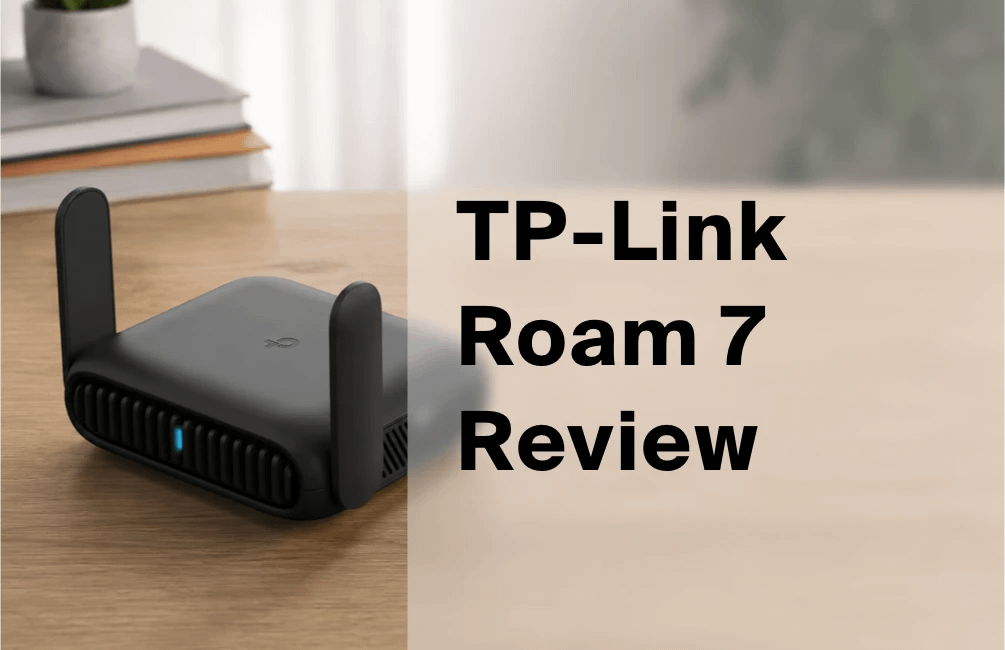
Welcome to my TP-Link Roam 7 review, a hands-on look at TP-Link's first Wi-Fi 7 travel router, the pocket-sized TL-WR3602BE. Above all, this little box promises fast, private internet from hotel, cafe, cruise and Airbnb connections. So does it deliver, or is the Wi-Fi 7 badge doing the heavy lifting? Let's dig in.
Everything below is based on my own use. I have been travelling with the Roam 7 for the past few months, leaning on it in hotels, cafes and serviced flats, so this reflects real trips rather than a spec sheet.
Ready to grab one? Here is the quickest place to check the current UK price.
Section 01 / The basics
What is the TP-Link Roam 7?
The TP-Link Roam 7 is a pocket-sized Wi-Fi 7 travel router, and it carries the model number TL-WR3602BE. TP-Link launched this hardware in 2025, then folded it into its new "Roam" travel line in early 2026, which is when the friendlier "Roam 7" name appeared. In short, the Roam 7 and the TL-WR3602BE are the same device.
Under the BE3600 badge sits dual-band Wi-Fi 7. You get up to 2882 Mbps on 5 GHz and 688 Mbps on 2.4 GHz. That is roughly 3.6 Gbps combined on paper. Crucially, however, there is no 6 GHz band here. I will come back to that caveat, because it matters.
The port layout also punches above the size. First, there is one 2.5 Gbps WAN port. Then you get a Gigabit LAN port, a USB 3.0 port, and a USB-C port for power. On top of that, TP-Link quotes support for up to 90 connected devices. That is plenty for a family or a small team.
For context, this sits a clear step above TP-Link's older pocket routers, such as the AC750-class TL-WR902AC. It also succeeds the Wi-Fi 6 Roam 6 (the TL-WR3002X). TP-Link frames it simply, describing a router "designed to cater to the modern traveler's needs." Throughout this TP-Link Roam 7 review, though, I care far more about real use than box copy.
Section 02 / Getting started
First impressions and setup
Early in this TP-Link Roam 7 review, setup deserves a mention. It runs through the TP-Link Tether app, and it is refreshingly quick. First, you power the router over USB-C. Then you scan the QR code, pick a mode, and follow the prompts. Within a few minutes, I had a private network running off a hotel connection.
The Tether app also exposes the router's many operating modes, which I will unpack below. Meanwhile, the clear labelling makes it easy to switch roles without digging through menus. For a travel gadget, that really matters, because you often set these things up tired, in a dim room, on patchy Wi-Fi.
Physically, the Roam 7 feels reassuringly solid rather than flashy. Two small antennas fold flat against the body, so it slips into a bag without snagging. Overall, first impressions land well, and the setup friction is low.
Section 03 / Speed
Real-world performance: speed and range
Here is the honest part of this TP-Link Roam 7 review. On paper, 3.6 Gbps sounds thrilling. In my own use, though, real-world throughput is good rather than record-breaking. On a fast line at close range, my 5 GHz devices comfortably cleared a gigabit. That is genuinely more than fast enough for streaming, calls and work.
Range is fine for a hotel room or a small flat, as you would expect from a compact unit. Move a few walls away, however, and the signal softens quickly. So think of it as a personal bubble of good Wi-Fi, not a whole-house mesh.
Independent testing matches what I found. Dong Ngo of Dong Knows Tech, who ran it head to head against its predecessor, called the upgrade real but modest. As he put it, "the support for Wi-Fi 7, including its new MLO connection, and the ostentatious antennas proved to be minor upgrades overall." That squares neatly with my own experience on the road.
Section 04 / The catch
The honest Wi-Fi 7 caveat
Now for the elephant in the room. This is Wi-Fi 7, yet it is dual-band only, so there is no 6 GHz. As a result, the headline gains over a good Wi-Fi 6 travel router stay small for most people. You still get Wi-Fi 7 features like Multi-Link Operation. However, the biggest Wi-Fi 7 benefit, that wide-open 6 GHz lane, is simply not present.
Does this ruin it? Not at all. Most hotel and cafe broadband is nowhere near fast enough to stress even Wi-Fi 6. Still, if you are buying purely for the "Wi-Fi 7" sticker, temper your expectations. The real wins here are the 2.5G WAN port and the security features, not raw wireless speed.
Buy it for the 2.5G port and the VPN, not for the Wi-Fi 7 badge.
Section 05 / Security
The built-in VPN, and why it matters on public Wi-Fi
For me, this is the Roam 7's quiet superpower, and it is the part of this TP-Link Roam 7 review that most swayed me. It runs a built-in VPN with both OpenVPN and WireGuard support. Consequently, you can route your traffic through a trusted server. That holds true even on a shared network you would never normally trust.
Public Wi-Fi is convenient, but it is also a soft target. Instead, you connect all your devices to the router. Because the router handles the VPN, every phone, tablet and laptop rides the same protected tunnel. That is far tidier than juggling a separate VPN app on each device.
WireGuard in particular is fast and modern, so the speed hit stays reasonable. Therefore, if security on the road is your main worry, this feature alone may justify the purchase. It is the strongest single reason to pick this router over a cheaper, VPN-free rival.
Section 06 / Flexibility
Versatility: several modes in one box
Travel throws up messy networks, so flexibility counts. Helpfully, the Roam 7 covers a lot of ground. It works as a Router, a Hotspot, an Access Point, a Range Extender and a Client. On top of that, it handles USB Tethering and a 3G/4G USB modem mode.
In practice, that means you can adapt to almost any situation. For instance, I have shared a wired hotel port one night, then extended a weak cafe signal the next. Because the modes are baked in, you are not carrying three gadgets to do three jobs.
The USB tethering and 4G modem modes also turn a data SIM into a handy backup, which I lean on whenever hotel Wi-Fi gives up. So if you need one before your next trip, it is worth comparing the best SIM-only deals, or a data-friendly network like SMARTY.
The USB 3.0 port adds another trick. It can share files from a drive, or supply internet from a USB source. For frequent travellers, this Swiss-army versatility is a genuine selling point.
Section 07 / Hardware
Build, design and power
Physically, the Roam 7 measures about 126 x 93.5 x 36 mm. So it is roughly the footprint of a deck of cards, with two fold-down antennas. It feels well made too, and the matte casing shrugs off bag scuffs.
Power comes over USB-C at 5V/3A. Notably, there is no built-in battery, so you plug into the mains adapter, a laptop, or a USB power bank. Tom's Hardware confirms it "can be powered by a portable battery in a pinch," which is exactly how I used it on long travel days.
That USB-C approach keeps things light and universal. However, it also means one more cable to remember, and no all-day cordless use. For a category built around going anywhere, the missing battery is a fair thing to flag.
Section 08 / The honest bit
Honest critical observations
No TP-Link Roam 7 review would be complete without naming what falls short, so here it is. First, the Wi-Fi 7 branding oversells the reality. Dual-band with no 6 GHz delivers only modest gains over Wi-Fi 6. That is a structural limit of the category, yet the marketing leans hard on the badge anyway.
Second, real-world throughput is merely good, not stellar. Dong Knows Tech scored it 8 out of 10 and still called the performance modest. Third, there is no battery and no built-in cellular modem. So you depend on external power, plus a separate dongle for mobile data.
Finally, the price sits above what many travellers strictly need. If you only want to secure a hotel connection, a cheaper Wi-Fi 6 travel router does most of this job. So the Roam 7 earns its keep only if you value the 2.5G WAN, the VPN and the versatility together.
Section 09 / Context
Why a Wi-Fi 7 travel router matters now
You might reasonably ask why any of this matters in 2026. The short answer is that home broadband keeps getting faster, and travel connections are slowly catching up. Because the Roam 7 has a 2.5 Gbps WAN port, it can actually use a faster-than-Gigabit line when one appears. A modern serviced apartment is a good example.
Meanwhile, more of us work from the road, so a secure, reliable personal network is no longer a luxury. The Roam 7 sits right in that shift, and this is the wider reason a TP-Link Roam 7 review is worth your time even if you already own an older pocket router.
In other words, it is less about peak speed today and more about headroom and security for the way people travel and work now.
Section 10 / Money
Value for money
For this TP-Link Roam 7 review, value is where the case gets strong. In the UK it lands at around £99.99 at the time of writing. That is still cheaper than the US list price of $139.99. For a dual-band Wi-Fi 7 router with a 2.5G port and a built-in VPN, that feels fair.
That said, a budget Wi-Fi 6 travel router can be had for much less. If you never need the 2.5G WAN or the VPN, the cheaper option makes more sense. So the value question hinges entirely on whether you will use the extras.
If you want the plain numbers before deciding, our TP-Link Wi-Fi 7 travel router detail page lays out the full spec sheet. This review is the opinion, and that page is the reference. Between them, you should have enough to make the call.
Section 11 / The details
Practical info: price, box and warranty
Here are the practical bits. In the box you get the router, a world-compatible power adapter, a USB-C cable and an Ethernet cable. So you can start on a wired connection straight away. That world-adapter detail is a small but thoughtful touch for international trips.
On price, expect roughly £99.99 in the UK, though it does move with sales, so check before you buy. Warranty follows TP-Link's standard UK terms, and you can confirm the current cover on TP-Link's official product page.
You buy it from the usual UK retailers, with Amazon UK the simplest route for most people. The buy button below uses our affiliate link.
Section 12 / The score
TP-Link Roam 7 review: the verdict
So where does this TP-Link Roam 7 review land? Ultimately, this is a solid, versatile and well-priced travel router that does the important jobs well. The 2.5G WAN port, the WireGuard and OpenVPN VPN, and the seven operating modes are the real stars. The Wi-Fi 7 badge, meanwhile, is more marketing than magic.
Cool Factor
★★★★☆
4 out of 5
Independent reviewers reached the same conclusion I did, capable without being spectacular. Tom's Hardware summed it up neatly: "If you fit into the travel router market that TP-Link is targeting, the TL-WR3602BE is a versatile tool with many operating modes and a small size." I would echo that, and for me the price and the VPN push it over the line.
Overall, a considered 4 out of 5, Stone cold. The Roam 7 impressed me with its 2.5G WAN port, its built-in VPN and its sheer versatility for the money, and that value is what earns the fourth point. However, it did not reach Ice cold. The dual-band Wi-Fi 7 delivers only modest real-world gains over Wi-Fi 6, there is no battery, and a cheaper Wi-Fi 6 router covers the basics for less. On raw speed alone this is really a 3, so the extras carry it. If you travel often and want secure, flexible Wi-Fi that will not choke a fast line, it is well worth your money. If you just need to log on at a hotel now and then, save your cash. That is my TP-Link Roam 7 review.
FAQs
Is the TP-Link Roam 7 worth it?
For frequent travellers, yes. As this TP-Link Roam 7 review has stressed, the extras are what justify it. You get the 2.5G WAN port, the built-in WireGuard and OpenVPN VPN, and many operating modes. If you only need occasional hotel Wi-Fi, though, a cheaper Wi-Fi 6 travel router will do.
Does the TP-Link Roam 7 have Wi-Fi 7 on the 6 GHz band?
No. The Roam 7 is dual-band Wi-Fi 7, so it uses the 2.4 GHz and 5 GHz bands only. There is no 6 GHz band. You still get Wi-Fi 7 features such as Multi-Link Operation, but the real-world gains over Wi-Fi 6 stay modest for most people.
How much does the TP-Link Roam 7 cost in the UK?
At the time of writing it costs around £99.99 in the UK, which is cheaper than the US list price of $139.99. Prices move with sales and stock, however, so always check the live figure on Amazon UK before you buy.
Is a travel router worth it for hotel Wi-Fi?
Often, yes. A travel router lets you connect all your devices once, add a VPN for privacy, and skip repeat hotel logins. On top of that, it can extend a weak signal. For regular travellers who care about security, a router like the Roam 7 quickly earns its place in the bag.
How is the TP-Link Roam 7 powered?
It draws power over USB-C at 5V/3A. There is no built-in battery, so you use the included mains adapter, a laptop, or a USB power bank. That keeps it light and universal, but it does mean one more cable to pack.
More from CoolCuration
- Best eSIM for UK travel: pair the router with a local data eSIM to dodge roaming charges abroad.
- Gomi power bank: the Roam 7 runs off USB-C, so a good power bank keeps it going anywhere.
- Gift guide for travel lovers: more clever kit worth packing for frequent flyers.
- NextDNS: add network-wide filtering on top of the router's built-in VPN.
- Brave browser: a privacy-first browser to pair with your locked-down travel Wi-Fi.
What's trending






Recent posts
- Best Audiobooks October 2026: 10 UK Listens Ranked
 Ten new audiobooks for October 2026, from a full-cast Dracula with Jonathan Bailey to Russell T Davies reading his own television memoir.
 - Louis Fratino at David Zwirner ReviewLast updated: 4 October 2026 By Tristan · Arts, exhibitions and creative culture This is an opinion piece. Views expressed are the author's own and do not constitute professional advice. Exhibition reviewMayfair Saunas, subway cars and a lot of skin in Mayfair Louis Fratino at Zwirner is the American painter's first solo show in London,… Read more: Louis Fratino at David Zwirner Review
- What Is a Sprive Boost? Seven Days, and What It Actually PaysA Sprive boost lifts your cashback rate for seven days, and it arrives on its own. What mine paid, and why Supercharge is a display toggle rather than extra cashback.



No Comments.