
(Not Boring) Camera: Features, UK Pricing and What Plus Unlocks
Last updated: 17 September 2026
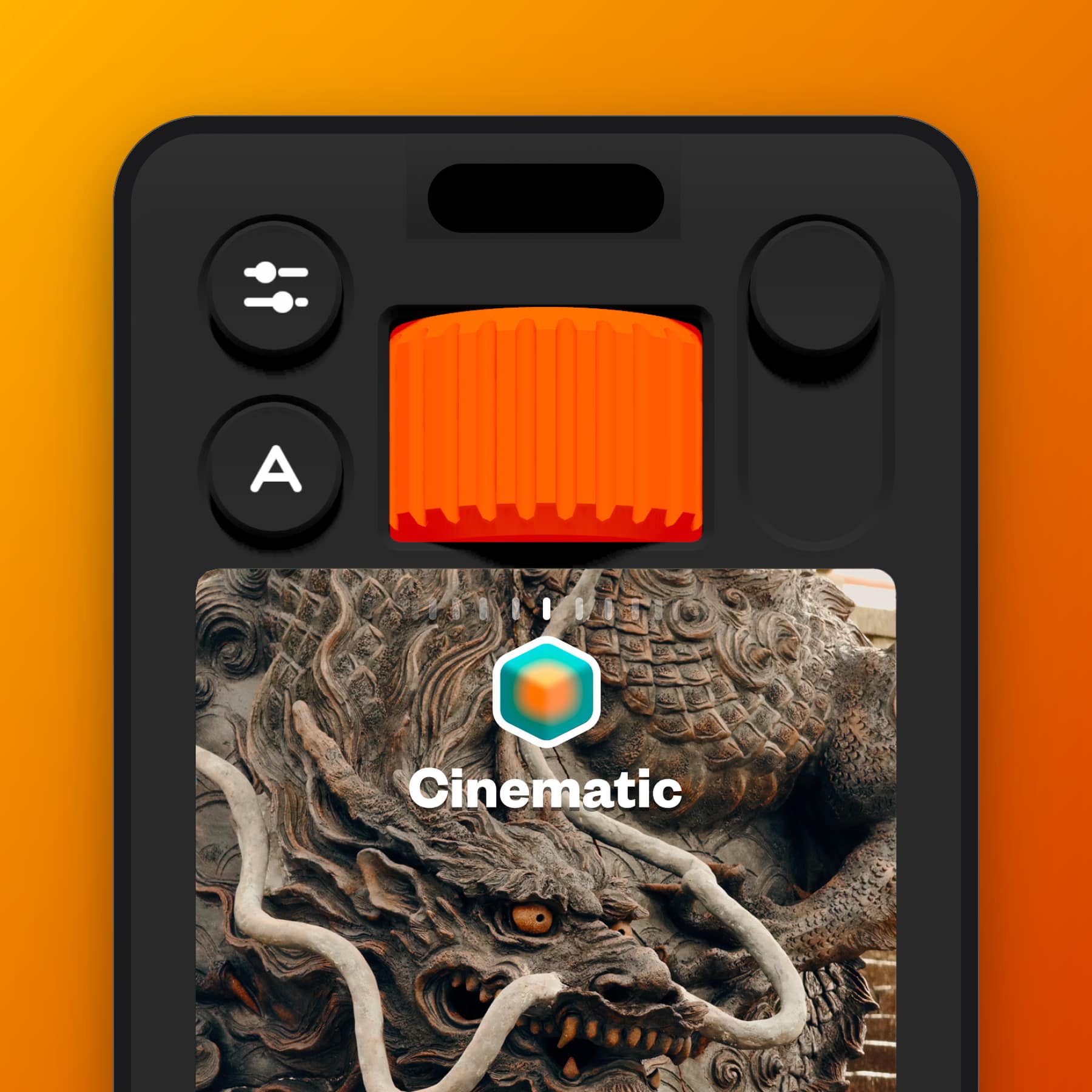
The Not Boring Camera app is a free iPhone camera from Not Boring Software, the two-person studio founded in 2020 by Andy Allen and Mark Dawson. Every control is a 3D object. There is a knurled Style dial you spin, a shutter button that clicks and buzzes, and a focus ring you drag on to the viewfinder. Underneath sits a raw processing pipeline the studio calls SuperRaw, real-time colour grading with 3D LUTs, and a full manual mode. Apple made it a 2026 Design Award finalist for Visuals and Graphics.
The download is free. The paid tier, !Camera Plus, is £14.99 a year or £59.99 once. The studio's all-apps membership, Super !Boring, is £7.99 a month or £29.99 a year. Every price on this page comes from the UK App Store listing, read on 10 September 2026. The app needs iOS 18.2 or later.
For the opinion, the Cool Factor score and the things that grate, read the Not Boring Camera review. This page carries no affiliate or referral links, because the studio does not run a referral scheme.
Get (Not Boring) Camera free on the App Store
What the Not Boring Camera app does
Most iPhone camera apps are a viewfinder with buttons around it. This one is a camera body drawn in three dimensions, rendered in Apple's SceneKit game engine. The dials cast shadows that move when you tilt the phone. Each notch on a dial is a separate haptic tick. Every tap plays one of a dozen slightly different click sounds, so no two presses sound the same.
The Auto screen has a huge shutter button, an exposure dial, a Style dial and two switches, one for the flash and one to swap lenses. The preview is inset rather than full screen, like looking through a viewfinder. Photos save straight to the Photos app. An optional Photo Review holds each shot on screen for a set number of seconds before the camera comes back.
SuperRaw, ProRaw and Basic
The app offers three processing routes, chosen in Capture Settings:
- SuperRaw: the studio's own pipeline. It reads the sensor data with none of Apple's multi-frame processing, so photos keep natural grain and film-like tone curves. This is the default and the reason the app exists.
- ProRaw: Apple's own high-quality processing. Balanced exposures, little grain, the largest files and the slowest captures.
- Basic: Apple's default processing, the closest match to the stock Camera app.
Andy Allen put the argument plainly on the Sub Club podcast in July 2026: "The default camera apps, it's not just Apple, it's Google, it's everyone, their goal is to make sure that you never take a bad photo. But I think the result is that you never can really take a great one."
Styles, or LUTs applied live
Styles are 3D LUTs, the lookup tables photographers and cinematographers use to grade colour. The app applies them in real time, in the viewfinder, so the photo that lands in your library already has the look. There is no editing step unless you want one.
The built-in set includes Cinematic. The Tokyo collective AgBr contributed two black and white styles, Mono Expired and Mono Tokyo, drawn from their research into vintage film stock. New styles arrive each season: the 31 August 2026 update added Deakins, after the cinematographer Roger Deakins, and Altman, a 1970s New Hollywood look. Members can also import any .CUBE LUT file, and the studio points free-LUT hunters at Panasonic's Lumix Lab app.
Manual mode and the pro tools
- Shutter speed: 1 second to 1/71,000 of a second
- ISO: 54 to 12,000
- White balance: 2,600K to 9,000K
- Exposure compensation: minus 6 to plus 6, in third-stop steps, on the Auto screen
- Precision Focus ring: tap and drag on the viewfinder to pull focus, with minimum and maximum distances marked and a Macro readout on lenses that support it
- Focus peaking, histogram and zebra stripes to check sharpness and exposure before you press the shutter
The developer's own support guide notes that shutter speed and ISO are tied together by Apple's camera framework, so there is no shutter-priority mode yet.
What is free and what needs a membership
The developer describes the app as free to try, with the paid tier covering "full access to all Styles, Customizations, Pro Settings, Widgets, and more". The support guide marks these five as membership features:
- HDR display, which recovers up to two stops of highlight detail and saves 10-bit HEIF files
- Max resolution, up to 48 megapixels on iPhones that support it, instead of the 12-megapixel standard
- HEIC plus RAW saving, which keeps a DNG digital negative alongside every photo
- Importing your own LUTs as new Styles
- Saving and sharing colourways, the custom colour schemes for the camera body
The developer's pages do not spell out which of the manual controls, if any, sit behind the paywall. Treat the list above as the confirmed part and expect the in-app paywall to show the rest.
Not Boring Camera app prices in the UK
These are the in-app purchases on the UK App Store listing, read on 10 September 2026. The studio's own website quotes US dollar prices that do not map one-to-one on to these. The App Store figures are the ones a UK reader pays.
- !Camera Plus, yearly: £14.99
- !Camera Plus, lifetime: £59.99, paid once
- Super !Boring, monthly: £7.99, covering all six Not Boring apps
- Super !Boring, yearly: £29.99, covering all six Not Boring apps
Super !Boring includes Camera, Weather, Habits, Vibes, Timer and Calculator, plus skins and widgets. The studio promises a price lock for as long as a subscription stays active. It also offers a full refund within 14 days, issued by Apple under Apple's own policy.
Platforms and requirements
- iPhone and iPad: iOS 18.2 or later. The current build is 1.58, released 31 August 2026, and the download is about 197 MB
- Android: none, and the studio says it has no plans for one
- Mac: no standalone app. Widgets work on the Mac desktop and the app runs through iPhone Mirroring
- Languages: English, French, German, Italian, Japanese, Korean, Spanish and Chinese
- Launch: a Lock Screen control, the Action button and the Camera Control button can all open the app directly. The studio claims under a second from lock screen to first shot
- Privacy: the app collects, stores and shares nothing, and photos stay on the device
The Apple Design Award
Apple named (Not Boring) Camera a finalist in the Visuals and Graphics category of the 2026 Apple Design Awards, announced at WWDC in June. Apple's citation calls it "a tactile throwback to the cameras of the '70s and '80s, all giant buttons and haptic scroll wheels that make it fun to dial in focal points and precision settings". The studio's other apps have won two Apple Design Awards between them.
Get (Not Boring) Camera
Free to download on the UK App Store, with !Camera Plus and Super !Boring sold as in-app purchases.
Frequently Asked Questions
Is the Not Boring Camera app free?
Yes, the download is free and the camera, the built-in Styles and the manual controls open without paying. HDR, 48-megapixel captures, RAW saving, LUT import and saved colourways need !Camera Plus or Super !Boring.
How much is Not Boring Camera Plus in the UK?
£14.99 a year or £59.99 once for lifetime access. Super !Boring, which covers all six apps, is £7.99 a month or £29.99 a year. Prices read from the UK App Store on 10 September 2026.
Is there an Android version?
No. The studio says it is a small team and has no plans for Android.
Does it shoot RAW?
Yes. With a membership, the app saves a DNG file alongside each HEIC, and it can also capture in Apple's ProRaw format. The DNG opens in Darkroom, Lightroom or Photoshop.
Does it record video?
Nothing on the developer's feature list or in its support guide mentions video. As of build 1.58, every control is for stills.
Who makes the Not Boring Camera app?
Not Boring Software, founded in 2020 by Andy Allen and Mark Dawson. Allen co-founded FiftyThree, the studio behind the drawing app Paper. The pair also make !Weather, !Habits, !Vibes, !Timer and !Calculator.
Official Sources and Terms
- (Not Boring) Camera on the UK App Store
- Apple Design Awards 2026 winners and finalists
- The developer's !Camera guide
- Not Boring Software plans and price lock
Feature lists and prices are accurate at the time of the last update and are subject to change by the developer. CoolCuration is not affiliated with Not Boring Software.
More from CoolCuration
- Not Boring Camera review: the opinion piece, with the Cool Factor score and the two things that stop it being a five.
- Polaroid Lab: turns the photos on your phone into real Polaroids, which suits a camera app built for film looks.
- Gifts for photo lovers: cameras, prints and books for people who notice light.
- Structured daily planner: last month's App of the Month, another Apple Design Award finalist.
- Back Market: a refurbished iPhone is the cheapest way to get a phone that runs this app well.


Follow us: Instagram
Copyright 2026 CoolCuration | Privacy Policy | Cookie Policy | Affiliate Disclosure | Cool Factor
-----------
We are proud supporters of a safer more private internet via encouraging people to use Brave browser and are actively taking on Spammers as part of ProjectHoneypot. This site is hosted on servers that run on 100% renewable energy in the UK thanks to GreenWebHosting.
This site contains affiliate links, including to Amazon.com and Amazon.co.uk. We may earn a commission if you make a purchase or sign up for a service via these links, at no extra cost to you. All offers and promotions are accurate at the time of publication but are subject to change or withdrawal by the businesses featured. We cannot guarantee their continued availability. Read our full affiliate disclosure.
Reviews and opinions on CoolCuration reflect the personal experience of our writers at the time of publication. They are not professional endorsements and your experience may differ. Scores use our Cool Factor rating system and are given independently of any commercial relationship.
All content on CoolCuration is provided for informational and entertainment purposes only. It does not constitute financial advice, investment recommendations or an endorsement of any product or service. We are not authorised by the Financial Conduct Authority and do not offer personalised financial guidance. You should always do your own research or consult a qualified financial advisor before making any financial decisions.