
If you're anything like us, you've been patiently waiting for Siri to finally get smart. Spoiler alert: it hasn't. And with "Apple Intelligence" rolling out... well, it's not giving what it was supposed to give.
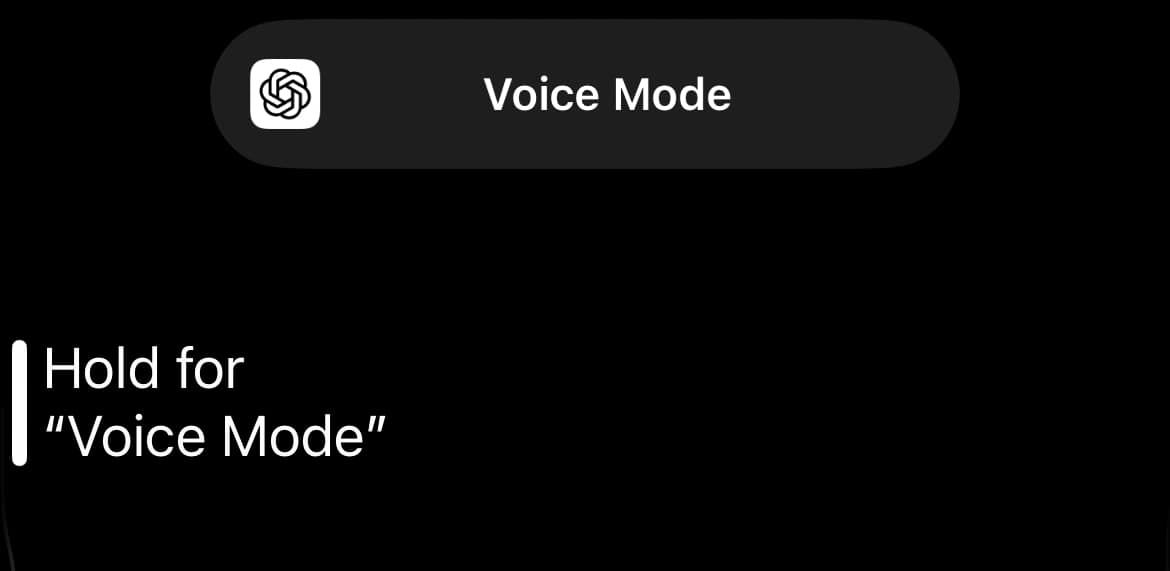
Luckily, we don't have to suffer anymore. We can bypass Siri with ChatGPT Voice instead. By setting up the iPhone's Action Button (or even a Back Tap or Home Screen shortcut), we can open ChatGPT Voice instantly. In about two minutes, we can bypass Siri entirely and get straight to a much smarter AI assistant.
Here's exactly how to do it:
Step 1: Install the ChatGPT App for Smarter AI Help 💾
First things first – make sure you've downloaded the official ChatGPT app from the App Store. (It's the one by OpenAI, not a random knockoff.)
Open the app at least once and log in. You'll need to have access to Voice Mode. (As of now, Voice Mode is rolling out to paid users first, but will be free to all users soon.)
Step 2: Create a Shortcut to Bypass Siri 🔄
- Open the Shortcuts app on your iPhone.
- Tap the + icon to create a new shortcut.
- Tap Add Action.
- Search for ChatGPT.
- Tap Voice Mode
- Tap Done
You can rename the shortcut if you like (e.g., "Launch ChatGPT Voice"). Totally up to you.
Setting up this shortcut is key if we want to bypass Siri with ChatGPT Voice quickly and easily.
Step 3: Use the Action Button for ChatGPT Voice 🔍
If you have an iPhone 15 Pro, 15 Pro Max, or later (iPhone 16, iPhone 16e etc):
- Go to Settings > Action Button.
- Scroll to Shortcuts.
- Select the shortcut you just created ("Launch ChatGPT Voice" or whatever you named it).
Now, every time we press and hold the Action Button, boom. ChatGPT Voice pops up bypassing Siri and going straight into voice mode, ready to chat. A simple way to bypass Siri with ChatGPT Voice and get better results.
Bonus: Set Up ChatGPT Voice with Back Tap 🔙
No Action Button? No worries.
- Go to Settings > Accessibility > Touch > Back Tap.
- Set Double Tap or Triple Tap to your shortcut.
This is another quick and smart way to bypass Siri with ChatGPT Voice if you're using an older iPhone model.
Why You Should Switch to ChatGPT Voice Today 🔪
- Speed: ChatGPT loads way faster than Siri tries to "think."
- Accuracy: We get better answers, faster.
- Convenience: No more shouting "Hey Siri" twenty times and getting nowhere.
Final Thoughts: Bypass Siri with ChatGPT Voice 👍
Apple Intelligence might get better someday, but why wait? We deserve better right now. Setting up this shortcut gives us instant access to a smarter AI assistant — with just one click.
Stop talking to Siri. Let's start talking to something that actually listens.
Looking for even more smart upgrades? Don’t miss our ultimate gift guide packed with brilliant ideas for tech lovers, gadget geeks, and anyone who loves clever hacks. Plus, check out our service guides to get the best discounts and deals on apps, subscriptions, and more. Save money, save time, and level up your everyday life!
What's trending






Recent posts
- Best Audiobooks October 2026: 10 UK Listens Ranked
 Ten new audiobooks for October 2026, from a full-cast Dracula with Jonathan Bailey to Russell T Davies reading his own television memoir.
 - Louis Fratino at David Zwirner ReviewLast updated: 4 October 2026 By Tristan · Arts, exhibitions and creative culture This is an opinion piece. Views expressed are the author's own and do not constitute professional advice. Exhibition reviewMayfair Saunas, subway cars and a lot of skin in Mayfair Louis Fratino at Zwirner is the American painter's first solo show in London,… Read more: Louis Fratino at David Zwirner Review
- What Is a Sprive Boost? Seven Days, and What It Actually PaysA Sprive boost lifts your cashback rate for seven days, and it arrives on its own. What mine paid, and why Supercharge is a display toggle rather than extra cashback.


No Comments.