
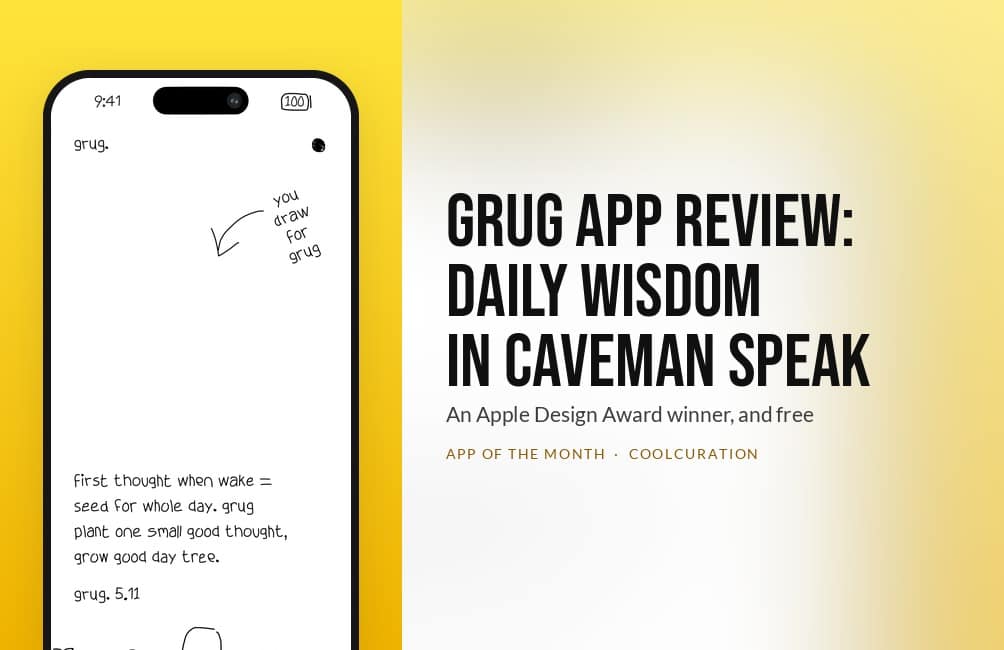
Last updated: 17 October 2026. I checked every price and rating in this grug app review on the UK App Store on 11 October 2026.
By Stiv · Design, technology and personal finance
October's App of the Month talks like a caveman. grug is a free iPhone app that gives you one short piece of advice every morning. It comes in broken English and hand-drawn lettering. Ocho, the two-person Dutch studio behind it, won the 2026 Apple Design Award for Delight and Fun with it. This grug app review covers what the app does each day and why the lettering matters. It also covers who it suits, and the three things that stop it scoring a five.
This is an opinion piece. Views expressed are the author's own and do not constitute professional advice.
Cool Factor: 4/5
Get grug free on the App Store
October 2026's pick in my monthly App of the Month series. Every pick so far, with scores and UK prices, is on the App of the Month page.
What is grug?
grug is a daily advice app for iPhone. Every morning at sunrise it shows one new wisdom, written in the voice of a caveman. Each one is three or four lines long. There is space on the page to draw and a strip of earlier days along the bottom. You also get a share button and Home Screen widgets. That is the full feature list, and it is short on purpose.
The App Store description puts the pitch in grug's own words: "grug not guru." The idea is that big problems are made of small ones. One small step today beats waiting for the perfect one. One wisdom from the store screenshots reads "first thought when wake = seed for whole day. grug plant one small good thought, grow good day tree."
It costs nothing. The UK App Store listing has no in-app purchases, no subscription and no paid tier. There is no account to make, and the privacy label says the developer collects no data from the app.
Who makes it, and why every letter is drawn by hand
Ocho is Jip van der Velde and Michel Elings, two friends in the Netherlands. They have worked together since 2012. They launched the studio in April 2025, and grug came out that September. The studio's other apps are Sudoku a Day, Peek Message and Photo Restore App.
One design decision in grug is easy to miss. The lettering is not a font. In an interview with Apple Developer, van der Velde explains that the first versions used existing handwriting fonts. Those looked too clean. So the pair built a drawing canvas inside the app and drew every letter themselves. Then they wrote a rendering engine that uses those strokes as its type. "The imperfection is intentional," he said. "The roughness sets the stage for grug's character and for the idea behind the app: make the useful thing feel small enough to start."
Elings called one choice the hardest they made: using that engine everywhere, not only for the daily wisdom. It meant drawing their own menus, icons and animations as well. As he put it: "If we had compromised on the handwritten engine early, grug would probably feel like a quote app with a cute font. Instead, it feels like its own little world." I think he is right. The drawn lettering is what sets grug apart from other quote apps.
First impressions: a caveman with a battery meter
The detail Apple's citation points to first is the status bar. The time and the battery percentage at the top of the screen are drawn in the same wobbly hand. The battery is a little sketched box. The citation also mentions the release notes.
Those release notes are worth a look on the App Store, because they stay in character. One update reads "grug hit bug with stick." Another says "grug fix stuff. grug make widgets better." It is a small joke. Still, it shows the team cared about every surface of the app. On a typical app, that space just says "bug fixes".
The colour is the other thing you notice. The developer's screenshots show the page in five colours: white, forest green, sky blue, mint and orange on navy. Each one keeps the lettering in a single colour. As a result the page looks like ink on coloured paper.
The daily page
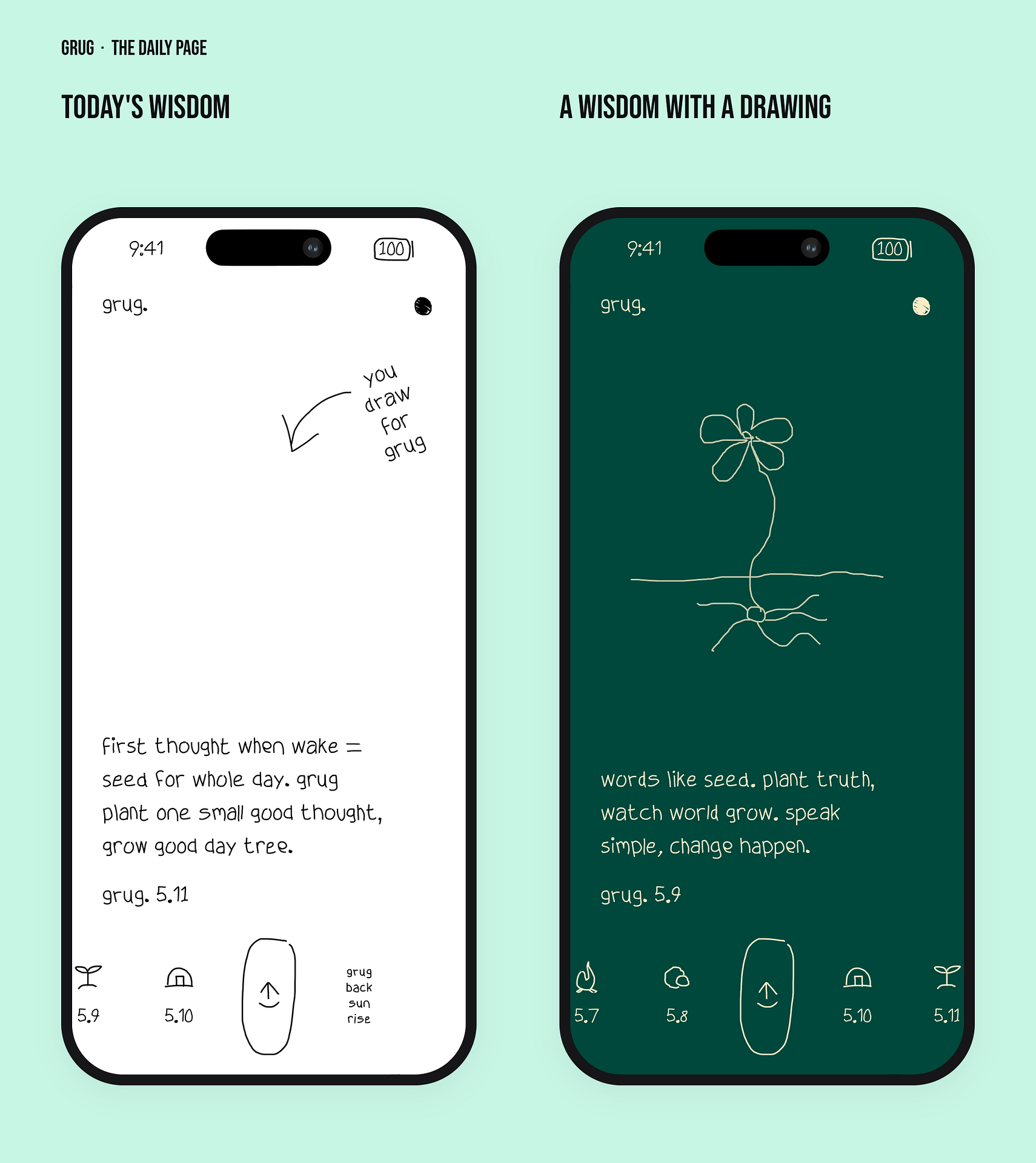
The daily page has three parts. At the top is an empty space with a scribbled arrow and the words "you draw for grug". In the middle is the day's wisdom, signed with grug's name and the date. Along the bottom runs a strip of earlier days, each with a small drawn icon. The slot after today reads "grug back sun rise".
So there is no feed and nothing to catch up on. You open the app, read three or four lines, maybe draw something, and close it. Elings told Apple what feedback means most to the studio. It is people saying "grug makes the morning feel a little lighter". That is the job, and the app does not try to do any other.
The wisdom itself is better than the format suggests. "words like seed. plant truth, watch world grow. speak simple, change happen." is not a new idea, but the caveman voice stops it sounding pompous.
Drawing, widgets and themes
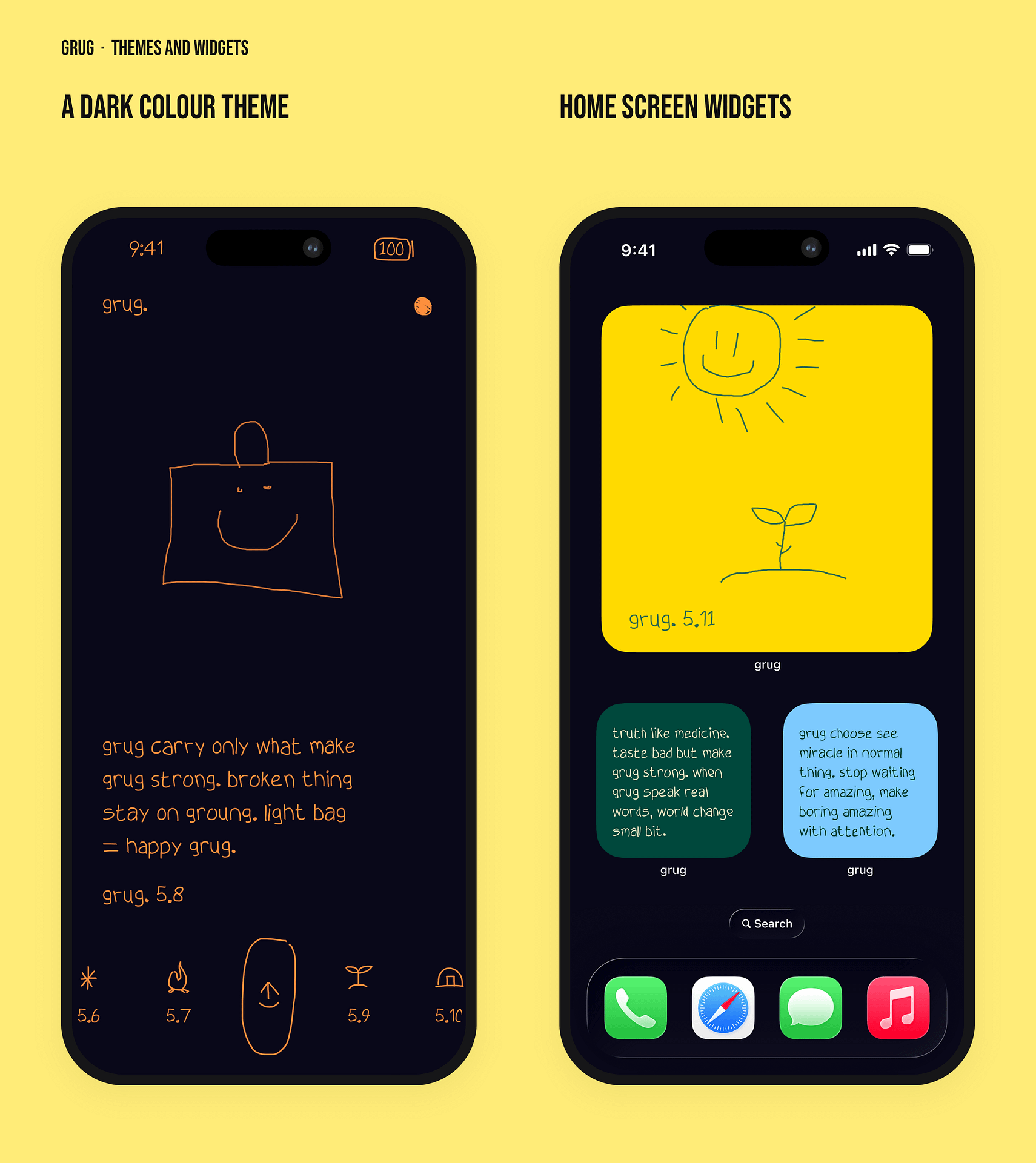
The drawing space gives you something to do with the line beyond reading it. The App Store screenshots show four examples. There is a flower with roots for a line about planting truth, and a heart with an arrow. There is also a sign reading "Life", and a smiling bag for a line about travelling light. None of them are polished drawings. The app's own lettering is rough too, so a quick sketch does not look out of place next to it.
The widgets mean you can read the day's line without opening the app. A large widget shows a drawing and the date on a yellow square. The smaller ones carry a wisdom in grug's lettering. That suits an app that asks for so little of your time. The themes cover light and dark, plus the coloured pages above. The developer's description says you can "give grug shiny color".
Sharing sends a page to someone else. Elings says people quickly "started speaking back to us in grug's voice". Appbot, a review analysis tool, studied grug's App Store reviews. It found that about one in ten reviewers writes in grug's voice. So a fair share of reviewers have taken to the character.
Honest critical observations
No grug app review is any use if it only lists the charm. Three things hold it back, and one of them matters a lot to the people it affects.
The accessibility gap. The App Store listing says the developer "has not yet indicated which accessibility features this app supports". Appbot's analysis of 866 reviews picked out a three-star review titled "Love the design, but not accessible". It reports that VoiceOver and Select to Speak do not work. That is likely a side effect of drawing every letter by hand instead of using system text. If that review is right, a blind or partially sighted reader cannot use the app. An Apple Design Award winner should do better.
It is English only, and iPhone only. The App Store lists English as the only language. A June 2026 update note says "grug now able speak other language", but the listing has not changed. Appbot also found reviewers asking for a Chinese version. There is no Android app and no iPad version on the store. It does run on Apple silicon Macs and Vision Pro as the iPhone app.
There is not much of it. One wisdom a day, a drawing and a widget is all grug offers. That is a deliberate choice and it is the reason the design is so tidy. Still, grug has no journal, no streaks, no reminders you can set and no search of past advice. Appbot also lists onboarding as one of three complaints in the lower-rated reviews. Those reviewers could not work out how to start.
Why grug matters now
A typical free app wants more of your time. It sends notifications, counts streaks and sells you a subscription to unlock the good bits. grug asks for three or four lines of reading in the morning, collects nothing and charges nothing. Apple's 2026 Design Award citation calls it "a little masterpiece of clever simplicity that never takes itself too seriously". It also notes there is "no login, no cloud syncing, nothing extraneous".
It also makes a good point about design. The award went to a hand-drawn type engine built by two people. Other winners that year were praised for Liquid Glass and immersive video. Last month's pick, covered in my Not Boring Camera review, also came from a two-person studio. Both teams built their own interface instead of using Apple's standard controls. Both got Apple's attention for it.
Value for money
On price, this grug app review has an easy job. grug is free, with no in-app purchases on the UK App Store. The only cost is 22.7 MB of storage. There is nothing to upgrade to and nothing to cancel.
If you already pay for a meditation or journalling app, grug is not a replacement. It does one small thing and leaves the rest to you. As a free extra on the Home Screen, though, it is hard to argue with. My grug app guide has the feature list and requirements in one place, without my opinion attached.
Practical info
grug is on the UK App Store for iPhone and needs iOS 18 or later. It also runs on Apple Vision Pro, and on a Mac with an M1 chip or newer and macOS 15. The current version is 1.5.1, released on 9 October 2026, and it is rated 4+.
In the UK it holds 4.9 stars from 356 ratings. Those figures are from 11 October 2026. The app has its own small site at grug.so. grug posts on Instagram as @grug_app and on X as @grug_speak. Ocho's Sudoku a Day follows the same idea: one small thing each day.
The verdict
Cool Factor: 4/5, Stone cold.
Cool Factor
★★★★☆
4 out of 5
grug takes a tired category, the daily quote app, and makes it worth opening. The hand-drawn type engine is a real piece of design work. The caveman voice makes the advice easier to hear. And it is free, with no data collected. This grug app review lands on a four because the craft is properly impressive.
Overall, a solid 4/5 Stone cold. The hand-drawn lettering that earned the award is also what held it back from Ice cold. One review reports that VoiceOver users cannot read it. It is also English only and iPhone only. Beyond one page a day, there is very little to it. Fix the accessibility and it would be close to a five. As it stands, download it, add the widget, and give it a week of mornings.
grug app review FAQs
Is the grug app free?
Yes. grug is free on the UK App Store. The listing shows no in-app purchases, so there is no paid tier to unlock. I checked on 11 October 2026.
What does the grug app do?
It shows one short piece of advice each morning at sunrise, written in a caveman voice and hand-drawn lettering. You can draw on the page, share it and add Home Screen widgets.
Is grug on Android?
No. grug is only on Apple's App Store, for iPhone. The same app runs on Apple silicon Macs and Vision Pro.
Does grug work with VoiceOver?
Not reliably. The developer has not listed any accessibility features on the App Store. At least one review reports that VoiceOver and Select to Speak do not read the hand-drawn text.
Who made grug?
Ocho, a two-person studio in the Netherlands run by Jip van der Velde and Michel Elings. grug won the 2026 Apple Design Award for Delight and Fun.
Is grug worth downloading?
If you want one small, well-made thing on your phone each morning, yes, and it costs nothing. If you want a full journal or a meditation course, this grug app review would point you elsewhere.
More from CoolCuration
- Structured app review: August's App of the Month, a visual day planner that also made the 2026 Apple Design Award list.
- 1Blocker: a content blocker for Safari, for a calmer phone that collects less about you.
- Requin Renard glass pen: a handmade glass dip pen from Marseille, for drawing on paper instead of a screen.
- Gifts for artists: presents for people who sketch, paint and make things.
- Affinity by Canva: the free design suite, if grug has you wanting to draw your own lettering.
What's trending
Recent posts
- Warm Home Discount 2026/27: Who Gets the £150 and How
 Last updated: 18 October 2026. I checked every date and rule in this Warm Home Discount guide against GOV.UK on 18 October 2026. By Stiv · Design, technology and personal finance Affiliate disclosure: This article contains affiliate and referral links, which are paid links. If you click one and buy or sign up, I earn… Read more: Warm Home Discount 2026/27: Who Gets the £150 and How
 - Five Years of Sprive: What It Actually Did to My MortgageFive years of Sprive on my own mortgage: £10,237.41 overpaid, a remortgage from Nationwide to Halifax, and what the cashback actually added.
- grug App Review UK: Daily Wisdom in Caveman SpeakOctober's App of the Month: grug, the free iPhone app where a caveman writes you one small piece of wisdom every morning, in lettering its makers drew by hand. Winner of Apple's 2026 Design Award for Delight and Fun. Cool Factor 4/5. @grug_app #grug #AppOfTheMonth #AppleDesignAwards #iPhoneApps #AppDesign

No Comments.