
Last updated: 9 June 2026
By Stiv · Design, technology and personal finance
This is an opinion piece. Views expressed are the author's own and do not constitute professional advice. CoolCuration is not authorised by the Financial Conduct Authority.
This article contains affiliate and referral links, which are paid links. If you click one and buy or sign up, I earn a commission or referral bonus at no extra cost to you. Brands don't choose what I feature or what I say about them.
Capital at risk. The value of investments can go down as well as up and you may get back less than you invested. Past performance is not a reliable indicator of future results.
This Stock Events app review covers everything we like (and a few things we do not) about one of the highest-rated portfolio trackers on both app stores. Stock Events promises a clean, ad-free way to monitor your stocks, dividends, earnings, and more from a single screen. After spending time with it, here is our honest take on whether it delivers.
Cool Factor: 4/5
What is Stock Events?
Stock Events is a portfolio tracking and stock market companion app built by Stock Events GmbH, a company based in Germany. It is available on iOS and Android and covers over 100,000 assets worldwide, including stocks, ETFs, crypto, commodities, bonds, and indices.
The app does not let you trade. It does not hold your money or custody any assets. It is a pure tracker that sits alongside your brokerage and gives you a unified view of your holdings, dividends, earnings dates, price movements, and economic events. Because Stock Events holds no client money, FSCS deposit protection does not apply and is not relevant here.
The app operates on a freemium model. The free tier lets you track up to 15 stocks, with five AI messages per 24 hours and core watchlist, portfolio, dividend, and event tracking. The paid Pro tier, currently priced at $49.99 per year (with a 7-day free trial), unlocks unlimited stocks, expanded AI access, portfolio analytics, extended charts, competitor views, custom assets, advanced dividends, and API access. A separate Connect add-on ($0.99 per week) enables automatic syncing with brokerages, crypto exchanges and wallets.
First impressions
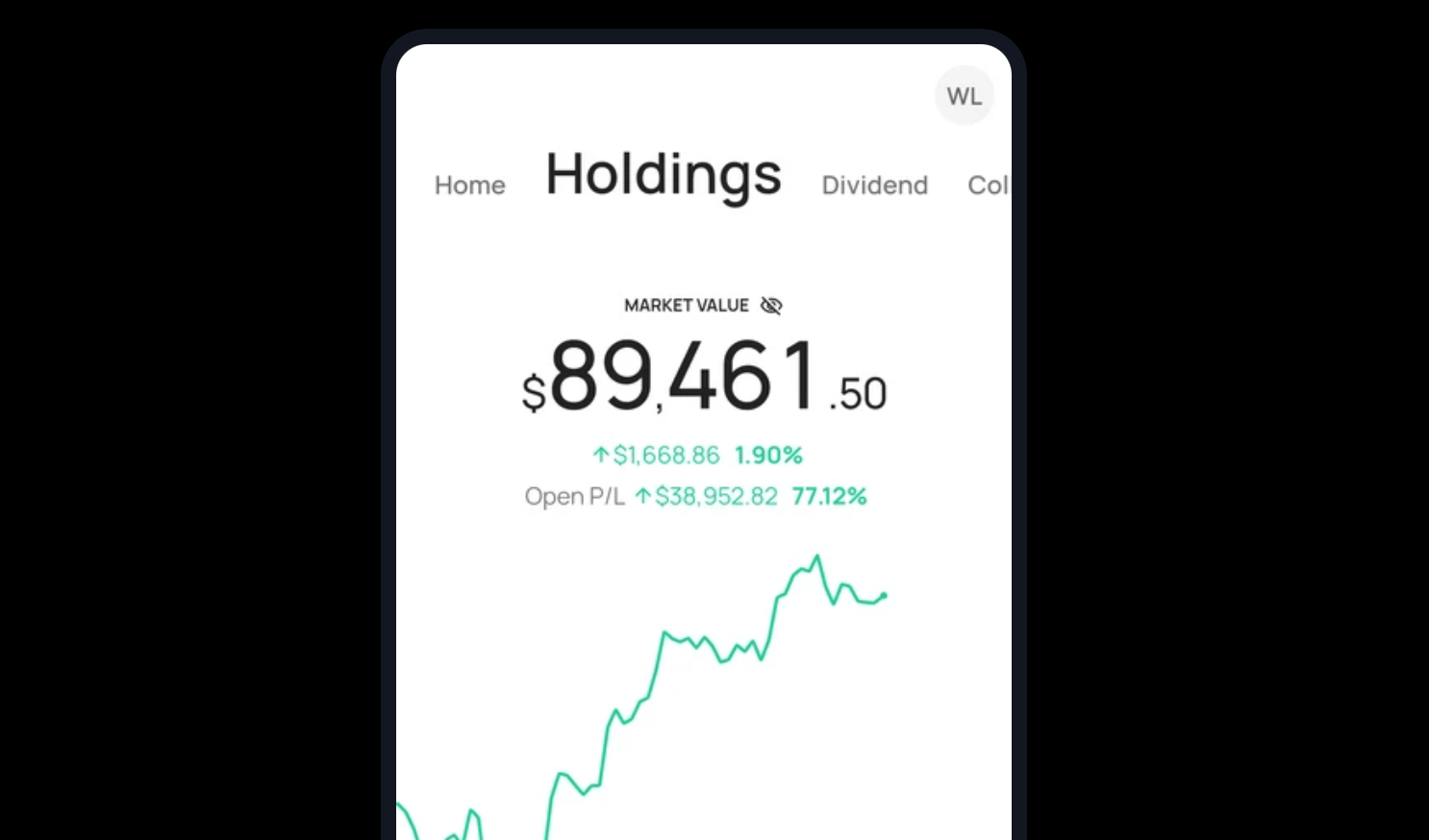
The first thing you notice is how clean the interface is. There are no ads, no pop-ups trying to sell you penny stocks, and no cluttered news feeds fighting for attention. The home screen is split into tabs for your personalised feed, holdings, dividends, and collections, and it all loads quickly.
Setting up is straightforward. You create an account, add stocks to your watchlist, and optionally log transactions with purchase price and date to track profit and loss over time. You can also import transactions, which saves a fair bit of manual data entry if you have an established portfolio.
The design language is modern and restrained. If you have ever bounced off Yahoo Finance because it feels like a wall of noise, Stock Events will feel like a breath of fresh air.
The experience
The standout feature is dividend tracking. Stock Events provides estimated future dividends, ex-dividend date alerts, payout calendars, a passive income chart, and dividend yield calculations. For anyone building a dividend portfolio, this is best-in-class in our experience. The app estimates missing future dividends so you always have a forward-looking view of expected income. We have not seen another free app do this as comprehensively.
Tax treatment depends on the individual circumstances of each client and may be subject to change in future.
The timeline view is another strong point. It combines earnings reports, dividend dates, price changes, analyst ratings, and economic events into a single scrollable feed tailored to your watchlist. Push notifications keep you in the loop without requiring you to open the app constantly.
Portfolio tracking is solid if not spectacular. You get intraday charts, overall profit and loss, and the ability to add transactions manually. The charts are clear and responsive, and the app handles multiple asset types in a single portfolio without fuss. That said, if you hold assets across several brokerages, the manual entry process can feel tedious unless you upgrade to Pro and add the Connect add-on for brokerage connections.
One thing we appreciated is the economic events calendar. Interest rate decisions, inflation data, unemployment figures: it is all laid out in a calendar view that makes it easy to see what is coming up and how it might affect your holdings. This is the sort of feature that a lot of standalone apps charge for.
Widgets are a nice touch too. You can add real-time stock prices to your phone's home screen, which means a quick glance gives you a snapshot without opening anything.
Where it falls short
The free tier is increasingly restrictive. The 15-stock watchlist limit is the most common frustration in app store reviews, and it is a valid one. The app used to be more generous before introducing the subscription model.
Automatic brokerage syncing is not included with Pro. You need to add the Connect add-on at $0.99 per week on top of the annual subscription. For a tracking app, that is a notable extra cost, especially when some competitors offer basic syncing without additional charges.
While the app covers UK-listed stocks and supports multiple currencies, the interface and data lean towards US markets. LSE-listed shares are available, but the default experience feels US-centric in its layout and featured content.
Stock Events app review: value for money
The free version is good enough to get a genuine feel for the app and track a small portfolio. You can earn additional free watchlist spots through referrals, and we have more details on our Stock Events detail page.
The Pro subscription at $49.99 per year works out to roughly £40 depending on exchange rates, which competes well against alternatives like Seeking Alpha or Simply Wall St. The developers have been transparent about why they charge: server costs, data feeds, and a commitment to staying ad-free. That is a trade-off we can respect, even if the free-to-paid transition could be smoother.
Compared to alternatives like Freetrade (which is a full brokerage rather than a tracker) or Yahoo Finance (free but ad-heavy), Stock Events occupies a useful middle ground: focused, clean, and genuinely informative. For what you get, especially the dividend data, it offers strong value if you are willing to pay for Pro or can work within the free limits.
The verdict
Cool Factor
★★★★☆
4 out of 5
Stock Events does one thing and does it well. It takes the mess of tracking stocks, dividends, earnings, and economic events across multiple sources and puts it all in one clean, ad-free app. The dividend tracker alone sets it apart from most competitors, and the timeline view is a genuinely smart way to stay on top of market events without drowning in noise.
It is not perfect. The free tier feels tight, the US-centric defaults may annoy UK investors at first, and the additional cost of the Connect add-on for brokerage syncing is a miss at the Pro price point. But as a companion to your existing brokerage, it earns its place on your home screen.
If you want to try it out, head to our Stock Events detail page to get started and find out how to earn extra watchlist spots.
Capital at risk. The value of investments can go down as well as up and you may get back less than you invested. Past performance is not a reliable indicator of future results.
Overall, a solid 4/5. Stock Events earned that score with its best-in-class dividend tracking, clean ad-free design, and a timeline feature that genuinely saves time. It did not quite reach the top because the free tier is too restrictive, brokerage syncing costs extra, and the overall experience still leans a little too heavily towards US markets for UK users.
Stock Events is a tracking tool, not a brokerage. It does not hold your money or custody any assets. FSCS deposit or investment protection is not applicable. You can read more about the app on the official Stock Events website. This review reflects the author's personal experience. CoolCuration earns additional watchlist spots when readers sign up via our referral link on the detail page.
Capital at risk. The value of investments can go down as well as up and you may get back less than you invested. Past performance is not a reliable indicator of future results. Rates, terms and features can change at any time. This article is for information only and does not constitute financial advice. CoolCuration is not authorised by the Financial Conduct Authority. If you are unsure about any financial decision, consider speaking to an independent financial adviser.
Frequently asked questions
Is the Stock Events app worth it?
If you want a clean, ad-free portfolio and dividend tracker, in our experience yes. The free tier is limited but usable, and Pro adds genuine value for active investors. It is especially strong for dividend portfolios.
Can I trade stocks on Stock Events?
No. Stock Events is purely a tracking and information app. You cannot buy or sell securities through it. It works alongside your existing brokerage. The app holds no client money.
Does Stock Events work for UK investors?
Yes. The app supports LSE-listed stocks and multiple currencies, though the default interface is somewhat US-focused. UK assets are fully trackable.
How does Stock Events compare to Yahoo Finance?
Stock Events is more focused and ad-free, with far superior dividend tracking. Yahoo Finance offers broader news coverage and is entirely free, but the experience is cluttered by comparison.
Is there a free trial for Stock Events Pro?
Yes. The Pro tier currently offers a 7-day free trial via the official pricing page. Availability may vary by platform. The free tier itself has no time limit.
What rating does Stock Events have on app stores?
Stock Events holds a 4.8-star rating on both the Apple App Store and Google Play, based on over 14,000 combined reviews at the time of writing.
What does Stock Events Pro cost?
As of June 2026, Pro is priced at $49.99 per year (saving around 48% versus the monthly rate), with a 7-day free trial. A separate Connect add-on for automatic brokerage syncing costs $0.99 per week. Pricing is set in US dollars; the equivalent in sterling will vary with exchange rates. Always check the official pricing page for current figures.
More from CoolCuration
- Cheapest investment app UK: FX fees compared: Find out which platforms charge the least when you invest in overseas stocks.
- Trading 212: A popular commission-free brokerage with a referral bonus for new UK users.
- Lightyear: Low FX fees and a clean design make this a strong pick for global investing.
- Oura Ring 4: A smartwatch for tracking more than just your portfolio.
- Best referral offers UK: Our full roundup of the top sign-up bonuses available right now.
What's trending



Recent posts
- Warm Home Discount 2026/27: Who Gets the £150 and How
 Last updated: 18 October 2026. I checked every date and rule in this Warm Home Discount guide against GOV.UK on 18 October 2026. By Stiv · Design, technology and personal finance Affiliate disclosure: This article contains affiliate and referral links, which are paid links. If you click one and buy or sign up, I earn… Read more: Warm Home Discount 2026/27: Who Gets the £150 and How
 - Five Years of Sprive: What It Actually Did to My MortgageFive years of Sprive on my own mortgage: £10,237.41 overpaid, a remortgage from Nationwide to Halifax, and what the cashback actually added.
- grug App Review UK: Daily Wisdom in Caveman SpeakOctober's App of the Month: grug, the free iPhone app where a caveman writes you one small piece of wisdom every morning, in lettering its makers drew by hand. Winner of Apple's 2026 Design Award for Delight and Fun. Cool Factor 4/5. @grug_app #grug #AppOfTheMonth #AppleDesignAwards #iPhoneApps #AppDesign

No Comments.