
Last updated: 8 October 2026. I wrote this Figma Creator Micro review from my own use, and checked every price in it on 29 September 2026.
By Stiv · Design, technology and personal finance
Beautiful on the desk. Harder to justify in the workflow.
This Figma Creator Micro review comes from my own desk. I bought the Figma edition of Work Louder's Creator Micro. Then I set it up next to my Work Louder Knob1 keyboard and used it for my design work. So this is real use, including the parts that did not land.
This article contains affiliate and referral links, which are paid links. If you click one and buy or sign up, I earn a commission or referral bonus at no extra cost to you. Brands don't choose what I feature or what I say about them.
This is an opinion piece. Views expressed are the author's own and do not constitute professional advice.
Cool Factor: 3/5
In short, the design is beautiful and the build quality is admirable. However, just as with the Knob1, I struggle with the price. And unlike a keyboard I type on every day, this feels like something I did not really need. Here is why it lands at a 3.

What is the Figma Creator Micro?
First, the basics for this Figma Creator Micro review. The Figma Creator Micro is a small macropad: a grid of programmable keys that sits beside your keyboard and fires shortcuts. Figma and Work Louder announced it together on Figma's own blog on 7 December 2023.
It has 12 keys and two rotary dials. Figma describes it as allowing "48 different shortcuts", which works out as four layers of twelve keys. For context, Figma itself has over 150 shortcuts, so the Micro holds the ones you use most rather than all of them.
It arrived set up with Figma shortcuts, and it came with switch options in clicky or tactile. Pre-orders opened at $139, with the price rising to $159 afterwards, according to BGR's launch report. Shipping began in 2024. Meanwhile, keymapping ran through VIA, a free keyboard configuration app that lets you remap each key without writing code.
Work Louder, Figma and where the Micro sits
Work Louder is a small hardware studio based in Montréal. It built its name on the Creator Micro, and the Figma version is a special edition of that original design. Later, it added the Knob1 keyboard, which I reviewed earlier this year, and now the Creator Micro 2.
Figma's reasoning for the collaboration is clear. Product Manager Rob Bye, who developed it with Work Louder, told Figma's blog that "most people [using Figma] aren't typing; they're using their mouse, they're needing to navigate a file." That is why the Micro behaves less like a keyboard and more like a second control surface for the canvas.
Work Louder co-founder Michael di Genova made the case for the layout: "With the Micro all the keys are in a grid, making it super easy to mentally map your custom shortcut placement." In practice, the grid does make it easy to remember where each shortcut lives.
First impressions and unboxing
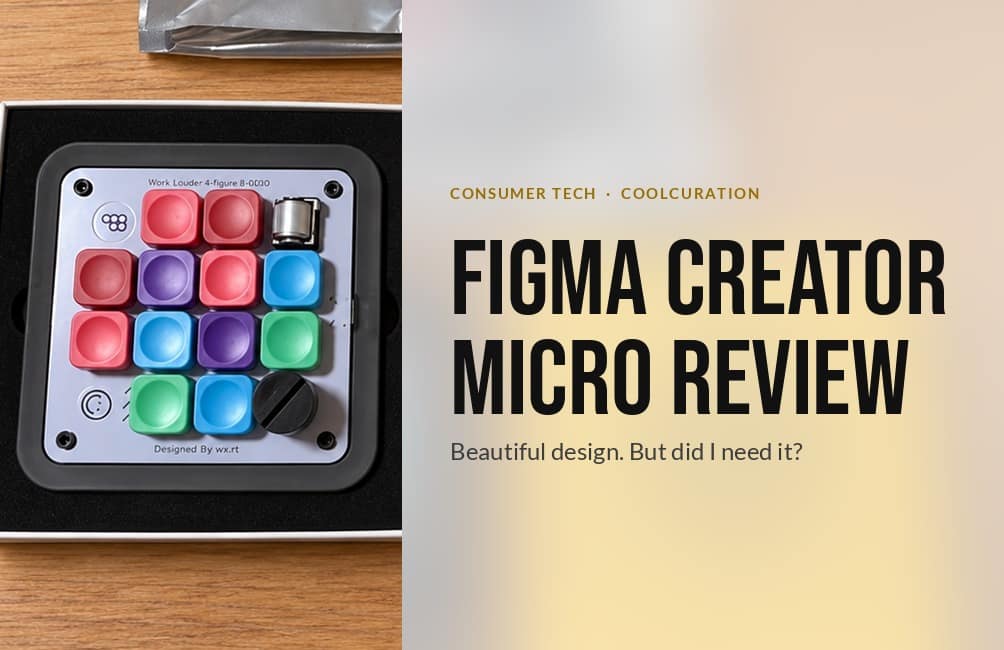
For this Figma Creator Micro review, the unboxing set the tone straight away. The Micro comes in a bright yellow box printed with a line drawing of the pad itself. Inside, the pad sits in a black foam tray. A separate bag holds the spare keycaps, including Figma icon caps and solid colours.
My unit wears red, pink, purple, blue and green caps on a pale lilac plate. There is a silver dial at the top right and a black dial at the bottom right of the grid.
Design and build quality
In this Figma Creator Micro review, design and build are where it earns its score. The design is beautiful. Every colour choice looks deliberate, from the caps to the plate to the yellow packaging. Furthermore, it looks as good switched off on the desk as it does in use.
The build quality is admirable too, just as it was on the Knob1. It feels solid in the hand, and it matches the Knob1 on my desk for finish.
Figma Design Director Marcin Wichary summed up why this sort of object appeals: "I can be intentional about buying a keyboard, not just for efficiency, but for other reasons." That is the strongest case for the Micro too: you buy it partly because it is lovely to own.
The keys, dials and layers in practice
Day to day, the 12 keys handle single shortcuts, and the dials handle anything you would otherwise drag or scroll. For example, a dial is a natural fit for zooming the canvas or nudging a value up and down.
Layers are where it gets clever. Each of the four layers can hold a different set of twelve shortcuts, so one pad can cover several apps. On the other hand, switching layers means remembering which one you are on, because the keycaps cannot change to show it.
Setup takes patience. Mapping a key means working out the exact key combination for your operating system. Then you assign it, one key at a time. Consequently, my first evening with it went on configuration rather than design work, and I enjoyed it.
Unlike a keyboard I use daily, this feels like something I didn't really need.
How I actually use the Figma Creator Micro
In my setup, the Micro does three jobs. First, it holds my Figma shortcuts. Second, it runs smart actions, where one press triggers a short chain of steps. Third, it launches and switches between apps, which is the part I use most.
That app switching earns its place. A single press takes me straight to the app I want. Because I set it up in Work Louder's desktop software, the keys also change to suit whichever app I am working in, which saves a little friction every time. Similarly, the smart actions are handy for the repetitive jobs I do several times a day.
I did try using it to tidy up how I name my Figma layers. In the end, though, Figma's own rename layers with AI tool does that job well, so the Micro added little there. Overall, it has not added that much to my workflow. Maybe I am missing the point. But from my own use, this Figma Creator Micro review cannot claim it changed how I work.
Honest critical observations
Now for the parts that hold it back. The first is the price. At $159 after launch, the Figma Creator Micro is a lot to pay for twelve extra keys. As with the Knob1, I struggle with that. The difference is that I type on the Knob1 all day, whereas the Micro is an extra.
The second is need. My keyboard already covers most of what the Micro does, so it often duplicates shortcuts my keyboard already handles. Therefore the benefit shrinks the more fluent you already are with your tools.
The third is setup. I enjoyed it, but mapping keys by hand takes time, and the layer system asks you to keep a mental map of four pages of shortcuts. If you do not want to spend an evening configuring it, the Micro will stay on its factory Figma layout.
Finally, the Figma edition is now hard to buy new. None of these is a dealbreaker on its own. Together, however, they are why this Figma Creator Micro review stops at Cool rather than Stone cold.
Figma Creator Micro vs Creator Micro 2
Work Louder has since released the Creator Micro 2. I have not tried it, so unlike the rest of this Figma Creator Micro review, the details below come from Work Louder's product page rather than my desk.
It is a different device, not a refresh of the Figma edition. The Micro 2 has 13 keys, a rotary encoder, a joystick and a touch sensor. It also detects which app you are using and switches to your chosen preset automatically, which Work Louder puts plainly: "The Micro will detect which app you are using and change to your designated preset automatically." It runs through Work Louder's Input app rather than VIA.
On price, Work Louder lists the wired Base at $168 and the wireless Pro at $198. At the exchange rate on 29 September 2026, that is roughly £127 and £149 before any import charges. Note that its keycaps are a different design, so your Figma edition caps will not carry over.

Value for money: my Figma Creator Micro review verdict on price
So, is the Figma Creator Micro worth the money? For me, not quite. It is a lovely object and it does its job, but it rarely does something your keyboard cannot.
The obvious alternative is a Stream Deck. The Elgato Stream Deck MK.2 has 15 keys with small screens on each, so every key shows what it does. When I checked on 29 September 2026, it was £114.50 on Amazon UK. That labelling solves my biggest complaint about the Micro's layers, although it lacks the Micro's dials and its design charm.
The cheapest alternative is simply learning your shortcuts, which costs nothing. If the money would otherwise go on software, my Affinity by Canva review covers a free creative suite. Similarly, my Mobbin review weighs up whether another designer tool is worth what it costs.
Where the Micro does make sense is as part of a considered desk. Paired with the Knob1, which I cover in my Work Louder Knob1 review, it looks like one designed system. If that matters to you, and it does to me, the value case gets stronger.
See the Stream Deck MK.2 on Amazon UK
Practical info for UK buyers
When I checked on 29 September 2026 while writing this Figma Creator Micro review, neither Work Louder's shop nor the Figma Store listed the Figma Creator Micro for sale. As a result, secondhand listings are the main route now. Check that the seller includes the spare keycap bag.
If you buy from overseas, import costs apply. According to GOV.UK's guidance on goods sent from abroad, the seller adds VAT at checkout on goods worth £135 or less. Above £135, you pay VAT to the delivery company before you get the parcel, and Customs Duty may apply too. The courier can also add its own charges.
That matters for the Creator Micro 2. The wired Base sits just under £135 at current rates, while the wireless Pro sits above it, so the Pro is likely to cost noticeably more once it lands. It works with Mac and Windows, and Work Louder offers a two-year warranty on the Micro 2.
Cool Factor
★★★☆☆
3 out of 5
The verdict
This Figma Creator Micro review ends at 3/5 Cool. The design is beautiful, and the build quality is admirable. App switching and smart actions work well in my setup. However, the price is high for an extra, setup takes time, and it has not added much to how I work.
Overall, a solid 3/5 Cool. The Figma Creator Micro earned its score with its design and its build, which match the Knob1 on my desk. It did not reach Stone cold because it duplicates much of what my keyboard already does, and at its price I cannot say I needed it. If you want a beautiful object for a design-led desk, it delivers. If you want a faster workflow, learn your shortcuts first.
Figma Creator Micro review FAQs
Is the Figma Creator Micro worth it?
In my experience, only if you value the design and build as much as the function. It works well, but for me it duplicates much of what my keyboard already does, which is why I scored it 3/5.
How much does the Figma Creator Micro cost in the UK?
It launched at $139 on pre-order and $159 afterwards. When I checked on 29 September 2026, it was not on sale new from Work Louder or the Figma Store, so secondhand prices vary.
Can you buy the Figma Creator Micro on Amazon UK?
I could not find it on Amazon UK. Secondhand listings are the main route now, and imports over £135 carry VAT, possible duty and courier charges.
What is the difference between the Figma Creator Micro and the Creator Micro 2?
The Figma edition has 12 keys and two dials. The Creator Micro 2 has 13 keys, an encoder, a joystick and a touch sensor, and it switches presets automatically based on the app you are using. I have not tried the Micro 2.
Does the Figma Creator Micro work with a Mac?
Yes. I use mine with a Mac, and it connects over USB-C.
Figma Creator Micro vs Stream Deck: which should you buy?
A Stream Deck labels every key with a small screen, which makes layers easier to follow. The Micro has dials and a nicer design. If function comes first, the Stream Deck is easier to live with.
More from CoolCuration
- reMarkable Paper Pro review: another beautiful, expensive desk object, and whether it earns its price.
- Penpot: the free, open-source design tool worth knowing if you work in Figma.
- Framework wireless touchpad keyboard: a keyboard with a built-in touchpad for a tidier desk.
- Gifts for designers: design-led picks for the creative in your life.
- Affinity by Canva guide: what the free creative suite includes and how to get started.
What's trending





Recent posts
- Figma Creator Micro Review: Beautiful, But Do You Need It?
 My Figma Creator Micro review: beautiful design and admirable build, but a price I found hard to justify. Cool Factor 3/5.
 - New on Mobbin October 2026: Jomo, Delphi, Lloyds and MoreNew on Mobbin October 2026: Jomo, Delphi, Lloyds and five more apps, with the consent, search and unlock screens worth studying.
- British Art Fair 2026 ReviewArt fairsSaatchi Gallery A Sickert study best in show, a Hockney for £800, and naff AI art Last updated: 28 September 2026. I checked every price and date in this British Art Fair review against the dealers' labels and the fair's own pages. By Tristan · Arts, exhibitions and creative culture This is an opinion… Read more: British Art Fair 2026 Review

No Comments.