
Last updated: 24 May 2026
By Stiv · Design, technology and personal finance
This is an opinion piece. Views expressed are the author's own and do not constitute professional advice.
This article contains affiliate or referral links. If you click through and sign up I may earn a commission or referral bonus at no extra cost to you. It does not affect my editorial view.
HP Colour Laser 150nw review: the printer that died at eleven months
We bought an HP Colour Laser 150nw for about £130 thirteen months ago. It is now sitting in a recycling pile. This HP Colour Laser 150nw review explains exactly why, because the power button broke, HP's support website was impenetrable, and returning it to Currys was not worth the trip.
Cool Factor
★☆☆☆☆
1 out of 5 — Do Not Buy
So here is the short version. The print quality was genuinely fine. Everything else was not. We are writing this review so that you do not waste your money the way we wasted ours. Below, we walk through everything that went wrong, why the fault is baked into the design, and exactly what to buy instead.
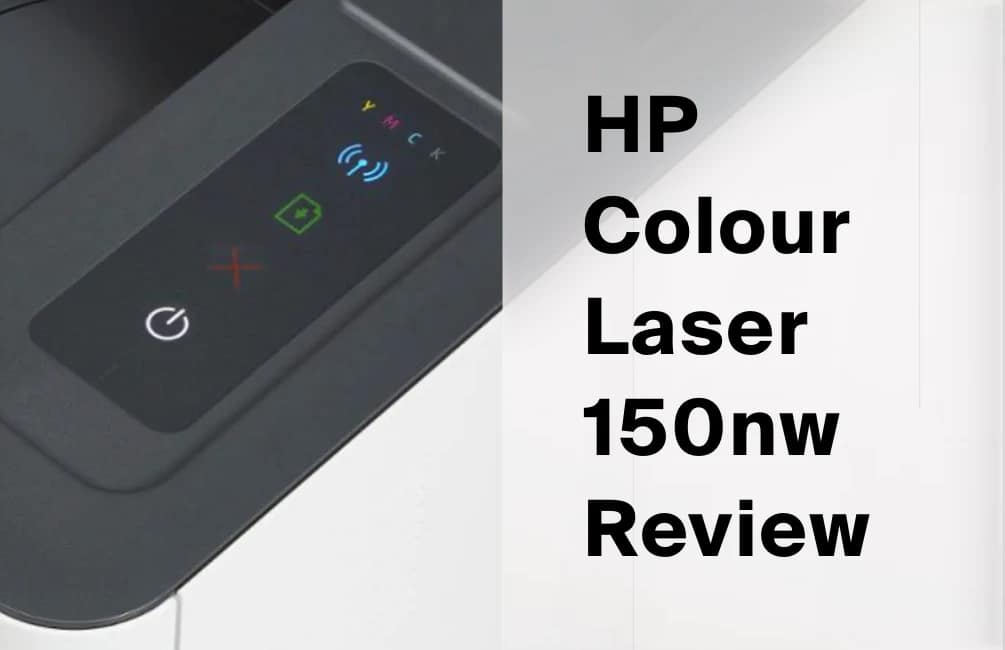
The HP Colour Laser 150nw. Compact, tidy, and now destined for the recycling centre.
What is it?
The HP Colour Laser 150nw is a compact colour laser printer aimed at the home office. On paper, it ticks the boxes. You get Wi-Fi, USB and Ethernet connectivity, plus Apple AirPrint support, all squeezed into a tidy white box that genuinely is one of the smallest colour lasers in its class. Furthermore, HP rates it at 18 pages per minute in mono and 4 in colour, with 600 x 600 dpi output. We paid roughly £130 in a sale; as of May 2026 it still retails new in the UK for around £230 to £250 at Currys and Amazon.
On paper. That phrase is doing a lot of heavy lifting in that sentence.
Because here is the thing about printers. They are not judged on the spec sheet. Instead, they are judged on whether they still work in eighteen months, whether you can get help when they do not, and whether the running costs quietly bankrupt you. On all three counts, this one fell apart, and so our HP Colour Laser 150nw review quickly turned from a routine write-up into a warning.
The brand context
It helps to know where this printer came from. The HP Colour Laser 150 range is not a traditional HP LaserJet at all. Rather, it descends from Samsung's printer division, which HP bought for $1.05 billion back in November 2017. Consequently, the control panel, the firmware and the general feel are noticeably different from the LaserJets older buyers might remember.
That matters, because the design decision that killed our unit sits right there on the control panel. We will come to it shortly. First, though, the experience of actually living with the thing.
First impressions
Initially, things went well. Setup was straightforward, the printer is genuinely small, and it slotted neatly onto a shelf without dominating the room. Moreover, the first prints looked crisp and the colours were pleasant. For the first few months, we had no complaints worth writing down, which is precisely why a printer like this is so frustrating. It lulls you.
Then the problems started arriving, one after another, until the whole thing simply stopped.
What went wrong
This is the case-building section. We have grouped the failures into seven issues, because no single one tells the whole story. Together, however, they paint a clear picture of a product we cannot recommend to anyone.
1. The power button (the fatal flaw)
The 150nw uses a flat membrane button under a plastic sheet, not a physical switch. Ours broke at eleven months. The printer would not turn on. With no way to power it up, a fully working printer became a brick. That is £130 in the recycling for the sake of a button.
2. HP support (the wall)
Trying to get help meant navigating HP's support site, which demands your exact product number, funnels you through endless articles, and never quite lands on a human. We run a website for a living. Even so, we could not get a straight answer or a clear repair route.
3. The return that was not worth attempting
By month eleven we were well past the standard Currys returns window, and the manufacturer warranty is only twelve months anyway. Hauling a dead printer back across town, with no guarantee of a resolution, simply was not worth the petrol or the afternoon.
4. AirPrint errors that lied
AirPrint is listed as a headline feature, and HP officially supports it. In practice, though, it would frequently report a successful print while nothing emerged, or throw an error on a job that then printed anyway. You stop trusting it. HP's own customer reviews echo the same complaint.
5. The ghost print queue
Jobs would vanish into a queue and refuse to clear. Cancelling did nothing. Restarting sometimes helped, until the day restarting was no longer an option because, of course, the power button had broken.
6. Paper feeding issues
On standard paper it was usually fine. On anything slightly textured or recycled, though, jams became common. TechRadar found the same, noting that with more porous recycled paper "things start to look rough around the edges" and jams "become likely".
7. Software updates that never worked
Firmware and driver updates routinely stalled or failed outright. Combined with HP's dynamic security, which periodically updates to block non-HP toner chips, the software experience felt designed to frustrate rather than help.
"A printer that breaks before its first birthday and cannot be returned, repaired, or even complained about is not a product. It is a donation to HP's shareholders."
What actually worked
In fairness, it was not all bad, and a good review should say so. The print quality was genuinely good. Text was sharp, colours were decent, and speed was perfectly acceptable for a home printer. Setup, as mentioned, was straightforward initially. If this were a review of print quality alone, the score would climb considerably.
However, a printer that produces beautiful prints for eleven months and then becomes a doorstop is not a good printer. It is a ticking clock. The quality is real, but it is irrelevant once the hardware bricks itself over a component that should cost pennies to make reliable.
The membrane button problem
Let us explain why this single component matters so much. A membrane button is a flat, printed contact that sits under a plastic overlay. There is no satisfying click and no mechanical rocker. Instead, you press a sheet and hope the contact beneath registers. By contrast, a physical power switch is a moving part with a metal contact, and it tends to outlast the rest of the machine.
For a phone, a membrane control is fine. For an appliance you expect to keep for years, however, it is a genuine weak point. When that flat contact fails, there is no workaround, because there is no separate switch to fall back on. The whole device dies with the button.
Crucially, this is not just our unit having a bad day. HP uses the same flat four-button panel across the Colour Laser 150a, the 150nw, the MFP 178 and 179 series, and the mono Laser 100 range including the 107 and 135. Owners report the identical failure on HP's own support forum, where one thread is bluntly titled "power button in control panel has broken", and on UK help sites describing the 150nw on-off switch giving out. In other words, it looks like a design fault rather than a fluke.
Our new rule is simple. If an appliance does not have a physical power switch, we do not buy it. We expanded on that thinking in our best home printer UK guide, which is where this review sends anyone still shopping.
Should HP still be selling this?
Here is the part that genuinely surprised us. HP has already discontinued the 150nw in the United States; its US store page now simply reads "Discontinued". Yet in the UK the product page is still live, and Currys, Argos and Amazon (via a third-party seller) all continue to stock it new at close to its original price.
So HP has effectively retired the model on its home market while UK buyers can still walk straight into the same mistake we made. Knowing what we now know, we would find it difficult to recommend any HP home laser printer without first checking the power switch design. When even the manufacturer has moved on, that tells you something.
Why this matters now
Printer reliability is having a moment, and not a flattering one for HP. A 2024 Consumer Reports survey of nearly 70,000 printers concluded that Brother's machines "tend to cause fewer problems and keep owners happier in the long run", while HP missed the reliability bar across the models it checked. Separately, HP currently sits at just 1.2 out of 5 on Trustpilot across thousands of reviews, with firmware-driven cartridge blocking a recurring theme.
HP's own data sheet confirms the dynamic security policy in writing, stating the printer "is intended to work only with cartridges that have a new or reused HP chip" and that firmware updates will "block cartridges that previously worked". That practice has already triggered a US class action, Ware v. HP, which received final approval in April 2019 and created a $1.5 million fund for affected owners. None of this is reassuring when you are holding a dead £130 printer.
"We are a tech-literate team that runs a website. If we cannot navigate HP's support system, what chance does a normal person have?"
Value for money
Even setting aside the early death, the economics never made sense. A full set of genuine HP 117A toner costs roughly £170 in the UK, which is more than the printer's launch price and close to what it sells for today. TechRadar put it perfectly in their own review, warning that "a set of replacement toner costs considerably more than a new printer".
So you are buying a machine where the consumables cost more than the hardware, where dynamic security fights you on cheaper alternatives, and where the build quality means it may not survive long enough to use that second set of toner anyway. For comparison, the Brother alternatives we recommend below use cheaper toner and, critically, have a switch you can actually rely on. If you want the full shortlist with running costs, our home printer guide lays it all out.
What we learned
A few lessons came out of this, and they apply well beyond printers. Firstly, always check the power switch design before buying any appliance you want to keep. Secondly, always buy from somewhere with a strong returns policy, because John Lewis includes a minimum two-year guarantee on electricals at no extra cost, whereas Currys typically gives you twelve months unless you pay for extended cover.
Thirdly, be cautious about paying with gift cards if there is any chance you will need to return the item, since refunds and gift-card logistics rarely play nicely together. Finally, and most simply, HP's support infrastructure is not fit for purpose. A £130 printer should last more than a year, and a brand with HP's resources should make it possible to reach them when it does not.
What to buy instead
Time for some good news. Brother is our default recommendation for home laser printers, and for good reasons: reliable hardware, genuinely cheap toner, and proper physical power switches on every model. Here are four we would happily buy ourselves, all available now in the UK. Wherever the same model is stocked at John Lewis, buy it there for the two-year guarantee.
Brother HL-L2400DW — our default pick for most homes. Mono only, but fast, reliable, and toner is cheap. If you do not genuinely need colour, this is the one.
Brother HL-L3220CW — the budget colour option. Wireless, compact, and far better value over time than the HP once you factor in toner.
Brother DCP-L3520CDW — colour printing plus a scanner and copier, with auto-duplex and a small display. Ideal if you want one tidy box that does everything.
Brother HL-L3240CDW — the step-up colour model with Gigabit Ethernet and automatic double-sided printing. The one to get if you print a fair bit.
The verdict
Cool Factor
★☆☆☆☆
1 out of 5 — Do Not Buy
The HP Colour Laser 150nw printed well for eleven months and then became e-waste because of a cheap power button. HP made it nearly impossible to get help. Currys was not worth the trip. The printer is being recycled, and we are not buying HP again any time soon. Buy a Brother.
Overall, this HP Colour Laser 150nw review lands on a 1 out of 5, Lame, and a clear Do Not Buy. The print quality saves it from a hypothetical zero, because the output really was fine. Nothing else about the experience was acceptable, though. A £130 printer that lasts less than a year, from a brand that hides behind an impenetrable support website, is simply not a product we can recommend to anyone. If you are shopping for a home printer, read our guide and buy a Brother instead. Your future self will thank you.
Frequently asked questions
Is the HP Colour Laser 150nw any good?
In our experience, no. The print quality is genuinely good, but the printer failed at eleven months because of a flimsy membrane power button, and HP support was no help. That is why our HP Colour Laser 150nw review scores it 1 out of 5.
What is wrong with the HP Colour Laser 150nw?
The main issue is the flat membrane power button, which has no physical switch to fall back on when it fails. On top of that, we hit unreliable AirPrint, a sticky print queue, paper jams on textured stock, failed software updates, and expensive toner. Several owners report the same power button failure on HP's own forum.
Does the HP Colour Laser 150nw work with AirPrint?
Officially, yes, AirPrint is a supported feature. In practice, though, we found it unreliable, with jobs reporting success while nothing printed, or errors on jobs that printed anyway. HP customer reviews mention similar AirPrint frustrations.
What is the best alternative to the HP Colour Laser 150nw?
We recommend Brother. The Brother HL-L2400DW is our default mono pick, while the HL-L3220CW and HL-L3240CDW are strong colour options. All have proper physical power switches and cheaper toner. Our best home printer UK guide has the full shortlist.
How long does the HP Colour Laser 150nw last?
Ours lasted eleven months before the power button failed. Your mileage may vary, but given the shared membrane button design across the range and the matching failure reports on HP's forum, we would not count on long-term reliability.
Is HP good for home printers?
Based on this experience, we are cautious. A 2024 Consumer Reports survey found Brother more reliable than HP, and HP's dynamic security policy, which can block cheaper toner, adds further friction. We would check the power switch design and the returns policy before buying any HP home laser printer.
More from CoolCuration
- Best Home Printer UK — our full guide to what actually lasts, with Brother picks and running costs.
- Back Market review — where we buy refurbished tech instead of paying full price for new.
- Best refurbished laptops UK — kit out your home office without the premium.
- Parallels Desktop — run Windows apps on a Mac for those one or two stubborn programs.
- Sprive review — the app we use to chip away at our mortgage every month.
Disclosure: this review reflects our own experience and independent opinion. Some links to retailers such as Amazon are affiliate links, which means we may earn a small commission at no extra cost to you. This does not influence our verdict, and we have not been paid by HP or Brother. Affiliate relationships never change our scoring.
What's trending





Recent posts
- Best Audiobooks October 2026: 10 UK Listens Ranked
 Ten new audiobooks for October 2026, from a full-cast Dracula with Jonathan Bailey to Russell T Davies reading his own television memoir.
 - Louis Fratino at David Zwirner ReviewLast updated: 4 October 2026 By Tristan · Arts, exhibitions and creative culture This is an opinion piece. Views expressed are the author's own and do not constitute professional advice. Exhibition reviewMayfair Saunas, subway cars and a lot of skin in Mayfair Louis Fratino at Zwirner is the American painter's first solo show in London,… Read more: Louis Fratino at David Zwirner Review
- What Is a Sprive Boost? Seven Days, and What It Actually PaysA Sprive boost lifts your cashback rate for seven days, and it arrives on its own. What mine paid, and why Supercharge is a display toggle rather than extra cashback.



No Comments.