
Last updated: 22 August 2026
By Stiv · Design, technology and personal finance
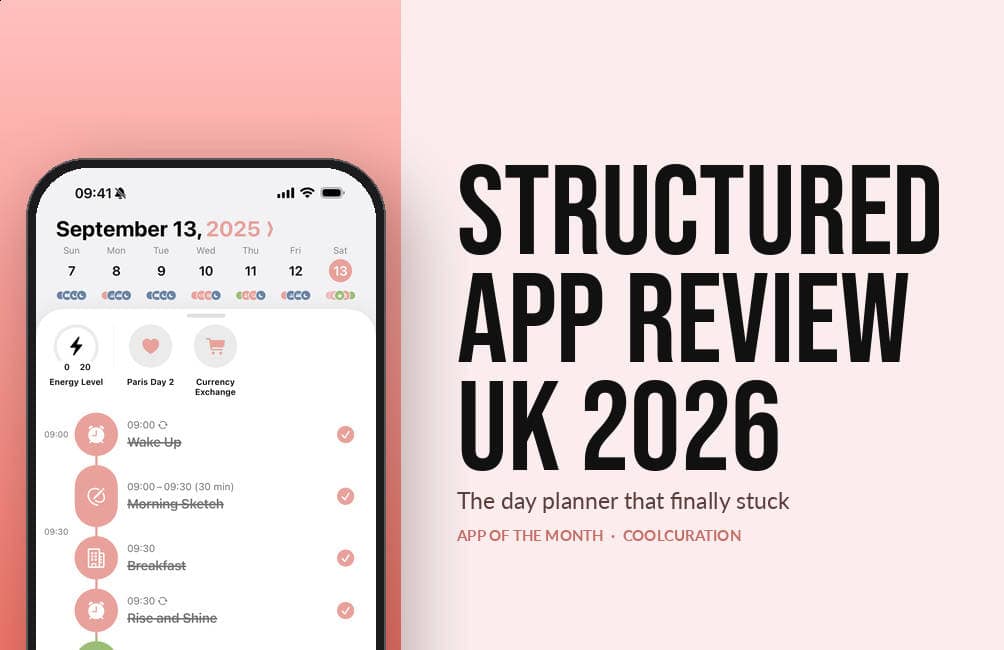
Welcome to our first App of the Month, and to a Structured app review that has been a long time coming. Structured is a daily planner that throws out the tick-box list. Instead it gives you a single vertical timeline. Everything you have to do that day sits on it, in order, at the time you said you would do it. It is free to start. It comes from a ten-person studio in Germany. In June, Apple named it a Design Award finalist for Inclusivity.
This is an opinion piece. Views expressed are the author's own and do not constitute professional advice.
Nobody paid for this. Structured has no referral scheme, so there are no affiliate links anywhere in this Structured app review.
Cool Factor: 4/5
August 2026's pick in my monthly App of the Month series. Every pick so far, with scores and UK prices, is on the App of the Month page.
What is Structured?
Structured is a day planner built around one screen. That screen is a vertical timeline running from morning to night. You drop tasks onto it, give each one a start time and a duration, and the app draws your day as a single column. Calendar events sit on the same line as the washing up, so there is no swapping between apps.
The free version covers the timeline itself, plus an inbox, subtasks, notes, colour coding, hundreds of icons, widgets and notifications. It syncs across iPhone, iPad, Mac and Apple Watch. There is also an Android app, a web app and a Vision Pro build. In other words, the free tier is a real product rather than a demo.
Who makes Structured, and why that matters
Structured comes from unorderly GmbH, a small German studio founded by Leo Mehlig. The press kit puts the team at around ten people plus freelancers. Behind them sit 15 million downloads and roughly 230,000 paying subscribers. That is a serious business run at a small scale, which usually shows in the details.
More unusually, they publish research. The company's research page lists a 2024 preprint on thinking style, personality and productivity. Mehlig co-authored it alongside David Grüning of the GESIS Leibniz Institute for the Social Sciences. Grüning is listed as Science Director, and he works across the Max Planck Institute for Human Development and Stanford. Plenty of productivity apps talk about behavioural science. Very few put their name on a paper. For a Structured app review that matters, because it suggests the design choices come from somewhere.
First impressions
Opening Structured for the first time feels calm. That is not a word you often use about a to-do app. There is no onboarding gauntlet, no ten-screen tour and no immediate paywall. Instead you get today's date, an empty timeline and a plus button.
Adding a task takes about four taps. You type a name, pick a time and choose a length. Then you add an icon and a colour if you want one. Finally it appears on the line. Because everything is time-anchored, the app shows you something a list never can. It shows whether the day you have planned actually fits into the day you have.
The timeline is the whole idea
Almost every good decision in Structured follows from the timeline. Completed tasks strike through and fade. The current moment sits as a marker on the line. Consequently you can see at a glance what you are meant to be doing right now. Gaps between tasks show as real space, so overcommitting becomes obvious before it becomes a problem.
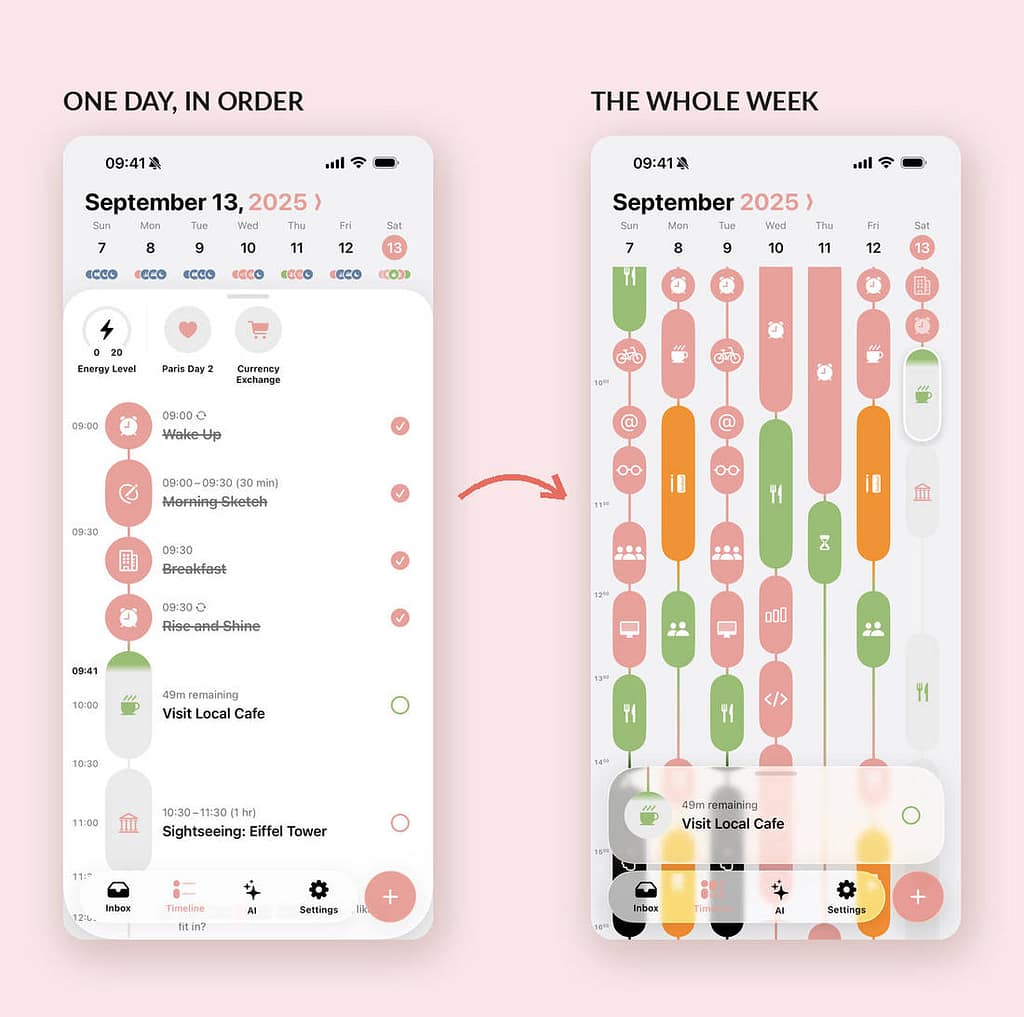
Swipe sideways and you get the week, drawn as seven of those columns side by side. It is a genuinely lovely piece of information design. As a result, you can spot the day that is quietly overloaded without opening anything else.
What you get free, and what Structured Pro costs
Here is where any honest Structured app review has to slow down. The free tier is generous. However, the split is not where you would expect it.
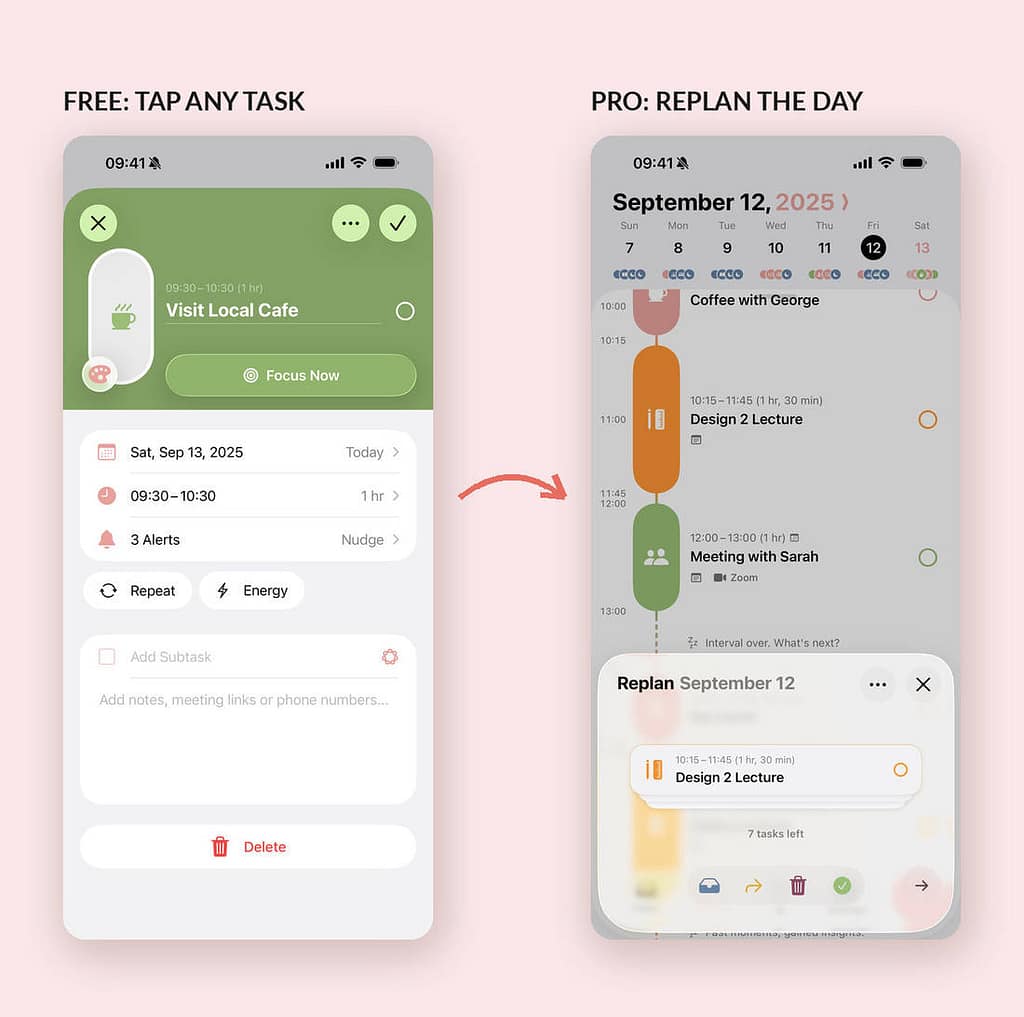
Free gets you the timeline, the inbox, subtasks, notes, icons, colour coding, widgets, the energy monitor and sync. Pro adds calendar and Reminders import, recurring tasks, Replan, custom notifications, a custom colour palette, premium icons and the AI planner. Replan is the standout. When your day slips, it takes what you missed and reshuffles it into the time you have left.
On the UK App Store, the listing shows Structured Pro at £5.99 a month, £17.99 a year or £59.99 once for lifetime access. A couple of cheaper legacy tiers sit on the same listing, at £2.99 monthly and £9.99 yearly. On Google Play in the UK the lifetime unlock is also £59.99. Prices were checked against both live store listings on 22 August 2026.
The Structured AI planner
Structured AI is a Pro feature and sits in its own tab. You type a request in ordinary words. For example, you can ask it to move everything you did not finish today into tomorrow. Then it drafts the schedule for you.
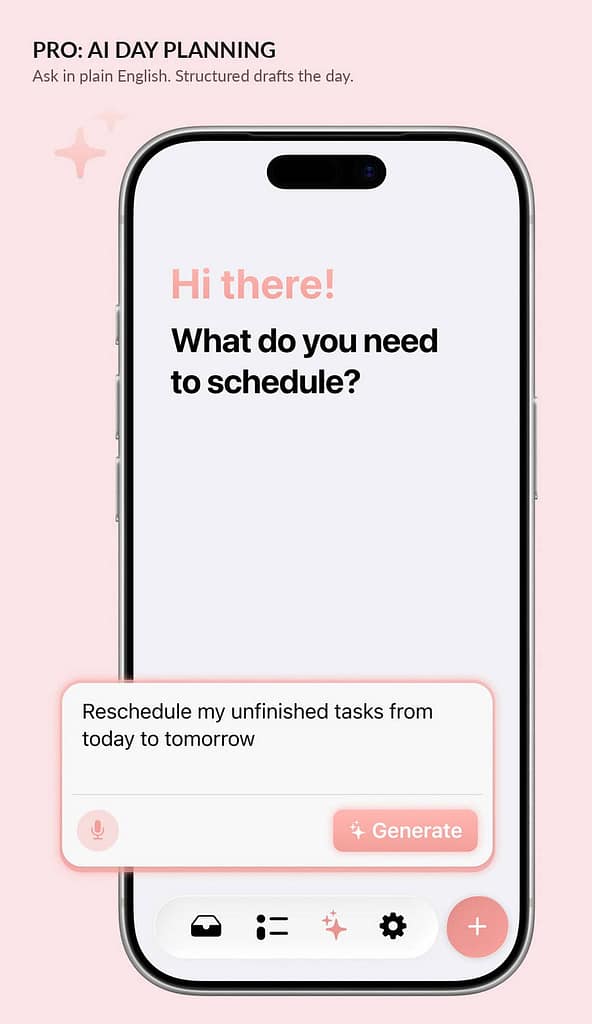
In practice it is useful rather than magical. It is quick at the boring rearranging jobs, and it understands relative dates well. However, it will not warn you that you have booked four hours of deep work into a day with three meetings in it. It shuffles; it does not think. Treat it as a fast pair of hands and you will get on fine.
Accessibility, and the Apple Design Award nod
In June, Apple named Structured a finalist in the Inclusivity category at the 2026 Apple Design Awards. Apple's own citation reads: "Visually sharp and easy to scan, this SwiftUI-built daily planner prioritizes downtime as much as productivity."
That is not marketing fluff. VoiceOver support, Voice Control, Dynamic Type, a dyslexia-friendly font option and more than thirty languages all ship in the free tier. None of it sits behind Pro. The company is also fairly direct about who it builds for. Writing about planning for neurodivergent users, the team put it like this: "It doesn't try to 'fix' how you think. It simply gives shape to your time in a way that feels intuitive for how your brain actually works."
There is also a Structured Scholarship, which hands a free year of Pro to people who cannot afford it. You fill in a form, and you get a code. Small thing, quietly decent.
Honest critical observations
No Structured app review is worth reading if it only lists the good bits. So what stops this being a five? Several things, and none of them are small.
Recurring tasks are behind Pro. This is the one that grates. Routines are the entire pitch, yet a free user cannot repeat a task. A daily planner that cannot handle "every weekday at eight" is doing half the job. Worse, the paywall lands exactly where the habit would have formed.
The pricing is genuinely confusing. The UK App Store listing currently shows two different monthly prices and two different yearly prices, all live at once. Until the paywall loads on your own device, you cannot reliably say what you will be charged. For an app this careful about clarity elsewhere, that is a strange blind spot.
Android is a second-class citizen. Replan, calendar import and duplicate days are iOS only. Meanwhile the Google Play listing offers a lifetime unlock plus a separate £4.99 purchase just for recurring tasks. That is a different shape of product at a similar price. If you are on Android, read the feature list carefully before paying.
The timeline strains on busy days. Stack a dozen fifteen-minute tasks together and the column compresses into an unreadable ribbon of colour. The design is optimised for a day with shape, not a day of back-to-back admin.
Feature spread is creeping in. An energy monitor and a menstrual cycle tracker are both fine ideas in isolation. Still, on a screen whose strength is restraint, every new widget row is a small tax on the thing that made the app good in the first place.
Why a visual day planner matters now
Calendars are good at appointments and terrible at intentions. Task lists are the reverse. Most of us therefore run both, badly, and lose the middle ground where the actual work happens.
Structured's bet is that the middle ground deserves its own surface. Judging by 15 million downloads and a place in the top hundred UK productivity apps, plenty of people agree. The wider shift matters too. In 2026, the interesting productivity apps compete on how little they demand from you, not on how much they can store.
Value for money
At £17.99 a year, Structured Pro undercuts most of its category. Todoist, Things and Fantastical all sit above it, and Things charges separately per platform. The £59.99 lifetime option is the interesting one. It removes the annual decision entirely, and the app has been shipping steadily since 2020.
So here is my honest advice for anyone reading this Structured app review and wondering where to start. Run the free tier for a fortnight. If you find yourself wanting recurring tasks, buy the year. If you are still using it six months later, the lifetime unlock pays for itself against roughly three and a half years of the annual plan.
If you would rather plan on paper without a screen, our reMarkable Paper Pro review covers the other end of that spectrum.
Practical info
Structured is free on the UK App Store and on Google Play. It needs iOS 17 or later. At the time of writing the current build is 4.5.4, updated on 21 August 2026. In the UK it holds 4.8 stars from just under 30,000 ratings.
Sync runs through Structured Cloud, which also powers the web app. Calendar import pulls from your existing iOS calendars and Reminders rather than replacing them, so nothing you already use gets moved. For the factual rundown that sits alongside this Structured app review, see our Structured daily planner guide.
The verdict
Cool Factor: 4/5, Stone cold.
Cool Factor
★★★★☆
4 out of 5
Structured does the hard thing well. It takes a day, makes it visible, and asks almost nothing of you in return. The accessibility work is real rather than decorative. The free tier is properly usable. The week view is the best piece of interface design I have used this year.
Overall, a solid 4/5 Stone cold. This Structured app review would happily have gone to Ice cold on the strength of the timeline alone. Two things hold it back. Recurring tasks sit behind Pro, which paywalls the exact habit the app is trying to build. The Android version quietly does less for similar money. Fix those and it is close to unimprovable. As it stands, download the free version today, and let the app earn the £17.99 rather than the other way round.
Structured app review FAQs
Is the Structured app free?
Yes. The free tier includes the timeline, the inbox, subtasks, notes, colour coding, widgets, notifications and sync across Apple devices. Recurring tasks, calendar import, Replan and the AI planner all require Structured Pro.
How much does Structured Pro cost in the UK?
The UK App Store listing shows £5.99 a month, £17.99 a year and £59.99 for lifetime access. A couple of cheaper legacy tiers are also listed. On Google Play the lifetime unlock is £59.99. Prices were checked on 22 August 2026.
Is Structured good for ADHD?
Many people say so. Apple also named it a 2026 Apple Design Award finalist for Inclusivity, partly on that basis. The visual timeline helps with time blindness, and the accessibility options are in the free tier. That said, this is a planning app rather than a clinical tool, so treat it as a helpful habit rather than treatment.
Does Structured work on Android and Windows?
There is an Android app and a browser-based web app, so Windows users are covered through the web. However, several features including Replan and calendar import are iOS only. The Android experience is therefore thinner.
Is Structured worth it compared with Todoist or Things?
If you think in lists, Todoist still wins. If you think in hours, Structured wins comfortably, and it costs less than both. This Structured app review comes down on the side of the timeline for anyone whose problem is fitting work into a day.
Who should skip the Structured app?
Anyone whose day is mostly unplanned, or who lives in back-to-back meetings, will get less from it. The timeline needs a bit of breathing room to be useful. In that case a plain list app will serve you better, and this Structured app review would point you elsewhere.
More from CoolCuration
- Emma app premium trial - see whether the money app's paid tier earns the upgrade before you commit.
- Mobbin promo code - the design reference library we use to keep an eye on how the best apps actually look.
- Best e-readers UK - if you want a screen that does one thing calmly, start here.
- Gifts for designers - well-made things for the people who notice details like these.
- 1Blocker - a quieter phone in one download, and a neat companion to a calmer planner.
What's trending



Recent posts
- Warm Home Discount 2026/27: Who Gets the £150 and How
 Last updated: 18 October 2026. I checked every date and rule in this Warm Home Discount guide against GOV.UK on 18 October 2026. By Stiv · Design, technology and personal finance Affiliate disclosure: This article contains affiliate and referral links, which are paid links. If you click one and buy or sign up, I earn… Read more: Warm Home Discount 2026/27: Who Gets the £150 and How
 - Five Years of Sprive: What It Actually Did to My MortgageFive years of Sprive on my own mortgage: £10,237.41 overpaid, a remortgage from Nationwide to Halifax, and what the cashback actually added.
- grug App Review UK: Daily Wisdom in Caveman SpeakOctober's App of the Month: grug, the free iPhone app where a caveman writes you one small piece of wisdom every morning, in lettering its makers drew by hand. Winner of Apple's 2026 Design Award for Delight and Fun. Cool Factor 4/5. @grug_app #grug #AppOfTheMonth #AppleDesignAwards #iPhoneApps #AppDesign
No Comments.