
Last updated: 19 April 2026
By Stiv · Design, technology and personal finance
I've been using Sprive with my Nationwide mortgage since October 2021. This guide is based on the actual setup process and over four years of daily use.
If you're trying to figure out how the Sprive app works, you're probably weighing up whether it's worth the setup effort or whether you'll download it and never open it again. This guide covers the mechanics only: what you do in the app, what happens next, and what to check so you don't accidentally trip over your lender's overpayment rules.
What Sprive actually does
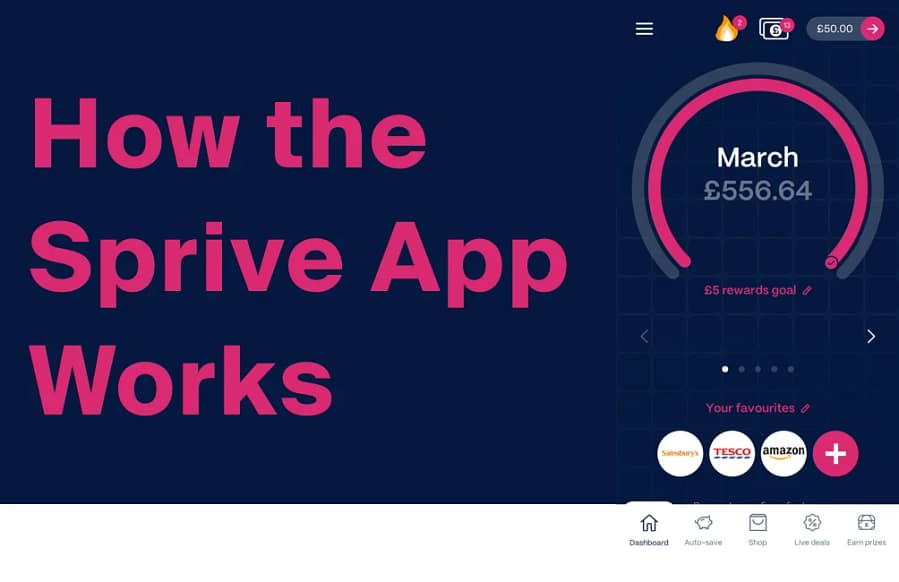
Sprive is a UK mortgage overpayment app. In simple terms, it connects to your bank account via Open Banking, helps you set aside small amounts you can afford, and then routes those amounts towards mortgage overpayments. On top of that, it offers cashback through in-app shopping, which also feeds into your overpayment pot.
The idea is behavioural rather than financial wizardry. Most people intend to overpay their mortgage but forget, get distracted, or do it inconsistently. Sprive turns that good intention into an automated habit. If you want the opinion-based verdict on whether it's actually worth using, that's in our Sprive mortgage app review. This page sticks to the practical "how".
Before you start: two checks that save you hassle
Before downloading anything, confirm these two things with your lender. They're mortgage questions, not app questions, and getting them wrong can cost you.
1. Your overpayment allowance. Most UK mortgages allow overpayments up to a set percentage each year without penalty. However, fixed-rate deals can carry Early Repayment Charges (ERCs) if you exceed your limit. Check what yours is and when it resets.
2. How your lender processes overpayments. Some lenders apply extra payments instantly and clearly. Others take a few days and don't always label them helpfully. Knowing how your lender handles this makes it much easier to confirm that payments have landed correctly.
For a detailed breakdown of allowances, ERCs, and how lenders typically apply overpayments, our Sprive overpayment rules guide covers the lot. And if you want the broader strategy for paying off your mortgage faster (beyond any single app), our how to pay off your mortgage faster hub is the place to start.
How the Sprive app works: step by step
Step 1: Download and create your account
Sprive is available on both iOS and Android. You'll go through a standard onboarding flow, entering your name, email, and some basic details. If you have a Sprive referral code, enter it during sign-up to activate any current bonus.
Step 2: Link your bank account
Sprive uses Open Banking to connect to your current account. This means you authorise access through your bank directly, and Sprive never sees or stores your login credentials. The connection lets the app read your transactions so it can gauge what you can realistically afford to set aside.
You can revoke this access at any time through your bank's connected apps or Open Banking settings. The connection typically expires every 90 days and the app will prompt you to re-authorise when needed. In my experience with Nationwide, the re-authorisation takes about 30 seconds and happens roughly four times a year.
Step 3: Add your mortgage details
Next, you'll connect or manually enter your mortgage information: lender, outstanding balance, monthly payment, and remaining term. This tells Sprive where overpayments should go and lets it generate projections showing how much time and interest you could save.
Sprive currently supports a range of major UK lenders including Nationwide, HSBC, Lloyds, Barclays, Santander, NatWest, Halifax, Virgin Money, Yorkshire Building Society, and TSB, among others. The supported list does grow over time, so it's worth checking in the app if your lender isn't immediately visible.
Step 4: Set your saving level
This is the part that makes Sprive feel different from a standing order. You set a minimum and maximum monthly saving amount, and the app adjusts within that range based on your spending patterns. In a tight month, it sticks closer to the minimum. In a comfortable month, it edges higher.
The point is consistency without suffering. You're not committing to a fixed sum that might cause problems when the boiler breaks or Christmas arrives. Instead, you're building a habit that flexes with real life. I've had mine set at £100 since October 2021 and have barely touched the settings since.
Step 5: Build up your overpayment balance
Once you're set up, Sprive starts setting aside small amounts based on your chosen limits. These accumulate in your Sprive balance (held via an e-money account, not directly in Sprive's own funds). When the balance reaches a level you're happy with, or according to your settings, it can be sent as an overpayment to your lender.
After each overpayment, double-check three things:
- Your lender has confirmed receipt of the payment.
- The payment is showing as an overpayment, not just a generic transfer.
- It's been allocated the way you expect (reducing the term or the monthly payment).
Shop with Sprive: the cashback side
Alongside the overpayment engine, Sprive has an in-app shopping feature. You buy digital gift cards for over 1,000 retailers including Tesco, Amazon, Just Eat, IKEA, Sainsbury's, and dozens of others, and a percentage of each purchase is added to your mortgage pot as cashback.
If you already shop at these retailers, it's a low-effort way to squeeze a bit extra out of spending you'd do anyway. If you never use gift cards, that's fine too. The overpayment side works independently, so you're not missing the core benefit.
For more detail on how the rewards feature stacks up, our Sprive cashback explained page covers how it works and what rates to expect.
Common setup issues and quick fixes
Bank connection keeps needing a refresh
This is a common Open Banking quirk, not a Sprive-specific fault. Connections expire roughly every 90 days. If the app prompts you, re-authorise through your bank. If it keeps dropping, try removing the connection entirely from your bank's connected apps list and reconnecting from scratch.
Overpayment not showing with your lender
Some lenders take a couple of working days to process and allocate overpayments. Before panicking, check the payment status inside Sprive first, then look at your lender's app or latest statement. If it still hasn't appeared after a few days, contact your lender with the transaction reference.
On a fixed rate and worried about ERCs
You can still use Sprive on a fixed-rate mortgage, but you need to stay within your annual overpayment allowance. The app itself doesn't override your lender's rules, so this is something you need to confirm separately. Our Sprive overpayment rules guide explains exactly what to check.
Is Sprive safe?
This page deliberately doesn't go deep on regulation and security. If you want the full trust breakdown, including FCA context, Open Banking protections, how your money is safeguarded, and the difference between safeguarding and FSCS protection, that all lives in our dedicated is Sprive safe guide.
Ready to try it?
If you've read enough to want to give it a go, the current sign-up bonus and step-by-step claiming instructions are kept on one page so they stay accurate:
This article is for informational purposes only and does not constitute financial advice. Always check your mortgage terms, including overpayment limits and early repayment charges, before making changes to your repayment plan.
FAQs
Do I need Sprive to make mortgage overpayments?
No. You can overpay by setting up a standing order directly with your lender. Sprive is useful if you want automation that adjusts to your spending, plus the cashback feature. For people who struggle with consistency, the app adds structure that a manual transfer doesn't. Our Sprive vs manual overpaying comparison covers the trade-off.
Does Sprive work with all UK mortgage lenders?
Not all, but the list covers most major lenders including Nationwide, HSBC, Lloyds, Barclays, Santander, NatWest, Halifax, Virgin Money, Yorkshire Building Society, and TSB. The supported lender list is growing, so check in the app if yours isn't showing yet.
Is Sprive free to use?
The core overpayment features are free. Sprive makes money through mortgage broking commissions when users remortgage through the app, and through retailer commissions on the cashback shopping feature. You don't pay a subscription to use the basic service. For a full breakdown: how does Sprive make money.
How does the Sprive app work with Open Banking?
Sprive connects to your bank using Open Banking, which means it gets read-only access to your transactions with your permission. It never sees your bank login details. You can revoke access at any time through your bank's settings. The connection uses 256-bit encryption and is regulated by the FCA through Sprive's Open Banking provider.
Can I pause or stop overpayments through Sprive?
Yes. You can adjust your saving level, skip a month, or pause entirely whenever you need to. Any money sitting in your Sprive balance can also be withdrawn back to your bank account if your circumstances change.
More from CoolCuration
- Save thousands on your mortgage UK – practical tips that reduce your mortgage interest bill over time.
- Octopus Energy referral guide – switch energy provider and pick up bill credit with minimal effort.
- Chip app – automate your savings without thinking about it, then redirect spare cash to your mortgage.
- Gifts for homebodies – cosy picks for people who'd rather stay in than go out.
- Hive thermostat smart heating – smart heating that can trim your energy bills over time.




No Comments.