
Last updated: 9 June 2026
By Stiv · Design, technology and personal finance
This is an opinion piece. Views expressed are the author's own and do not constitute professional advice.
This article contains affiliate and referral links, which are paid links. If you click one and buy or sign up, I earn a commission or referral bonus at no extra cost to you. Brands don't choose what I feature or what I say about them.
Want to test Emma properly?
Our referral link stretches the standard 7-day trial to a full 30 days on any premium plan.
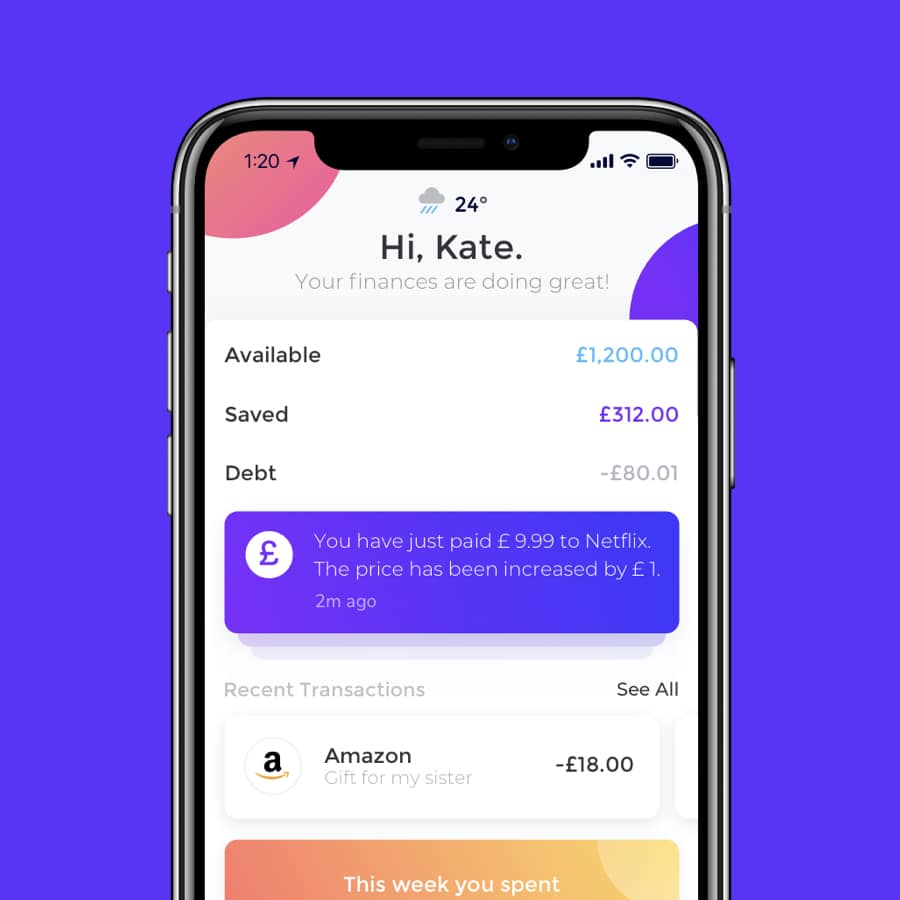
This Emma app review breaks down what the budgeting app actually delivers for UK users in 2026, from the limited free plan to the paid tiers that unlock the features most people will want. Emma connects your bank accounts, credit cards and investments into a single dashboard using Open Banking, and layers on budgeting tools, subscription tracking and spending insights. It is well-designed, useful and impressively well-connected to UK financial services. The main gripes? The pricing is steep for a budgeting app, and the constant nudges to upgrade to the Ultimate plan get old fast.
Cool Factor: 4/5
What is the Emma app?
Emma is a UK-based money management app built by Emma Technologies Ltd, which is registered with the Financial Conduct Authority as an Account Information Service Provider under the Payment Services Regulations 2017 (FRN 794952). Emma Technologies Ltd is also authorised and regulated by the FCA for investment services and consumer credit activities (FRN 1042167). It uses Open Banking to pull together your current accounts, savings, credit cards, investments and crypto balances into one place. The idea is simple: see everything, spot wasteful spending, and stick to a budget.
Emma is also an FCA-authorised broker in its own right, offering investment features including access to international ETFs directly within the app. So it is not just a budgeting overlay; it is a financial services product with its own regulated offerings. When using Emma's investing features, your capital is at risk and the value of investments can go down as well as up. You may get back less than you invest.
It is available on iOS, Android and a web app for paid subscribers. More than 50 UK banks and financial institutions are supported.
First impressions of the Emma app
Setup is quick. You download the app, connect a bank account via Open Banking (read-only access, so Emma cannot move your money), and within a couple of minutes you are looking at a categorised breakdown of your recent transactions. The interface is clean, modern and surprisingly easy to navigate for an app with this many features.
Where first impressions dip is when you realise the free plan only lets you connect two accounts. Most people have more than that, especially if you count a current account, a savings account, a credit card and maybe an investment account. So you hit the paywall fast. And once you are on a paid plan, Emma is relentless about trying to get you onto the Ultimate tier. Upgrade prompts pop up regularly, and while they are not blocking you from doing anything, the frequency is annoying. It is the budgeting app equivalent of a waiter asking if everything is OK with your meal every three minutes.
Using Emma: the detail
Once you get past the upselling, there is a lot to like. The budgeting tools are the standout. You can set monthly budgets by category or even by merchant, and Emma tracks your progress in real time with clear charts and breakdowns. A particularly useful touch is the ability to sync budgets to your payday rather than the calendar month, which makes the numbers feel far more realistic.
Subscription tracking is another strong point. Emma flags all your recurring payments, highlights ones you might have forgotten about, and lets you see at a glance what is draining your account every month. If you are the sort of person who signs up for free trials and forgets to cancel, this alone could save you money.
Bank and app integrations
This is where Emma really earns its keep. The range of financial services it connects to is impressive. You can link accounts from all the major UK banks, including Monzo, Barclays, HSBC, Lloyds, NatWest, Santander, Starling, Revolut, Chase, Halifax, TSB and more. Credit cards from American Express, MBNA and Barclaycard are also supported. On the investment side, Emma integrates with platforms like JPMorgan Personal Investing, meaning you can see your managed investments alongside your bank balances in one dashboard.
It is worth noting that Emma does not directly integrate with self-managed brokers like Freetrade or Trading 212. However, you can create manual accounts within Emma to track those balances yourself. It is not as seamless as an automatic sync, but it means you can still get a full picture of your net worth if you are willing to update the numbers occasionally.
Emma also offers in-app cashback through partner brands, including some of the banks and services you might already use. You activate offers within the app, make your purchase as normal, and the cashback tracks automatically with no codes or extra steps. It will not make you rich, but it is a nice bonus that can offset some of the subscription cost over time.
Emma as a broker
Beyond aggregation, Emma Technologies Ltd (FRN 1042167) is an FCA-authorised broker offering access to a curated range of international ETFs and funds directly within the app. You can invest from as little as £1, though management fees (AUM fees) vary depending on your plan tier: 0.60% on Free, 0.45% on Plus, 0.20% on Pro, and 0.10% on Ultimate. Capital is at risk. The value of investments can go down as well as up, and you may get back less than you invest. ISA and GIA accounts are available. Tax treatment depends on the individual circumstances of each client and may be subject to change in future. Emma's investment feature is best thought of as a handy add-on rather than a replacement for a dedicated brokerage account.
Emma's savings pots
Emma offers its own savings pots (Super Pot, Easy Access Pot and 45-day Notice Pot), which are FSCS-protected via partner banks. Eligible deposits are protected up to £120,000 per eligible person per UK-authorised bank, building society or credit union by the FSCS (since 1 December 2025). Rates vary by plan tier; check emma-app.com for the current figures as these are variable.
Emma app pricing in 2026
Here is what each tier costs if you pay monthly. Prices sourced from emma-app.com/plans/compare-emma-plans.
- Emma Free: £0. Connect up to two bank accounts. Basic budgeting and transaction categorisation.
- Emma Plus: £4.99/month (or £41.99/year, saving around 30%). Adds in-app cashback deals, rent reporting (Experian), fraud detection alerts, up to four bank account connections, priority support and access to the web app.
- Emma Pro: £9.99/month (or £83.99/year). Adds unlimited bank connections, custom categories, net worth tracking and advanced analytics. Rent reporting extends to TransUnion, Experian and Equifax.
- Emma Ultimate: £14.99/month (or £124.99/year). Adds Spaces for business and joint account management, lower AUM fees on investments (0.10%), higher savings pot rates, a free VPN and the option to add family members at £5.99/month each (up to four people).
All paid plans include a 7-day free trial as standard, extended to 30 days if you sign up via a referral link.
Try Emma with a 30-day free trialEmma app review: value for money
This is where it gets tricky. The free plan is fine for a quick look at your spending, but with only two connected accounts, it is more of a taster than a tool. Most people who stick with Emma will end up on Pro at £9.99/month, which works out at nearly £120 a year for a budgeting app.
Is that worth it? If you are someone who struggles to keep track of multiple accounts and subscriptions, and you would otherwise be overspending or missing payments, it could pay for itself quickly. The cashback offers help soften the cost too, especially if you are already using banks like Chase or Monzo that appear in Emma's partner network.
The frustration is the constant push to upgrade. If you are on Plus, you will be nudged towards Pro. If you are on Pro, you will get regular prompts about Ultimate. It feels at odds with an app that is supposed to be helping you spend less. Emma clearly wants you on the highest tier, and it lets you know about it more often than it needs to.
For comparison, alternatives like Snoop offer similar core budgeting features with a cheaper premium tier, and apps like Chip focus more on automated saving. Several UK banks now offer much better in-app budgeting than they did a few years ago too, which narrows Emma's edge if you are only banking with one provider.
The verdict
Cool Factor
★★★★☆
4 out of 5
Emma is one of the strongest budgeting apps available in the UK right now. The spending insights are helpful, the subscription tracking can save you real money, and the breadth of bank and financial service integrations is hard to beat. Connecting everything from your Chase account to your JPMorgan investments in a single dashboard is properly useful, and the budgeting tools are among the most flexible you will find.
Overall, a solid 4/5. Emma earned it with a polished app, strong financial integrations and budgeting tools that help you manage your money better. It did not quite reach the top score because the pricing is steep for what is essentially a budgeting tool, and the relentless upgrade prompts undermine the otherwise excellent user experience. If Emma dialled back the upselling and made the free plan more usable, this would be a 5. As it stands, it is well worth trying, especially with the 30-day free trial, but go in with your eyes open about the subscription costs.
If you want to try Emma with an extended trial, you can get 30 days free (instead of the usual 7) via our Emma referral page.
This is not financial advice. Emma's plans, pricing and features may change. Always check the Emma website for current terms before subscribing. If you are unsure what is right for your circumstances, consider speaking to a qualified financial adviser. This article contains affiliate or referral links, as disclosed above; CoolCuration may earn a referral reward at no extra cost to you.
Frequently asked questions about the Emma app
Is the Emma app free?
Emma has a free plan, but it only lets you connect two accounts. Most useful features, including advanced budgeting, net worth tracking and cashback, require a paid subscription starting at £4.99/month for Emma Plus.
Is the Emma app safe to use in the UK?
Yes. Emma Technologies Ltd is registered with the Financial Conduct Authority (FRN 794952 for Open Banking / payment services; FRN 1042167 for investment services and consumer credit) and uses Open Banking with read-only access, meaning it can view your transactions but cannot move your money. Data is protected with TLS 256-bit encryption.
How does the Emma 30-day free trial work?
The standard free trial is 7 days. If you sign up via a referral link, this extends to 30 days on any premium plan. You can cancel before the trial ends to avoid being charged.
Does Emma work with Freetrade or Trading 212?
Emma does not directly integrate with self-managed brokers like Freetrade or Trading 212. However, you can create manual accounts within Emma to track those balances yourself and include them in your net worth calculation.
Does Emma connect to Chase and JPMorgan?
Yes. Emma integrates with Chase UK and JPMorgan Personal Investing, so you can view those balances alongside your other accounts in one dashboard.
Is Emma better than Monzo for budgeting?
Monzo's budgeting works within your Monzo account only. Emma pulls in accounts from across multiple banks, giving you a broader view. If you only bank with Monzo, its built-in tools may be enough. If you have accounts spread across several providers, Emma offers a more complete picture.
Can I invest through the Emma app?
Yes. Emma Technologies Ltd (FRN 1042167) is an FCA-authorised broker and offers access to a curated range of international ETFs. You can invest from £1, though management fees vary by plan (0.60% on Free down to 0.10% on Ultimate). Capital is at risk. The value of investments can go down as well as up, and you may get back less than you invest. For a wider selection, dedicated investment apps may suit you better.
Does Emma offer cashback?
Yes. Paid plans include in-app cashback through partner brands. You activate offers within the app and the cashback tracks automatically when you make qualifying purchases. No codes needed.
More from CoolCuration
- Best cashback apps UK: stack cashback alongside your budgeting with these tried-and-tested reward apps.
- Zopa Biscuit vs Chase: an interest-and-cashback current account compared with Chase's cashback and boost features.
- Oura Ring 4: track sleep, activity and recovery from a ring that looks better than any fitness band.
- Honest Mobile: a carbon-neutral mobile network that plants trees with every plan.
- How to cut household bills: practical tips for trimming your outgoings across energy, broadband, insurance and more.
What's trending





Recent posts
- iPhone Duo Pre-Order UK: Price, Timing and Whether to Bother
 The iPhone Duo pre-order opens at 1pm UK time on 16 October. Every UK price, the case and folio, trade-in values, the eSIM catch and who should skip it.
 - Best Desk Accessories UK 2026: 10 Picks From My DeskLast updated: 5 October 2026. I checked every price in this best desk accessories UK guide at the shop each button points to that day. By Stiv · Design, technology and personal finance Affiliate disclosure: This article contains affiliate and referral links, which are paid links. If you click one and buy or sign up,… Read more: Best Desk Accessories UK 2026: 10 Picks From My Desk
- Freelands Painting Prize 2026 Review: Twelve New Painters, One DisagreementTwelve new UK painters, free near the Barbican until 31 October. We gave the Freelands Painting Prize 2026 a 4/5, and our favourite wasn't the winner.

No Comments.