
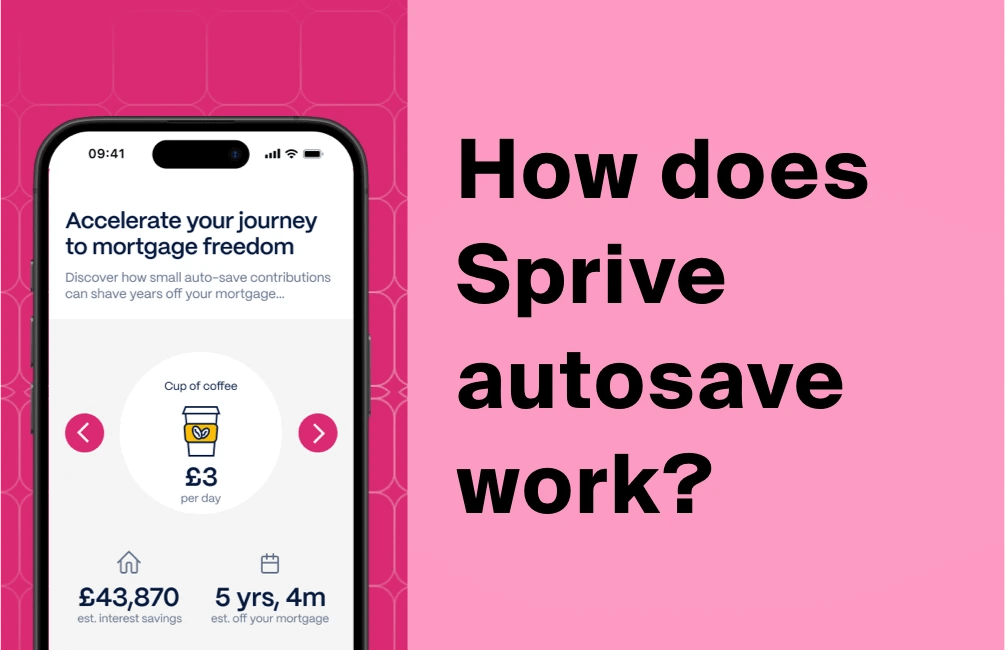
How Sprive AutoSave decides what to move each month
Last updated: 13 October 2026
By Stiv · Design, technology and personal finance
I have overpaid my mortgage through Sprive since October 2021, with Nationwide and now Halifax, making regular overpayments through the app. Because of that, this guide to Sprive AutoSave comes from steady real use rather than a quick demo.
This article contains affiliate and referral links, which are paid links. If you click one and buy or sign up, I earn a commission or referral bonus at no extra cost to you. Brands don't choose what I feature or what I say about them.
This is general information, not financial advice. Sprive deals with your mortgage, so your circumstances matter and it is worth doing your own research.
So what actually happens when you switch on Sprive AutoSave? In short, you set an amount, and each month it quietly moves that money into a holding pot inside the app, ready for your mortgage. Above all, you stay in control, because nothing reaches your lender until you tap to send it. Below, I walk through exactly how Sprive AutoSave works, where the money sits, and how to pause or switch it off, with notes from my own use since 2021.
Setting up AutoSave? The walkthrough is below. For every Sprive guide in one place, see our Sprive guides hub, updated as the app changes.
Want the Sprive sign-up bonus?
The current Sprive offer, and the steps to claim it, are kept up to date on our referral page.
The basics
What is Sprive AutoSave?
It is the hands-off setting that builds your mortgage overpayment for you, a little at a time.
Sprive is a free app that helps you overpay your mortgage and clear it sooner. AutoSave is the feature that does the saving part automatically. Instead of remembering to move money each month, you let Sprive set a sum aside on your behalf. Then, when you are ready, you send it to your lender in one tap.
Importantly, Sprive AutoSave is not a savings account and it is not an investment. Rather, it is a staging post. Money lands in your Sprive account, waits there, and only moves to your mortgage when you choose. If you want the whole-app picture instead of just this feature, our guide to how the Sprive app works covers the rest.
The connection
How AutoSave uses open banking
Open banking is the quiet bit of plumbing that makes the whole thing tick.
When you set up Sprive, you link a current account using open banking. To be clear, Sprive never gets your bank login, and it cannot move money out of your account on a whim. Instead, the connection does three practical jobs: first, it confirms you are a real UK account holder; second, it checks you have enough in the account before each Direct Debit; and third, it lets you make those one-tap payments to your lender.
Open banking is regulated and widely used, so the same technology sits behind apps like Chip, Plum and Emma. If you want the official background, the FCA's guidance on payment service providers is a sensible place to start.
The amount
How the AutoSave amount is set
In my experience it is refreshingly simple: you set an amount, and it moves that amount.
Here is how it actually works for me. You set the sum you want to put aside, and Sprive moves that same amount each month. There is no spending analysis that I can see, and no clever sliding figure. In short, it behaves like a simple standing overpayment rule that you control, which is honestly the thing I like most about it.
To be straight with you, Sprive's own setup guide does describe an automatic algorithm that flexes the amount between a minimum and a maximum, based on your spending. In my own use since 2021, though, I have not seen that happen. For me it has always moved the fixed amount I set, with Sprive's £25 minimum as the floor.
| Setting | What it means |
|---|---|
| Your amount | You set the sum you want to put aside. Sprive applies a £25 minimum. |
| The collection | Sprive takes it by Direct Debit into your Sprive account, covered by the Direct Debit Guarantee. |
| How often | Once a month. In my experience it lands within the first week. |
| Changing it | You can change the amount almost any time, or pause it from the AutoSave tab. |
| Your move | You then tap to send it to your mortgage, or withdraw it back to your bank. |
A couple of quirks from real use are worth flagging. You cannot pick the exact day it goes, and you cannot change the frequency. Mine has run every month since 2021, but a quick look at the app each month confirms the payment went out.
The holding pot
Where your AutoSave money sits
Before it reaches your lender, the money waits in an e-money account in your name.
Here is the bit that matters most for trust. The money AutoSave sets aside is held in your Sprive account as electronic money. Sprive uses an e-money issuer, PrePay Technologies Limited, to safeguard it. In practice, safeguarding means your cash is kept separate from the money used to run Sprive, and it is never invested or loaned out.
The payoff
How AutoSave money goes towards your mortgage
This is the step people often get wrong: AutoSave saves, but it does not pay your lender on its own.
So once the money is in your Sprive account, nothing is automatic. You open the app and tap to send the overpayment to your lender. In my case that lender was Nationwide and is now Halifax, and the payment lands as a normal overpayment. Because you control the button, you can also change your mind. If something comes up, you withdraw the money back to your current account instead, with no fuss and no penalty from Sprive. One caveat: money earned from shopping rewards can only go to your mortgage, not back to your bank.
Two things are worth saying clearly here. First, overpaying does not lower your contractual monthly payment unless your lender re-amortises the loan, so you usually keep paying the same direct debit while the term shrinks. Second, most lenders cap penalty-free overpayments at around 10% of the balance a year, so check your own deal. To see the impact in pounds, our mortgage overpayment calculator shows what a regular AutoSave overpayment could shave off your term and interest. Our guide to Sprive overpayment rules then goes deeper on limits and timing.
AutoSave is the bit that finally made overpaying a habit instead of a chore.
Staying in control
How to pause, change or turn off Sprive AutoSave
You are never locked in, and changing your mind is meant to be easy.
Flexibility is the whole point, so Sprive keeps the controls simple. You can change the amount almost whenever you like, which adjusts what moves the following month. In my experience, you can also pause AutoSave straight from the AutoSave tab, which is the quick way to stop it for a while without closing anything down. If instead you want to stop saving altogether, you cancel the Direct Debit. Sprive's own steps for that are Menu, then Settings, then Close Account, then Cancel Direct Debit. After that, any money already sitting in your Sprive account stays yours to withdraw or send to your lender.
One useful habit, in my experience, is to keep an emergency buffer in your current account rather than setting the amount too high. AutoSave moves real money on a fixed monthly schedule, so an ambitious figure in a tight month can sting. Therefore I treat the amount as a comfortable commitment, not a stretch target.
Trust and safety
Is Sprive AutoSave safe?
The regulation is real, but it is worth knowing exactly what is and is not protected.
On the regulatory side, Sprive Limited is an appointed representative of Connect IFA Ltd (FRN 441505) and New Leaf Distribution Limited (FRN 460421) for mortgage services, and its own Financial Services Register number is 919863. The money in your Sprive account is safeguarded by PrePay Technologies Limited (FRN 900010), an FCA-authorised e-money institution. As covered above, safeguarded does not mean FSCS-protected, and Sprive says so itself.
For balance, the honest limitation is this: AutoSave hands a small, recurring decision to software. So the safety question is less about Sprive vanishing and more about whether the amount suits your month. For a wider look at the app's security and protections, see our piece on whether Sprive is safe. And to be clear, CoolCuration is not authorised by the FCA and does not give personalised financial advice.
The bigger picture
AutoSave versus other uses of spare cash
Overpaying is one good option among several, not the only answer.
Before you funnel every spare pound into your mortgage, it is worth weighing the alternatives. MoneyHelper, the government-backed money guidance service, suggests clearing pricier debts first, keeping at least three months of expenses in reserve, and checking whether pension contributions or savings might beat your mortgage rate. Their guide on whether to pay off your mortgage early lays this out well. We dig into the same trade-off in our post on whether to overpay your mortgage or invest.
For me, AutoSave wins on consistency rather than maths. It turns a vague intention into a small monthly habit. Still, that only helps if the rest of your finances are in order first, which is exactly what the guidance above is getting at.
Sprive AutoSave FAQs
What is Sprive AutoSave?
It is Sprive's automatic saving feature. In short, you set an amount, and each month it moves that money aside into your Sprive account and holds it there until you tap to send it to your mortgage. So it does the saving for you, while you keep the final say on the overpayment.
Is Sprive AutoSave safe?
The money is held as safeguarded e-money by PrePay Technologies Limited, kept separate from Sprive's own funds and never invested or loaned out. However, safeguarding is not FSCS protection, so it differs from a bank account. Sprive itself is regulated for mortgage services as an appointed representative of Connect IFA Ltd and New Leaf Distribution Limited (FRN 460421).
How does Sprive decide how much to save?
In my experience, you decide. You set the amount you want to put aside, and Sprive moves that each month, with a £25 minimum as the floor. Sprive's setup guide does mention an automatic algorithm that flexes the figure based on your spending, but I have not seen that on my account, so for me it works like a simple amount I set.
Can I turn AutoSave off?
Yes, easily. You can change the amount almost any time, and in my experience you can pause AutoSave from the AutoSave tab in the app. To stop it entirely, cancel the Direct Debit through Menu, Settings, Close Account, then Cancel Direct Debit. Afterwards, any money already in your Sprive account remains yours to withdraw or pay to your lender.
Where does AutoSave money go?
First it goes into your Sprive account as e-money. From there, you either tap to send it to your mortgage lender as an overpayment, or withdraw it back to your current account if you need it. Shopping rewards, though, can only be paid towards your mortgage.
Bottom line and disclaimer: Rates, app features and offer terms can change, so always check the latest details in the Sprive app and on Sprive's own pages before acting. This article is general information and personal experience, not financial advice, and for a decision this size you may want to speak to a qualified mortgage adviser. CoolCuration is not authorised by the Financial Conduct Authority. This article also contains affiliate and referral links, which are paid links. If you click one and buy or sign up, I earn a commission or referral bonus at no extra cost to you. Brands don't choose what I feature or what I say about them. Your home may be repossessed if you do not keep up repayments on your mortgage.
More from CoolCuration
- Sprive vs manual overpaying: see how AutoSave stacks up against moving the money yourself.
- Mortgage overpayment UK: the overpayment rules and every mortgage guide in one list.
- Chip app: another open banking app that quietly auto-saves in the background.
- New home gift guide: just moved in? Cosy, useful picks for the new place.
- Google Nest Learning Thermostat: trim energy bills so there is more spare for overpayments.
What's trending





Recent posts
- iPhone Duo Pre-Order UK: Price, Timing and Whether to Bother
 The iPhone Duo pre-order opens at 1pm UK time on 16 October. Every UK price, the case and folio, trade-in values, the eSIM catch and who should skip it.
 - Best Desk Accessories UK 2026: 10 Picks From My DeskLast updated: 5 October 2026. I checked every price in this best desk accessories UK guide at the shop each button points to that day. By Stiv · Design, technology and personal finance Affiliate disclosure: This article contains affiliate and referral links, which are paid links. If you click one and buy or sign up,… Read more: Best Desk Accessories UK 2026: 10 Picks From My Desk
- Freelands Painting Prize 2026 Review: Twelve New Painters, One DisagreementTwelve new UK painters, free near the Barbican until 31 October. We gave the Freelands Painting Prize 2026 a 4/5, and our favourite wasn't the winner.



No Comments.