

Last updated: 5 October 2026. I checked every price in this best desk accessories UK guide at the shop each button points to that day.
These are the best desk accessories UK shops sell for someone who works at the same desk every day through the winter. Eight of the ten are also on my own desk, from the lamp and the screen riser to the smart plugs that switch the whole lot on at 7:30 on a weekday morning. The other two, a fountain pen and a small patterned tray, are picks I have researched rather than used.
Altogether, the picks run from £13.99 for a smart plug to £1,499 for a screen.
Section 01 / The argument
What earns a place on a desk you use every day
Light, screen height and the two things your hands touch all day.
The clocks go back on 25 October 2026, and from then on most working days finish in the dark. So the first thing a winter desk needs is a lamp that puts light on the page, rather than a ceiling light behind you that throws your shadow across it.
After that, the Health and Safety Executive's guidance on display screen posture sets out three positions. The top of the screen should sit level with your eyes, about an arm's length away. Meanwhile, the keyboard goes just below elbow height, and the mouse sits in line with your elbow. As a result, most of the picks below exist to get one of those three right.
After that, everything else has to earn its space by doing a job. In practice, that means a tray that holds the things you would otherwise lose, and a way to switch the whole desk off at night. That test rules out plenty of what gets sold as desk kit, so my list of the best desk accessories UK shops sell ends with three things I would not buy.
At a glanceThe best desk accessories UK buyers can get, at a glance
Section 02 / Light
A lamp that lights the page, not the room
A task lamp lights what you are working on, where a ceiling light lights the room.
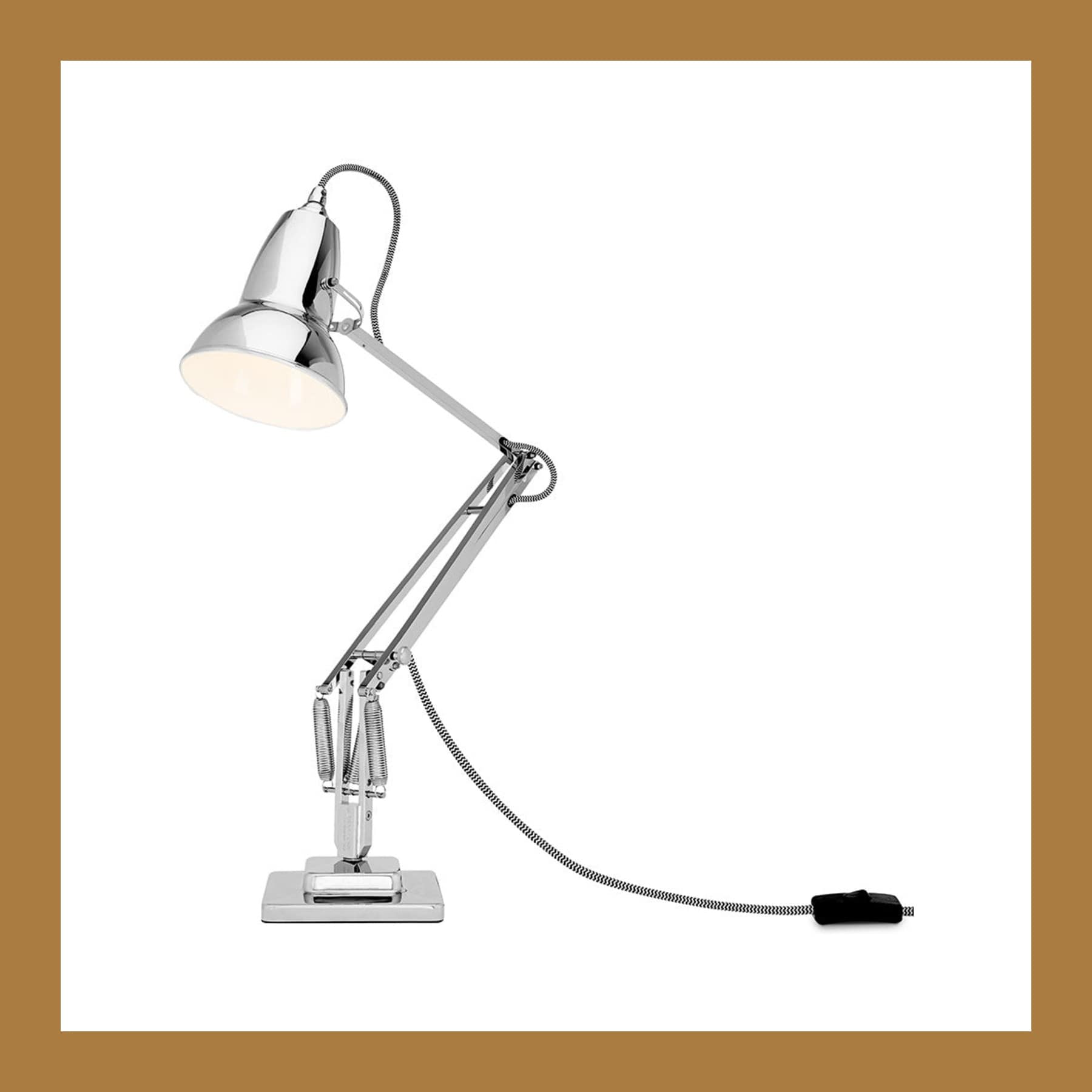
Anglepoise Original 1227
For anyone working under one ceiling light that puts their own shadow on the keyboard.
An Anglepoise is also the lamp on my desk. Three springs hold the arm, so you push the shade where you want the light and let go, and it stays there. On the full-size lamp, that reach is about 90cm from the base, so it covers a whole desk. George Carwardine designed it in 1935, and the V&A holds a 1938 example with the same 15 by 15cm base that Anglepoise sells today.
Buy Me Once sells the Bright Chrome version at £249 and the Mini from £189. Anglepoise itself sells the painted full-size colours, such as Jet Black and Dove Grey, at £219. For the details, my Anglepoise Original 1227 page has every size and the bulb each one takes.
The price and the Mini. Even so, £219 to £259 is a lot for a desk lamp. The Mini saves money, but its arm reaches 72cm rather than 90cm and it takes a smaller E14 bulb. For £50, the MADE x Barbican Curve lamp tilts its shade but stays put on the desk.
£249 at Buy Me Once
Section 03 / Screen
The screen, and how high it sits
The top of the screen should be level with your eyes, and a stand that only tilts may not get it there.

Apple Studio Display
For a Mac user who wants one cable from the laptop to the screen, the camera and the speakers.
Mine is the 2026 Studio Display with standard glass and the tilt-adjustable stand. Specifically, Apple lists it as a 27-inch 5K screen at 218 pixels per inch and 600 nits, with a 12MP Center Stage camera, six speakers and Thunderbolt 5 ports. Because the camera and speakers are built in, nothing else sits on top of it for calls. You can also read the full list on Apple's Studio Display specifications page.
The tilt-only stand. The standard stand tilts but does not go up or down. By contrast, Apple's tilt- and height-adjustable stand costs £400 more, at £1,899. You also choose the stand, or Apple's VESA mount adapter for an arm, when you order. Instead, mine sits on the £22.99 riser below to get the extra height. Also, it refreshes at 60Hz, so it is not a screen for fast games. Finally, if you want Apple's bigger, pricier option, my Studio Display XDR review covers it.
£1,499 at Amazon UK, the same as Apple
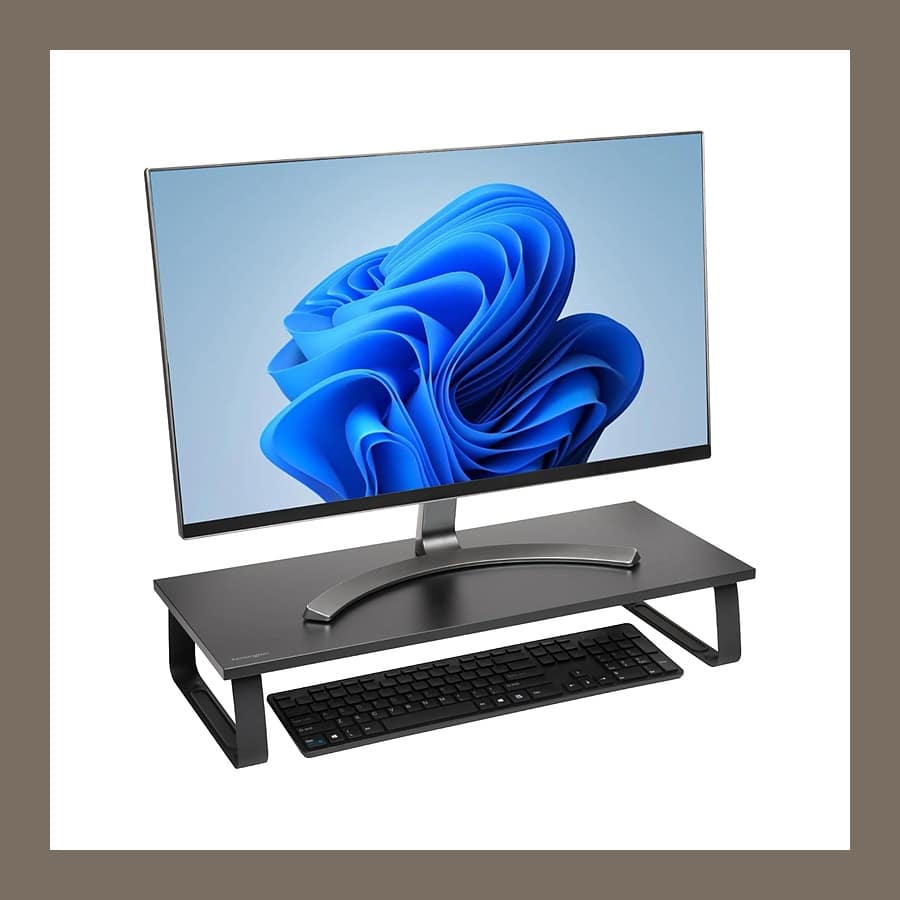
Kensington Extra Wide Monitor Stand
For anyone whose screen came on a stand that does not go up.
That standard Studio Display sits on this riser. It is a 60cm platform on steel legs that takes screens up to 32 inches and 20kg. Better still, it needs no tools to put together. Underneath there is 508mm of clear width, so a keyboard slides under it at the end of the day.
The Kensington logo. The logo on the front edge annoys me, because it is the only branding on an otherwise plain desk. The lift is also fixed. Before you buy one, therefore, measure from your desk to your eye line and check it gets the top of your screen there.
£22.99 at Amazon UK
Apple charges £400 more for a Studio Display stand that goes up and down. Mine sits on a £22.99 riser instead.
Section 04 / Typing and pointing
The two things your hands touch all day
A keyboard just below elbow height, and a mouse in line with your elbow.
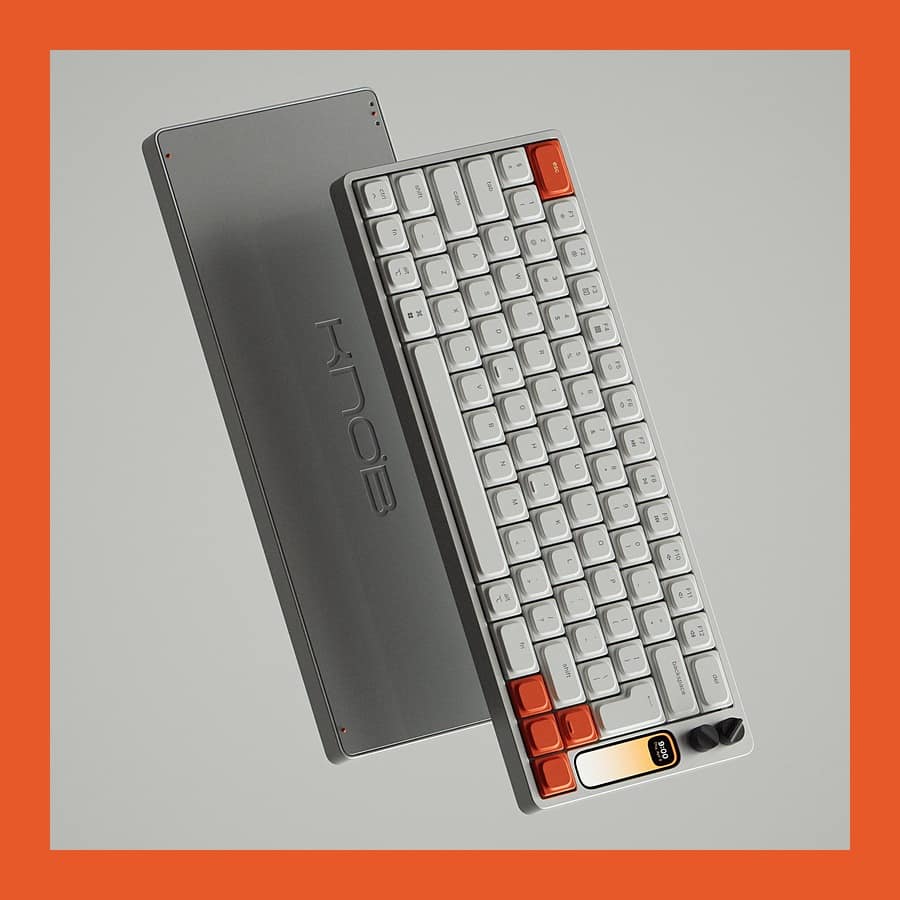
Work Louder Knob1
For a designer or developer who wants the keyboard to look as good as the rest of the desk.
At the moment, the Knob1 is my daily keyboard. In short, it is a low-profile mechanical board in machined aluminium, with quiet 55g linear switches you can pull and swap. Then, on the right, there is a narrow colour screen with two dials above it, which I use for volume and for scrubbing through video timelines. Overall, my Work Louder Knob1 review gives it 4/5. Next to it, meanwhile, sits a Figma Creator Micro, which I rate lower, and my Figma Creator Micro review explains why.
The price, the import and the battery. Work Louder sells it for $439 before shipping, and it is not on Amazon UK, so I imported mine. Goods over £135 sent from abroad also carry VAT payable to the delivery company. Its 3000mAh battery is sealed inside, so the battery's life caps the keyboard's.
$439 direct from Work Louder
For a keyboard you can buy here today, the Logitech MX Keys S is £99.98 on Amazon UK. It is backlit and has quiet low-profile keys, and it also switches between three devices. However, it is full-size with a number pad, which pushes the mouse further from your elbow.
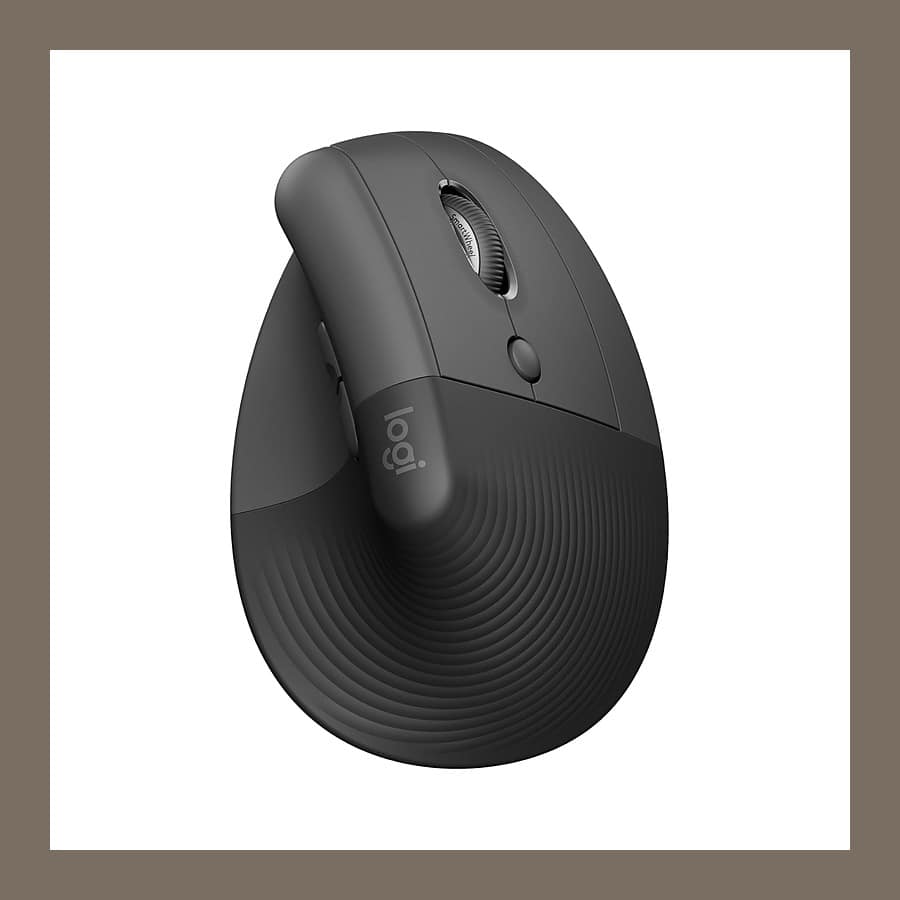
Logitech Lift vertical mouse
For anyone who spends the day with their palm flat on a mouse.
Similarly, the Logitech Lift is the mouse I use every day. It stands at 57 degrees, so you hold it the way you would shake someone's hand, rather than with your palm turned flat to the desk. In addition, the clicks are quiet, and it connects over Bluetooth or Logitech's own USB receiver. Logitech also makes a left-handed version.
The hand size. However, Logitech designs the Lift for small to medium hands. So if yours are large, it will feel cramped, and the bigger Logitech MX Vertical is the one to look at.
£38.99 at Amazon UK
Section 05 / Writing and small things
A pen, paper and somewhere to put them
Two picks I have researched rather than used, both from small makers.
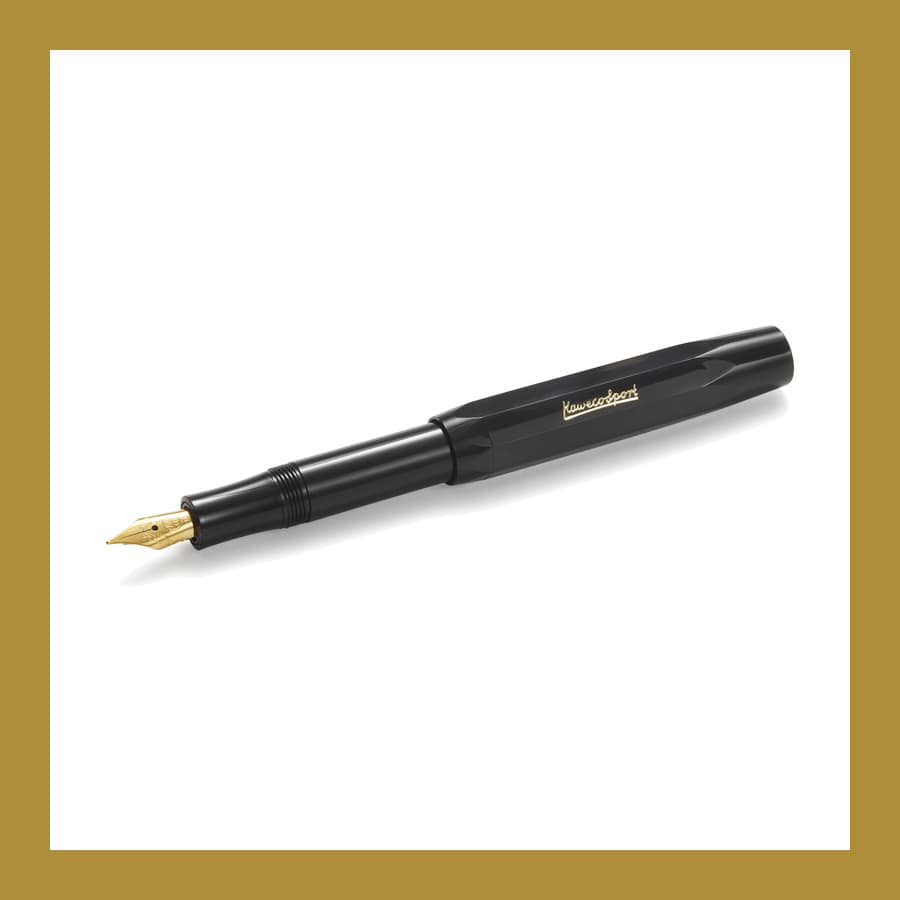
Kaweco Classic Sport and a Mark+Fold notebook
For someone who still thinks better on paper than on a screen.
The Kaweco Classic Sport is 10.5cm long with the cap on, and about 13cm once you push the cap onto the back. Its barrel is eight-sided, so it does not roll off the desk, and it weighs 10.7g. For example, Choosing Keeping sells the black one in medium or fine at £27. Meanwhile, my Kaweco Classic Sport page covers the nibs and the history.
For paper, the Mark+Fold Glow notebook is £32 direct from the British maker. It is A5, the size of half a sheet of A4, with 128 plain pages. The 120gsm paper is also heavy enough for fountain pen ink. The binding is sewn, so it lies flat from the first page, and a neon orange band runs down the middle of every spread.
The plain pages. The Glow has no lines or dots, which suits sketching but not anyone who needs ruled pages. It is also a limited edition, so it will not stay in stock for ever.
£27 at Choosing Keeping, £32 at Mark+Fold
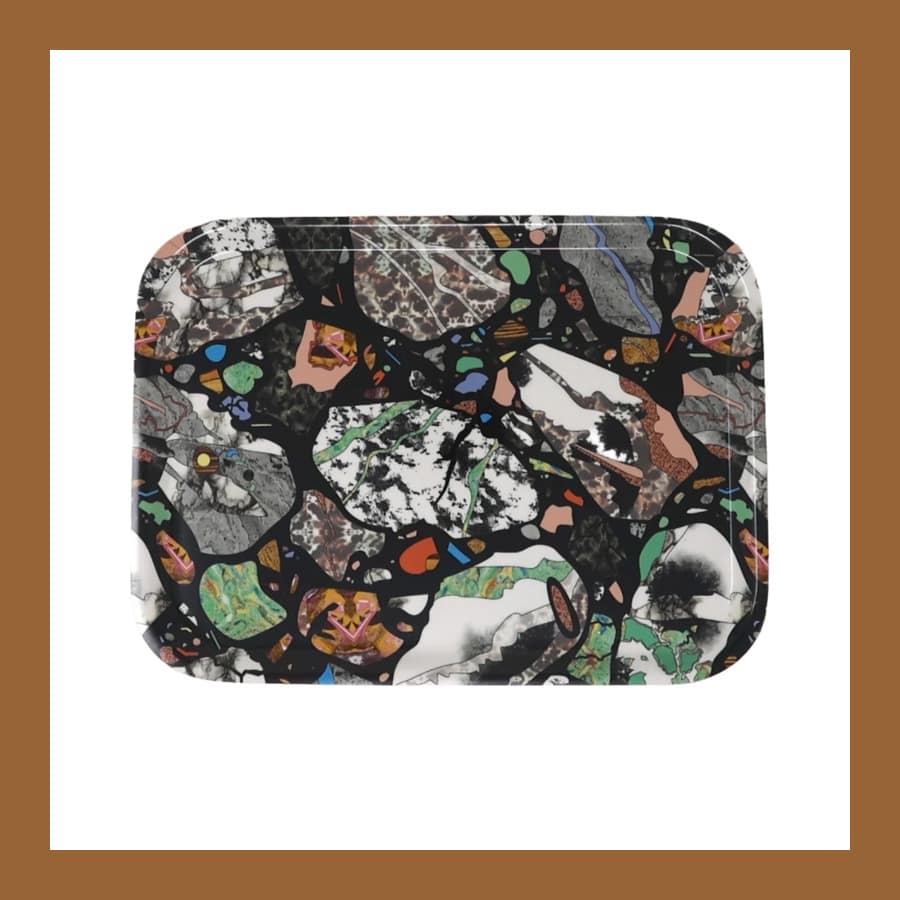
Design Museum x Bethan Laura Wood tray
For the small things that otherwise end up under a pile of paper.
This is a glazed wooden tray, 18 by 12cm, made in Sweden and printed with Bethan Laura Wood's 'Seamless' pattern. In fact, she drew it from Venetian terrazzo floors during a residency in Venice. Today her work is in the V&A and SFMOMA, and the Design Museum Shop is the only place selling this tray. There is more on the designer on my Bethan Laura Wood tray page.
The size. At 18 by 12cm, it holds a pen, a set of keys and a pair of earbuds, but not much more.
£20 at the Design Museum Shop
Section 06 / Under your hands, sound and power
The desk mat, the speakers and the switch
A mat under the keyboard and mouse, speakers over AirPlay, and one switch for the lot.
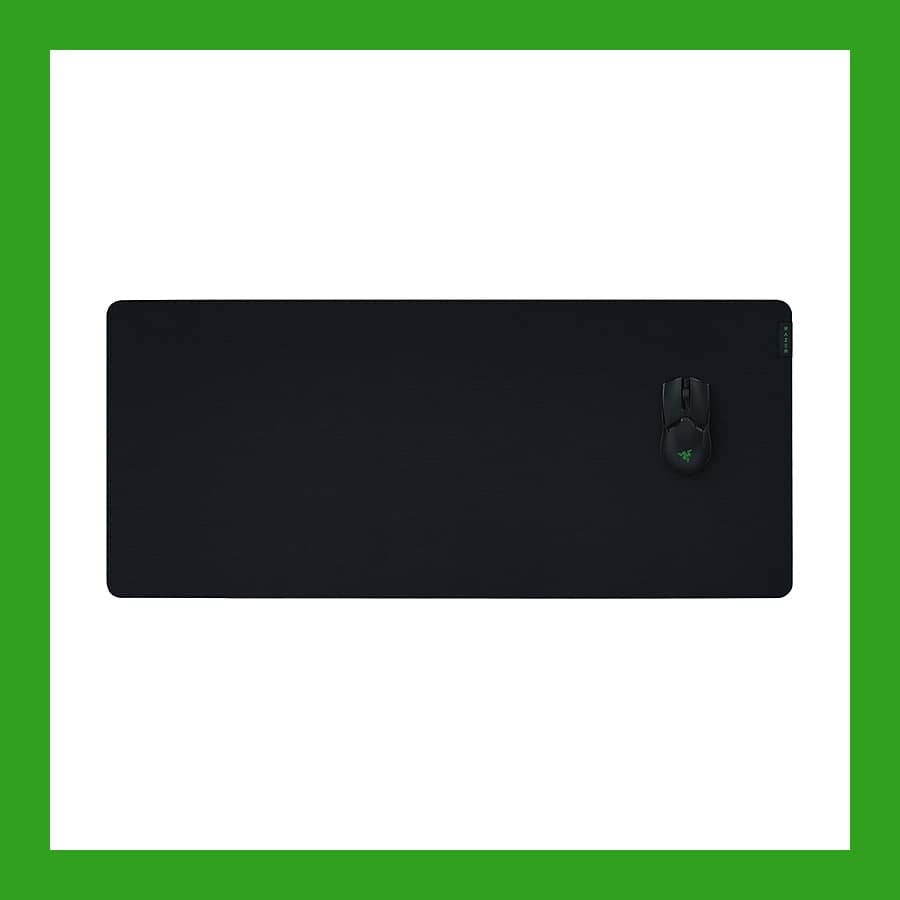
Razer Gigantus V2 XXL desk mat
For anyone whose keyboard and mouse sit on a hard, cold desktop.
Right now, my keyboard and mouse both sit on this Razer mat. It is 94 by 41cm of woven cloth on a 4mm rubber base, so it covers the whole working area and does not slide about. I also have Corsair's MM PRO Control Cloth Large, which comes in grey and costs £49.99 on Amazon UK, if black looks too heavy on a pale desk.
The length. Because it is 94cm long, it needs a desk at least that wide, with room either side for the lamp and the tray. Measure before you order.
£25.49 at Amazon UK
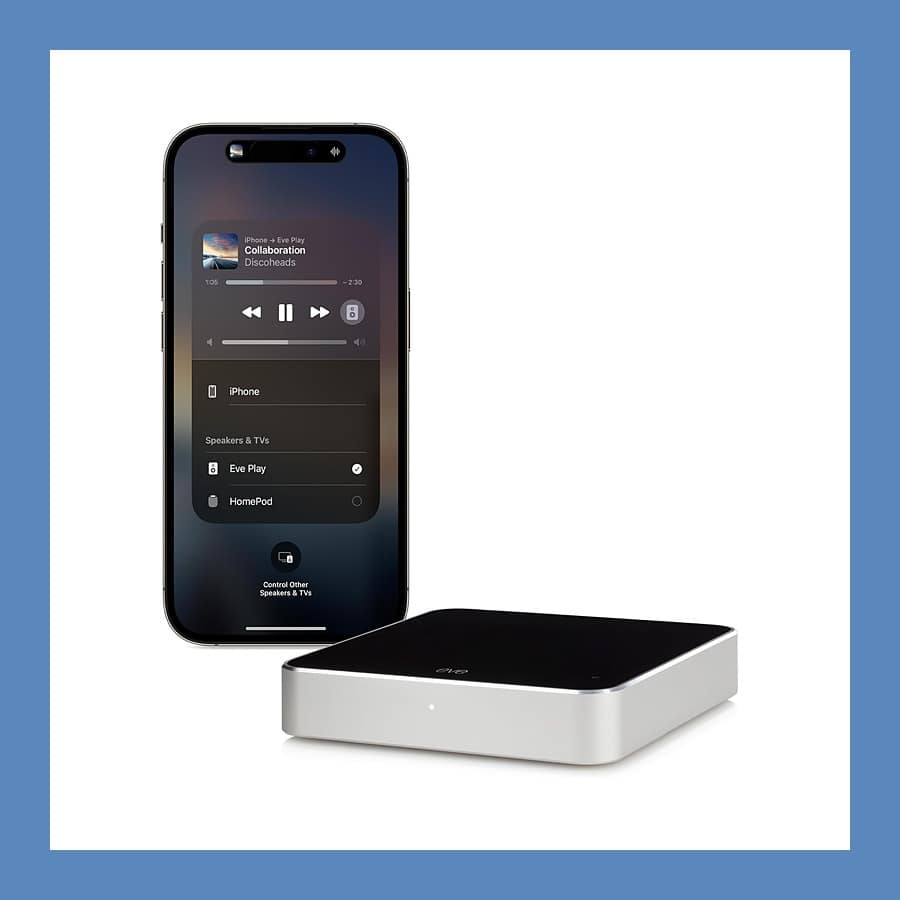
Eve Play AirPlay streamer
For a good pair of wired speakers that never got AirPlay.
The Eve Play is a small box that receives AirPlay and passes the sound to speakers or an amplifier. I use it to run my original Harman Kardon SoundSticks over AirPlay, next to a HomePod mini on the same desk. It connects with the RCA cable in the box, or by optical or coaxial cable. It also has an Ethernet port for a steadier stream than Wi-Fi.
The speakers it needs. It is a streamer only, so it needs powered speakers or an amplifier to play through. Equally, it only works over AirPlay, which iPhones, iPads and Macs have built in and most Android phones and Windows PCs do not.
£99.99 at Amazon UK
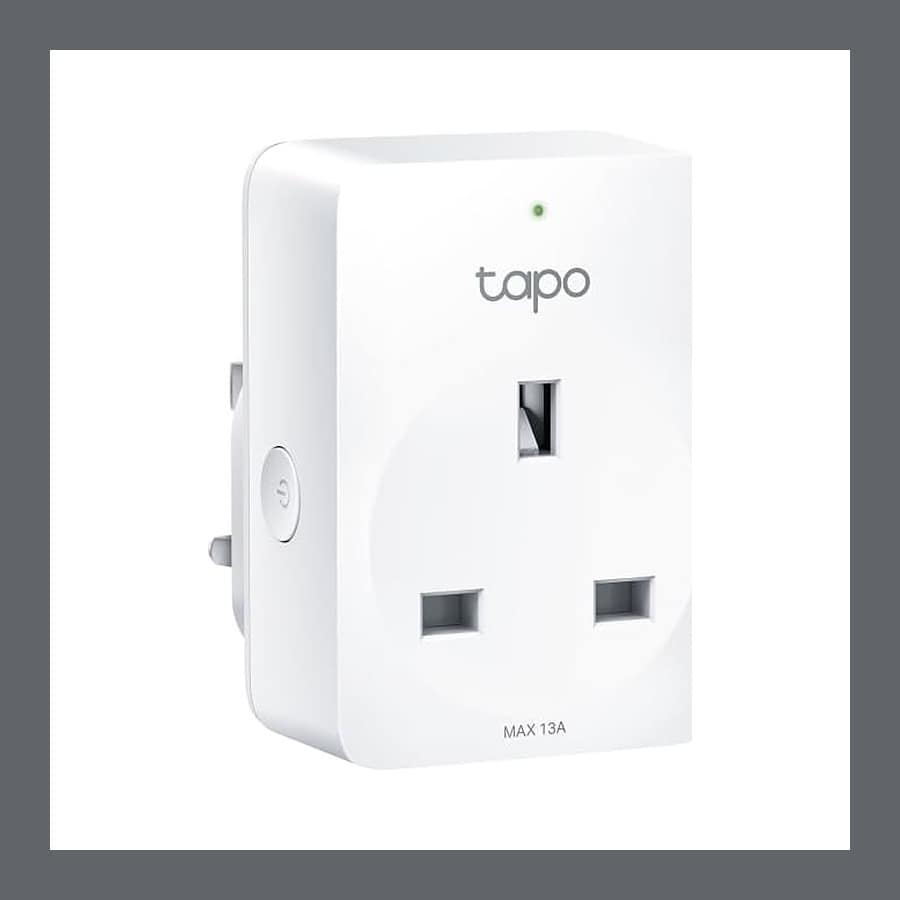
Tapo P110M smart plugs
For anyone who leaves a desk full of kit on standby all night.
First, every device on my desk has its own Tapo P110M. In Apple Home I have a scene called "turn on the office", so I can ask the HomePod to switch everything on or off at once. An automation also turns the lot on at 7:30 on weekdays, but only if I am at home. Besides Apple Home, the plugs work with Google Home and Alexa without a hub. For more, my Tapo P110M review covers the setup in more detail.
The energy figures. Unfortunately, TP-Link says the plug's energy monitoring only reaches SmartThings and Home Assistant through Matter. As a result, in Apple Home the plugs switch on and off, and the energy readings stay in the Tapo app.
£13.99 each, or £31.99 for four, at Amazon UK
Under the desk: one extension lead and a steel tray
All the plugs go into one Belkin 8-outlet surge protector, £39.99 on Amazon UK, with a 2m cable, 900 joules of surge protection and a USB-C and a USB-A port. Electrical Safety First says most extension leads are rated at 13A, and that you should never plug one extension lead into another. Eight sockets on one lead therefore suit a desk of low-power kit, but not a desk with a fan heater added in January.
The cables then sit in an Oakywood steel under-desk tray, sold on Etsy. It is 1.5mm steel, hangs 1cm under the desktop and hinges down on its bracket, so you can open it to add a cable and close it again. On Etsy, the 60cm version is £105.30 and the 100cm is £137.21.
Section 07 / Price check
The best desk accessories UK picks, compared on price
| Pick | What it does | Mine? | Price |
|---|---|---|---|
| Anglepoise Original 1227 | Spring-balanced task lamp, 90cm reach | Yes | £249 |
| Apple Studio Display | 27-inch 5K screen, camera and speakers | Yes | £1,499 |
| Kensington Extra Wide Monitor Stand | Fixed riser, screens up to 32 inches | Yes | £22.99 |
| Work Louder Knob1 | Aluminium mechanical keyboard with dials | Yes | $439 |
| Logitech MX Keys S | Backlit full-size keyboard, three devices | No | £99.98 |
| Logitech Lift | 57-degree vertical mouse | Yes | £38.99 |
| Kaweco Classic Sport | Pocket fountain pen | No | £27 |
| Mark+Fold Glow notebook | A5 layflat, 120gsm plain pages | No | £32 |
| Bethan Laura Wood tray | 18 by 12cm glazed wooden tray | No | £20 |
| Razer Gigantus V2 XXL | 94 by 41cm cloth desk mat | Yes | £25.49 |
| Eve Play | AirPlay streamer for wired speakers | Yes | £99.99 |
| Tapo P110M | Smart plug for Apple Home, Google Home and Alexa | Yes | £13.99 |
Section 08 / What I would not buy
Three desk accessories I would not buy
Each one is sold as a desk upgrade, and each one has a better answer elsewhere on this list.
Stick-on cable clips and cable spines
Adhesive clips and plastic spines only tidy the cables you can see, while the extension lead and the plugs stay in a heap on the floor. By contrast, a tray under the desk holds the whole lot, plugs included. Then, for one loose lead, a Nite Ize Gear Tie costs £4.83 for four and stays on the cable.
RGB light bars
Colour-changing light bars mostly light the wall behind the screen, not the desk in front of it. The page you are writing on stays as dark as it was. Instead, an adjustable task lamp pointed at the work does the job they are bought for.
Cheap monitor arms that sag
A gas-spring arm holds a screen within a set weight range, and a cheap one drifts down when the screen is near its limit. As a result, you spend the day pushing it back up. So check the arm's weight rating against your screen before you buy. For a Studio Display, you pick a stand or Apple's VESA mount adapter when you order, so decide on an arm before you buy the screen.
FAQs about desk accessories
What desk accessories are actually worth buying?
The best desk accessories UK shops sell start with the three that change how you sit: a task lamp, something to raise the screen, and a mouse and keyboard at the right height. For example, the Health and Safety Executive says the top of the screen should be level with your eyes, with the keyboard just below elbow height. After that, a desk mat and a way to switch everything off at night are the next most useful.
How much should I spend on a desk setup?
Overall, the best desk accessories UK shops sell in this guide run from £13.99 for a Tapo smart plug to £1,499 for the Apple Studio Display. However, without the screen and the imported keyboard, the other eight picks add up to £529.45, counting one smart plug and the Bright Chrome lamp. I checked every price on 5 October 2026.
Do I need a monitor riser?
You need one only if the top of your screen sits below your eye line. After all, some stands, including the standard Apple Studio Display stand, only tilt. In that case, a fixed riser such as the £22.99 Kensington Extra Wide Monitor Stand lifts the screen for far less than an adjustable stand.
Is a vertical mouse worth it?
It depends on your hand. A vertical mouse like the Logitech Lift holds your hand at 57 degrees, as if you were shaking hands, instead of palm-down. The Lift is designed for small to medium hands, so anyone with large hands should look at Logitech's MX Vertical instead.
Can I plug smart plugs into an extension lead?
Yes, as long as the total load stays within the lead's rating. Electrical Safety First says most extension leads are rated at 13A, and you should not plug one extension lead into another. In practice, a desk of low-power kit is fine. Adding a heater, on the other hand, is where the load starts to matter.
What is the best desk lamp for working from home?
My pick is the Anglepoise Original 1227, because the head stays wherever you put it and the full-size arm reaches about 90cm. It costs £219 for the painted versions direct from Anglepoise, or £249 for Bright Chrome at Buy Me Once. Alternatively, for £50, the MADE x Barbican Curve lamp is a cheaper option with a tilting shade.
More things like this:
- Best noise-cancelling headphones UK - for a desk in a shared flat or a noisy office.
- reMarkable Paper Pro review - a paper tablet for notes you want on screen as well as on the page.
- Penguin x Moebe book stand - holds a book or a recipe open at a readable angle.
- Gifts for techies - my collection of gadgets and tools for people who build things.
- Structured daily planner - the visual day planner I reviewed as App of the Month.
Disclaimer. Prices and stock change, so check the shop's page before you buy. This article contains affiliate and referral links, which are paid links. If you click one and buy or sign up, I earn a commission or referral bonus at no extra cost to you. Brands don't choose what I feature or what I say about them.
What's trending




Recent posts
- Best Grubby Recipes November 2026: Five Plant-Based Dinners
 Last updated: 2 November 2026 By Stiv · Design, technology and personal finance Grubby RecipesNovember 2026 Edit Five plant-based dinners for bonfire weekend and the cold that follows The best Grubby recipes November 2026 has on offer are a loaded sweet potato, a shepherdless pie, an Irish stew, a one-pan gnocchi and a tofu casserole.… Read more: Best Grubby Recipes November 2026: Five Plant-Based Dinners
 - Sprive Cashback Shops: Every Brand in the App and What It PaysAll the Sprive cashback shops in my app, from Nando's to Wayfair, with each rate, search and filters. Updated every fortnight.
- Xerox C305ae Review: A Brilliant Office Printer With a Frustrating SetupI spent a week with the Xerox C305ae colour laser printer. The printing and scanning are excellent; the packaging and setup app are not.



No Comments.